Skip to content
Repostit

Repostit

  • Features
  • Pricing | Repostit
  • Repostit Blog
  • Repostit Help Center
  • Contact
  • Log in
  • Start for free

Getting Started

9
  • What to check before turning on a new Repostit workflow
  • How to choose the best destination account in Repostit
  • How to choose the best source account for a Repostit workflow
  • How to test your first Facebook Reels repost
  • How to test your first Instagram Reels repost
  • How to test your first YouTube Shorts repost
  • How to test your first TikTok repost
  • Quick Start Guide
  • Browser blocking the connect account window? Allow pop-ups for Repostit

Connections

42
  • Do I need a Business or Creator account to connect Instagram or Facebook?
  • Why Facebook asks for permissions again
  • What to do before reconnecting Facebook
  • How to check if Facebook is still connected in Repostit
  • Set up a clean browser session for Facebook connections
  • Allow the Facebook authorization window for Repostit
  • Reconnect Facebook to Repostit after a password or permission change
  • Facebook Page permissions explained for Repostit
  • Fix Facebook opening the wrong Page during Repostit connection
  • Why Instagram asks for permissions again
  • What to do before reconnecting Instagram
  • How to check if Instagram is still connected in Repostit
  • Set up a clean browser session for Instagram connections
  • Allow the Instagram authorization window for Repostit
  • Reconnect Instagram to Repostit after a password or permission change
  • Instagram permissions explained for Repostit
  • Fix Instagram opening the wrong account during Repostit connection
  • Why YouTube asks for permissions again
  • What to do before reconnecting YouTube
  • How to check if YouTube is still connected in Repostit
  • Set up a clean browser session for YouTube connections
  • Allow the YouTube authorization window for Repostit
  • Reconnect YouTube to Repostit after a password or permission change
  • YouTube permissions explained for Repostit
  • Fix YouTube opening the wrong channel during Repostit connection
  • Why TikTok asks for permissions again
  • What to do before reconnecting TikTok
  • How to check if TikTok is still connected in Repostit
  • Set up a clean browser session for TikTok connections
  • Allow the TikTok authorization window for Repostit
  • Reconnect TikTok to Repostit after a password or permission change
  • TikTok permissions explained for Repostit
  • Fix TikTok opening the wrong account during Repostit connection
  • Connect TikTok to Repostit
  • Supported platforms and media types in Repostit
  • Connect YouTube to Repostit
  • Connect Facebook to Repostit
  • Connect Instagram to Repostit
  • Connecting Your Facebook
  • Connecting Your Instagram
  • Connecting Your TikTok
  • Connecting Your YouTube

Workflows

5
  • How to pause a Repostit workflow safely
  • How Auto Publishing Works in Repostit
  • What happens if I repost copyrighted music to YouTube Shorts?
  • How future-content workflows work in Repostit
  • How existing-content workflows work in Repostit

FAQs

18
  • Why should I run a manual Repostit test first?
  • Why does my browser matter for Repostit connections?
  • How to repost safely across TikTok, YouTube, Facebook, and Instagram
  • Can I connect multiple social accounts to Repostit?
  • What should my first Repostit workflow be?
  • When to contact support about Facebook Reels
  • When to contact support about Instagram
  • When to contact support about YouTube
  • When to contact support about TikTok
  • I didn’t receive my Repostit email confirmation
  • How to authorize a new or missing Facebook page
  • Why an item is stuck in processing
  • Why YouTube rejects videos that are too long
  • How to reset your Repostit password
  • Does reposting to TikTok hurt my reach?
  • Does reposting to YouTube Shorts hurt my reach?
  • Does reposting to Instagram Reels hurt my reach?
  • YouTube Shorts (60 seconds vs 3 minutes)

Workflow Recipes

24
  • Facebook Reels to Instagram Reels workflow checklist
  • How to repost Facebook Reels videos to Instagram Reels with Repostit
  • Facebook Reels to YouTube Shorts workflow checklist
  • How to repost Facebook Reels videos to YouTube Shorts with Repostit
  • Facebook Reels to TikTok workflow checklist
  • How to repost Facebook Reels videos to TikTok with Repostit
  • Instagram Reels to Facebook Reels workflow checklist
  • How to repost Instagram Reels videos to Facebook Reels with Repostit
  • Instagram Reels to YouTube Shorts workflow checklist
  • How to repost Instagram Reels videos to YouTube Shorts with Repostit
  • Instagram Reels to TikTok workflow checklist
  • How to repost Instagram Reels videos to TikTok with Repostit
  • YouTube Shorts to Facebook Reels workflow checklist
  • How to repost YouTube Shorts videos to Facebook Reels with Repostit
  • YouTube Shorts to Instagram Reels workflow checklist
  • How to repost YouTube Shorts videos to Instagram Reels with Repostit
  • YouTube Shorts to TikTok workflow checklist
  • How to repost YouTube Shorts videos to TikTok with Repostit
  • TikTok to Facebook Reels workflow checklist
  • How to repost TikTok videos to Facebook Reels with Repostit
  • TikTok to Instagram Reels workflow checklist
  • How to repost TikTok videos to Instagram Reels with Repostit
  • TikTok to YouTube Shorts workflow checklist
  • How to repost TikTok videos to YouTube Shorts with Repostit

Troubleshooting

32
  • Facebook Reels audio and music issues when reposting
  • Fix Facebook Reels video format issues in Repostit
  • Why is my Facebook Reels item stuck in processing?
  • Why did my Facebook Reels repost fail?
  • How to avoid publishing to the wrong Facebook Page
  • Instagram Reels audio and music issues when reposting
  • Fix Instagram Reels video format issues in Repostit
  • Why is my Instagram Reels item stuck in processing?
  • Why did my Instagram Reels repost fail?
  • How to avoid publishing to the wrong Instagram account
  • YouTube Shorts audio and music issues when reposting
  • Fix YouTube Shorts video format issues in Repostit
  • Why is my YouTube Shorts item stuck in processing?
  • Why did my YouTube Shorts repost fail?
  • How to avoid publishing to the wrong YouTube channel
  • TikTok audio and music issues when reposting
  • Fix TikTok video format issues in Repostit
  • Why is my TikTok item stuck in processing?
  • Why did my TikTok repost fail?
  • How to avoid publishing to the wrong TikTok account
  • Troubleshoot Facebook Reels to Instagram Reels reposts
  • Troubleshoot Facebook Reels to YouTube Shorts reposts
  • Troubleshoot Facebook Reels to TikTok reposts
  • Troubleshoot Instagram Reels to Facebook Reels reposts
  • Troubleshoot Instagram Reels to YouTube Shorts reposts
  • Troubleshoot Instagram Reels to TikTok reposts
  • Troubleshoot YouTube Shorts to Facebook Reels reposts
  • Troubleshoot YouTube Shorts to Instagram Reels reposts
  • Troubleshoot YouTube Shorts to TikTok reposts
  • Troubleshoot TikTok to Facebook Reels reposts
  • Troubleshoot TikTok to Instagram Reels reposts
  • Troubleshoot TikTok to YouTube Shorts reposts

Best Practices

18
  • How to review a Repostit workflow after the first week
  • How to name your Repostit workflows so you do not get confused
  • Audit your Facebook Reels Repostit workflow
  • Use Repostit for client Facebook Pages and Reels workflows
  • Make reposted videos feel native on Facebook Reels
  • How often should I repost to Facebook Reels?
  • Audit your Instagram Reels Repostit workflow
  • Use Repostit for client Instagram accounts
  • Make reposted videos feel native on Instagram Reels
  • How often should I repost to Instagram Reels?
  • Audit your YouTube Shorts Repostit workflow
  • Use Repostit for client YouTube channels
  • Make reposted videos feel native on YouTube Shorts
  • How often should I repost to YouTube Shorts?
  • Audit your TikTok Repostit workflow
  • Use Repostit for client TikTok accounts
  • Make reposted videos feel native on TikTok
  • How often should I repost to TikTok?

Agency Guides

5
  • How to prepare client accounts before using Repostit
  • Facebook Page connection checklist for agencies
  • Instagram connection checklist for agencies
  • YouTube connection checklist for agencies
  • TikTok connection checklist for agencies
  • Home
  • Docs
  • Connections
  • Do I need a Business or Creator account to connect Instagram or Facebook?
View Categories

Do I need a Business or Creator account to connect Instagram or Facebook?

5 min read

If Instagram or Facebook will not connect in Repostit, the issue is often not the browser. It can also be the type of social account being connected.

Short answer: Instagram needs a professional account, which means either Creator or Business. Facebook needs a Facebook Page that you manage. A personal Instagram account or personal Facebook profile by itself is not enough for Repostit publishing.

The images in this guide are Repostit-created visual checklists. Meta can change exact menu labels by device, app version, and country, so use the closest matching option if your screen is slightly different.

At a glance #

Platform What you need What will not work
Instagram An Instagram Professional account: Creator or Business A personal Instagram account
Facebook A Facebook Page where you have permission to create posts A personal Facebook profile only

Instagram: Business or Creator? #

For Repostit, an Instagram Creator account or Business account can be connected. Meta describes these as Instagram professional accounts, and professional accounts include both businesses and creators.

You do not need to switch specifically to Business just to connect Instagram to Repostit for normal short-form publishing. If the account is still personal, switch it to a professional account first, then try connecting again.
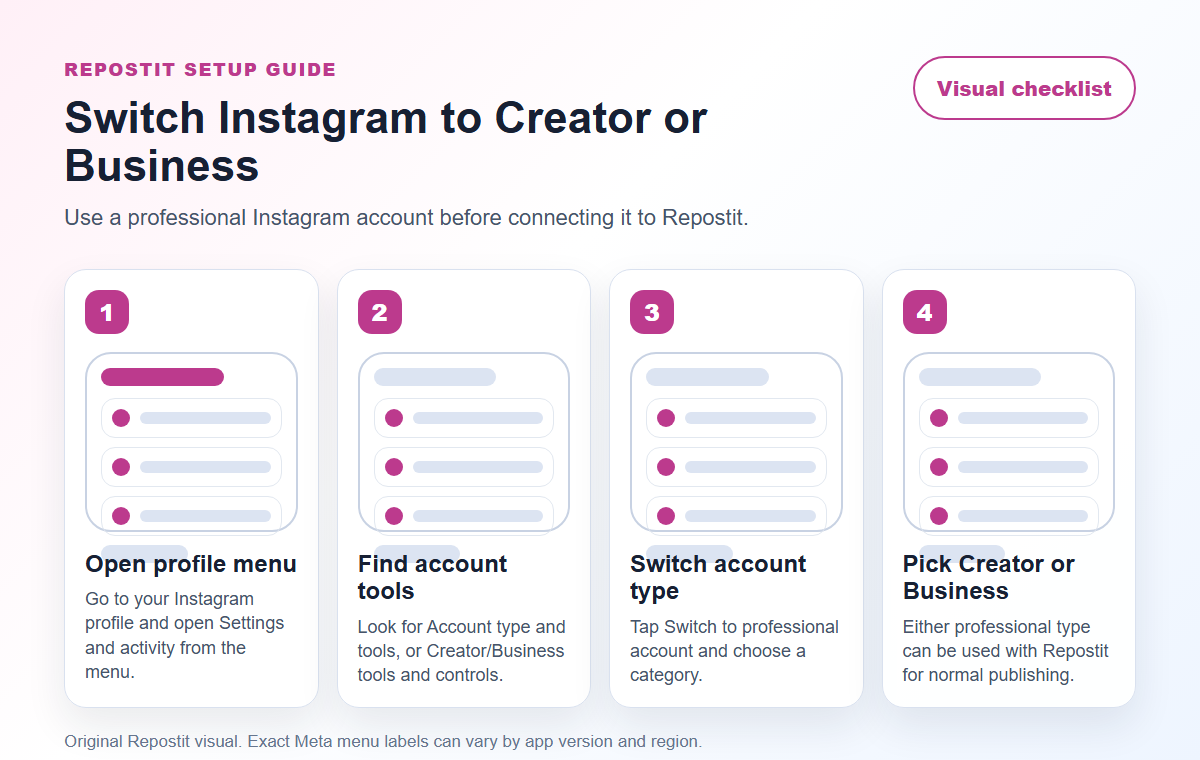
Visual guide showing how to switch Instagram to a professional Creator or Business account
Use this visual checklist when switching Instagram from a personal account to a professional Creator or Business account.

How to switch Instagram to a professional account #

  1. Open Instagram.
  2. Tap your profile picture to go to your profile.
  3. Tap the menu icon in the top right.
  4. Open Settings and activity.
  5. Look under For professionals.
  6. Tap Account type and tools. On some accounts this may appear as Creator tools and controls or Business tools and controls.
  7. Tap Switch to professional account.
  8. Choose a category that describes the account.
  9. Choose Creator or Business.
  10. Review the contact details. You can hide public contact details if Instagram gives you that option.
  11. Return to Repostit and connect Instagram again.

If you cannot find the Instagram switch option #

  • Open your Instagram profile and tap Edit profile. Some accounts show Switch to professional account there.
  • Use Instagram settings search and search for professional, account type, creator tools, or business tools.
  • Update the Instagram app, close it, reopen it, and check again.
  • If the account is already professional, you may see creator or business tools instead of the first-time switch screen.

Should I choose Creator or Business? #

Choose Creator if the account represents an individual creator, influencer, artist, coach, educator, or public personality. Choose Business if the account represents a company, shop, local business, agency, brand, or organization. For Repostit publishing, the important part is that the account is professional, not personal.

Facebook: you need a Page, not only a profile #

Facebook publishing in Repostit is for Facebook Pages. The Facebook profile you log in with is used to authorize access, but the destination should be a Page you manage.

Before connecting Facebook, make sure you can open the Page in Facebook and create a post on it. If you are working for a client, ask them to give you the right Page access before you try connecting the Page inside Repostit.
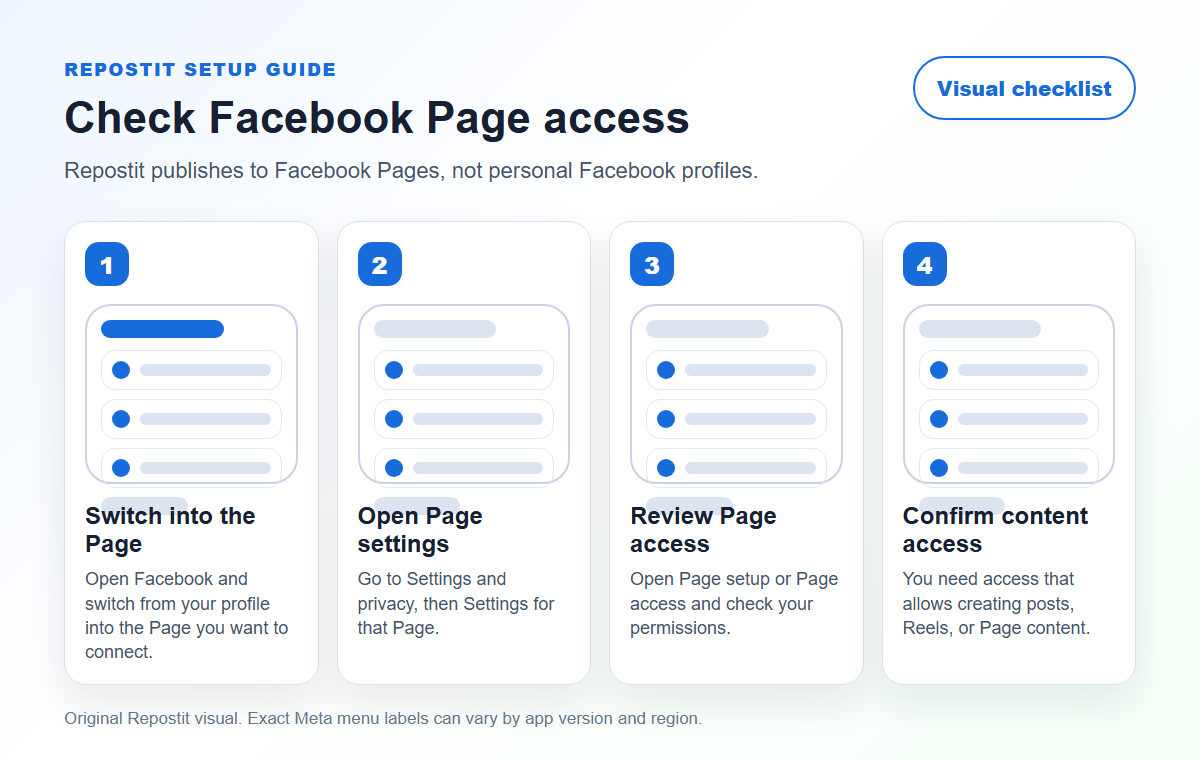
Visual guide showing how to check Facebook Page access before connecting Facebook to Repostit
Use this visual checklist when checking whether you have the Facebook Page access needed for Repostit.

How to check Facebook Page access #

  1. Open Facebook in the browser or app.
  2. Switch from your personal profile into the Facebook Page you want to connect.
  3. Open Settings and privacy, then Settings.
  4. Look for Page setup, Page access, or a similar Page permissions area.
  5. Confirm your name has access that allows you to create Page content, posts, or Reels.
  6. If you do not see the Page or cannot create a post on it, ask the Page owner to update your access first.
  7. Return to Repostit and connect Facebook again.

What permissions should you allow? #

During the connection flow, Meta may ask you to approve permissions for the account or Page. Approve the permissions needed for Repostit to list the accounts you manage and publish content to the selected destination. If you skip a required permission, the connection can succeed partly but fail when you try to create a workflow or publish.

If Facebook connects but your Page is missing #

  • Make sure you logged in with the Facebook profile that actually has access to the Page.
  • Check that you can switch into the Page and create a normal post manually.
  • Reconnect Facebook in Repostit and approve all requested permissions.
  • If the Page belongs to a client, ask them to confirm your Page access from their side.

If the connect window does not open #

If clicking Connect does nothing, your account type may not be the problem. Your browser may be blocking the pop-up window that opens Instagram or Facebook authorization.

  1. Allow pop-ups and redirects for Repostit in your browser.
  2. Sign in to the correct Instagram or Facebook account in the same browser.
  3. Return to Repostit and click Connect again.
  4. Approve all required permissions during the Meta authorization flow.

Use this guide if you need the browser steps: Browser blocking the connect account window: allow pop-ups for Repostit.

Suggested reply for a customer #

You can send this when someone says Instagram or Facebook will not connect:

For Instagram, Repostit needs an Instagram Professional account, either Creator or Business. Personal Instagram accounts cannot be used for publishing. For Facebook, you need a Facebook Page that you manage, not only a personal profile. If the connect window does not open at all, please allow pop-ups for Repostit and try again.

Official Meta references #

  • Meta: Instagram API with Instagram Login
  • Meta: Instagram content publishing
  • Instagram Help Center: set up a professional account
  • Instagram Help Center: about professional accounts
  • Meta: Manage a Facebook Page
  • Facebook Help Center: about Page access
  • Meta: pages_manage_posts permission

Related Repostit docs #

  • How to reduce mistakes when connecting social accounts
  • Supported platforms and media types in Repostit
  • Quick Start Guide
What are your Feelings

Share This Article :

  • Facebook
  • X
  • LinkedIn
  • Pinterest
Still stuck? How can we help?

How can we help?

Updated on June 21, 2026
Connecting Your YouTubeWhy Facebook asks for permissions again

Powered by BetterDocs

Table of Contents
  • At a glance
  • Instagram: Business or Creator?
  • How to switch Instagram to a professional account
  • If you cannot find the Instagram switch option
  • Should I choose Creator or Business?
  • Facebook: you need a Page, not only a profile
  • How to check Facebook Page access
  • What permissions should you allow?
  • If Facebook connects but your Page is missing
  • If the connect window does not open
  • Suggested reply for a customer
  • Official Meta references
  • Related Repostit docs
Our latest news, articles, and resources, we will sent to your inbox weekly.
loader

Pages

  • Features
  • Pricing | Repostit
  • Contact
  • Repostit Help Center
  • Affiliates

Policy

  • Privacy Policy
  • Terms of Service
Repostit - Your content, everywhere. | Product Hunt

© 2026 Repostit, Inc. Based in California.