 sara bellin
How to Link Social Media Accounts Safely for Content Repurposing
If you want to link social media accounts for content repurposing, begin with one source account and one destination account, grant only the permissions the workflow needs, and publish one test before connecting anything else. The goal is a controlled route for a finished video—not a blanket connection to every profile you manage.
Short answer: Link social media accounts safely by connecting only the profiles required for one approved workflow, reviewing the permission screen before authorizing access, and testing one source-to-destination route with a finished video. Verify the public post, account, caption, media quality, and link before you scale. For content repurposing, the safest pattern is one clean master file, one source, one destination, one public check, and a documented rollback. Keep creative decisions—rights, hook, caption, CTA, and timing—under human control. Use automation for the repetitive distribution step, then measure saves, shares, follows, profile visits, and qualified clicks instead of treating raw posting volume as success.
What linking social media accounts actually means
“Link your social media accounts” can describe two different jobs. The first is a profile-level connection, such as linking a Facebook Page to an Instagram professional account. The second is an authorization connection, where a publishing tool receives permission to act on a profile through an official login or API flow.
Those jobs are related, but they are not interchangeable. A platform-level connection may be required before publishing is possible. A tool-level authorization determines what the tool can do after the accounts are connected. Confusing the two is how teams end up with the wrong account selected, excessive permissions, or a workflow that looks connected but cannot publish.
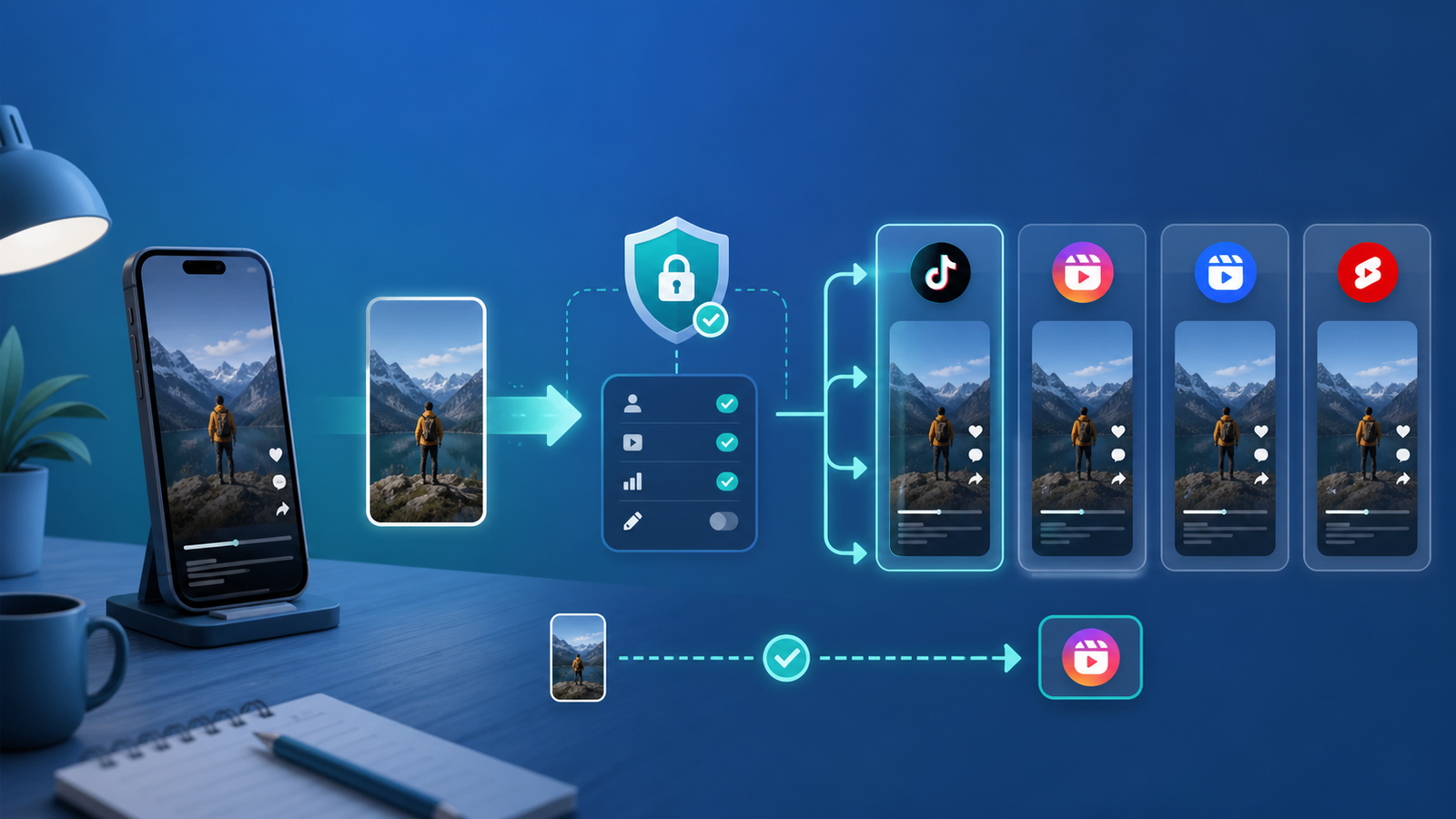
For repurposing, think in terms of a route:
| Component | Example | Question to answer |
|---|---|---|
| Source | A TikTok account or an approved video library | Where does the finished master file come from? |
| Transformation | Caption, title, CTA, or safe-zone adjustment | What must change for the destination audience? |
| Destination | Instagram Reels, Facebook Reels, or YouTube Shorts | Which account should receive this version? |
| Proof | Public URL, post ID, timestamp, or visible profile post | How will you verify that it worked? |
This model is deliberately boring. Boring is useful when several accounts, clients, or brand profiles are involved.
Why account linking matters in a repurposing workflow
The value is not simply the ability to log into more platforms. The value is removing a repeated handoff: download the master, find the correct profile, upload it again, copy the caption, check the destination, and record what happened.
That handoff is also where mistakes accumulate. A creator might publish to a personal profile instead of a brand Page. An agency might send a client video to last month’s test account. A team might copy a TikTok caption that mentions a trend nobody on Instagram recognizes. A queue might retry a failed upload and create a duplicate.
A good connection reduces the mechanical work while making the decisions visible. It should show the selected source, the selected destination, the requested permissions, and the status of each post. It should also make it easy to pause or disconnect a route when an account changes hands.
This is the distinction between content creation and content distribution. A repurposing tool can help move a finished asset. It should not be treated as permission to reuse footage, music, logos, or client work that the publisher does not own.
Permission checklist before you click Allow
Treat the authorization screen as part of your publishing checklist, not as a formality.
- Confirm the account name, profile image, handle, Page, or channel shown by the platform.
- Read the requested permissions and ask whether each one is needed for the route you are setting up.
- Use the official platform login and OAuth flow. Do not paste a password into an unfamiliar form or send credentials to a contractor in a chat.
- Record who owns the account and who is allowed to disconnect it.
- Note the date of authorization and the source-to-destination route.
- Start with the smallest useful test rather than authorizing a large batch.
The technical rules vary by platform and can change. TikTok’s official Content Posting API direct-post documentation describes the app, scope, authorization, creator-information, and post-status requirements for direct posting. Meta’s Instagram content publishing documentation is the relevant reference for publishing to eligible professional accounts. Google documents YouTube uploads through the YouTube Data API upload guide, including OAuth and upload metadata.
If a tool cannot explain which account is being connected or why a permission is requested, stop there. Convenience is not a reason to approve an unclear access request.
The safest setup: one route first
Do not begin by connecting an entire account portfolio. Begin with one route that has a clear owner and a low-risk test asset.
1. Inventory the accounts
Write down the source profile, destination profile, business or personal status, owner, and intended content pillar. A small table is enough. The point is to remove ambiguity before you open the connection dialog.
2. Prepare a clean master file
Use the original finished video whenever possible. A re-downloaded copy may have lower quality, an unwanted watermark, or audio that does not travel cleanly to the next platform. Confirm that the team has the right to reuse every visible and audible element.
3. Connect the source and destination separately
Authorize the route you intend to use, then pause. Check the resulting account labels in the tool. Do not assume that a successful OAuth screen means the correct profile was selected.
4. Configure the destination version
Keep the core idea if it is strong, but adapt the wrapper. A searchable YouTube title does not always make a natural Instagram caption. A TikTok hook that depends on a trend may need one line of context on Facebook. Change the CTA when the next action is different.
5. Publish one test
Use a representative finished video, not a throwaway asset nobody will inspect. Verify the public destination post, the account that published it, the video itself, the caption, the visibility setting, the audio, and any outbound link.
6. Record the proof
Save the public post URL or post ID, the time, the source asset identifier, and the route. If the test fails, record the actual failure instead of pressing retry repeatedly.
7. Expand one destination at a time
Once the first route is stable, add the next destination and repeat the same checks. This makes the source of a failure obvious and keeps a permissions mistake from spreading across the account set.
Platform notes: similar video does not mean identical workflow
Instagram Reels
Instagram is often where a repurposed video needs the most packaging work. Check whether the account is the intended professional profile, whether the caption makes sense without the original trend context, and whether on-screen text sits inside a safe area. Keep the CTA natural for profile visits, saves, shares, or DMs.
The platform’s publishing eligibility and permission model are not just UX details. They determine which account types and API flows can be used. Recheck the current Meta documentation when a connection fails or a client account changes.
TikTok
TikTok’s official direct-post flow requires more than a connected username. An app, the relevant approved scope, user authorization, creator information, and post-status handling all matter. If you build or evaluate an integration, confirm that the tool is using the official route and handling a failed or pending post visibly.
YouTube Shorts
YouTube adds channel context and upload metadata to the same vertical-video file. Rewrite the title so it explains the topic, set the intended visibility, and make sure the description does not promise a result the video does not deliver. Custom API workflows also need to account for OAuth and quota behavior described in Google’s documentation.
Facebook Reels and Pages
Be precise about whether the destination is a Facebook Page, a profile, or another supported surface. The label shown in the connection flow should match the destination your team expects. If a client has multiple Pages, ask them to verify the exact Page before the first public test.
Across all four cases, the operational rule is the same: confirm the destination identity in the tool and on the public post. The platform name alone is not proof.
Common failure modes
| Failure | What it looks like | Prevention |
|---|---|---|
| Wrong profile | The post is live, but on a personal or old account | Verify handle, avatar, Page, and public post before scaling |
| Too many permissions | The tool requests access unrelated to publishing | Use least privilege and reject unclear scopes |
| Duplicate upload | A retry creates two identical posts | Check status and public proof before retrying |
| Non-native packaging | Caption, audio, or CTA only makes sense on the source platform | Edit the wrapper for each destination |
| Broken link | The video is live but the CTA points to the wrong page | Test the exact destination URL and use one clear CTA |
| Rights gap | The master includes music, footage, or client work without permission | Confirm rights before the asset enters the queue |
| Invisible failure | The dashboard says sent, but no public post exists | Treat public verification as the completion gate |
The last one deserves emphasis. A green status inside a dashboard is useful operational evidence, but it does not prove that the right public account received the right content. The public destination is the source of truth for publication.
A practical QA checklist
Before you connect a second destination, answer yes to each question:
- Do we know exactly who owns the source and destination accounts?
- Did we review the permission screen rather than accept it automatically?
- Is the video a clean, rights-cleared master file?
- Does the caption fit the destination platform?
- Is the main on-screen text readable around the destination UI?
- Did we publish one test and verify it publicly?
- Do we have the public URL, post ID, or another durable proof?
- Can we pause or disconnect the route without losing account ownership?
- Do we know what to do if the status is pending, rejected, or duplicated?
If any answer is no, keep the route in testing. The fastest workflow is the one that does not create cleanup work later.
Measurement: the account connection is not the outcome
Track the route, not just the number of connected accounts. A useful log includes:
| Field | Example |
|---|---|
| Source asset | Internal video or campaign ID |
| Route | Source account → destination account |
| Destination proof | Public URL or post ID |
| Published at | Timestamp with timezone |
| Adaptations | Caption, title, CTA, or audio changes |
| Status | Published, pending, failed, or manually reviewed |
| Cleanup time | Minutes spent fixing or removing a post |
Then measure the audience response that matches the destination: retention, saves, shares, follows, profile visits, qualified clicks, trial starts, and activated users when analytics can connect the landing page to the product funnel. Do not claim a reach lift merely because several accounts are connected. Connection is a capability; useful audience response is the outcome.
Review the route weekly at first. If the workflow produces duplicates, wrong-account posts, or repeated failures, reduce volume and fix the route. More automation will not repair an unclear process.
Where Repostit fits
Repostit is designed for the distribution part of the workflow: moving finished videos through supported connected accounts and reducing repetitive posting work. It is not a substitute for rights review, creative judgment, caption adaptation, or public QA.
The current public Repostit plans are intentionally simple: Basic is listed at $5 per month for 10 posts, while Starter is listed at $14 per month for unlimited automated video posts. Repostit also advertises a 14-day trial without a card. Check the current pricing page for the live offer and the Repurpose.io comparison for the current product-scope distinction.
If you are starting with one finished video and one safe route, Repostit can remove the repetitive distribution step without pretending that every platform version should be identical. The right starting point is a small queue, a visible approval rule, and a public verification habit.
For related workflows, see Repostit’s guide to linking social media accounts together, the short-form video repurposing workflow, the guide to automatically reposting content, and the automatic video reposting tool.
FAQ
Is it safe to link all my social media accounts to one tool?
It can be safe when the tool uses an official authorization flow, requests permissions that match its job, and makes the connected account and disconnect process clear. Start with one route and test it before adding the rest.
Should I use the same caption on every platform?
Usually not. Keep the core promise if it is accurate, but adapt the first line, context, hashtags, and CTA for the destination audience and interface.
What should I do if the wrong account is connected?
Pause the route, do not publish more tests, disconnect through the official account settings or tool flow, and record which account was selected. Reconnect only after the owner has confirmed the intended profile.
Does connecting accounts guarantee more reach?
No. It makes distribution more efficient. Reach and qualified traffic still depend on the content, audience fit, platform packaging, account health, and the response of real viewers.
Final recommendation
Connect social media accounts as if you were opening a controlled publishing route, not as if you were turning on a universal growth button. Choose one source, one destination, one clean finished video, and one public verification step. Review permissions, adapt the wrapper, log the proof, and only then expand.
That small discipline protects account ownership, makes failures easier to diagnose, and gives you evidence about whether repurposing is helping the business. Automation earns its place when it removes repetition while leaving the important decisions—and the final public check—in human hands.
Sources and update note
This article was prepared from Repostit’s current public product pages, a Google Search Console query opportunity for “linking social media accounts” and “link social media accounts,” live Google results, and official platform documentation. Platform permissions and eligibility can change, so use the linked primary documentation when implementing a technical integration. Last reviewed August 26, 2026.