Repostit Team
How to Post One Video to Every Social Platform (2026 Workflow)
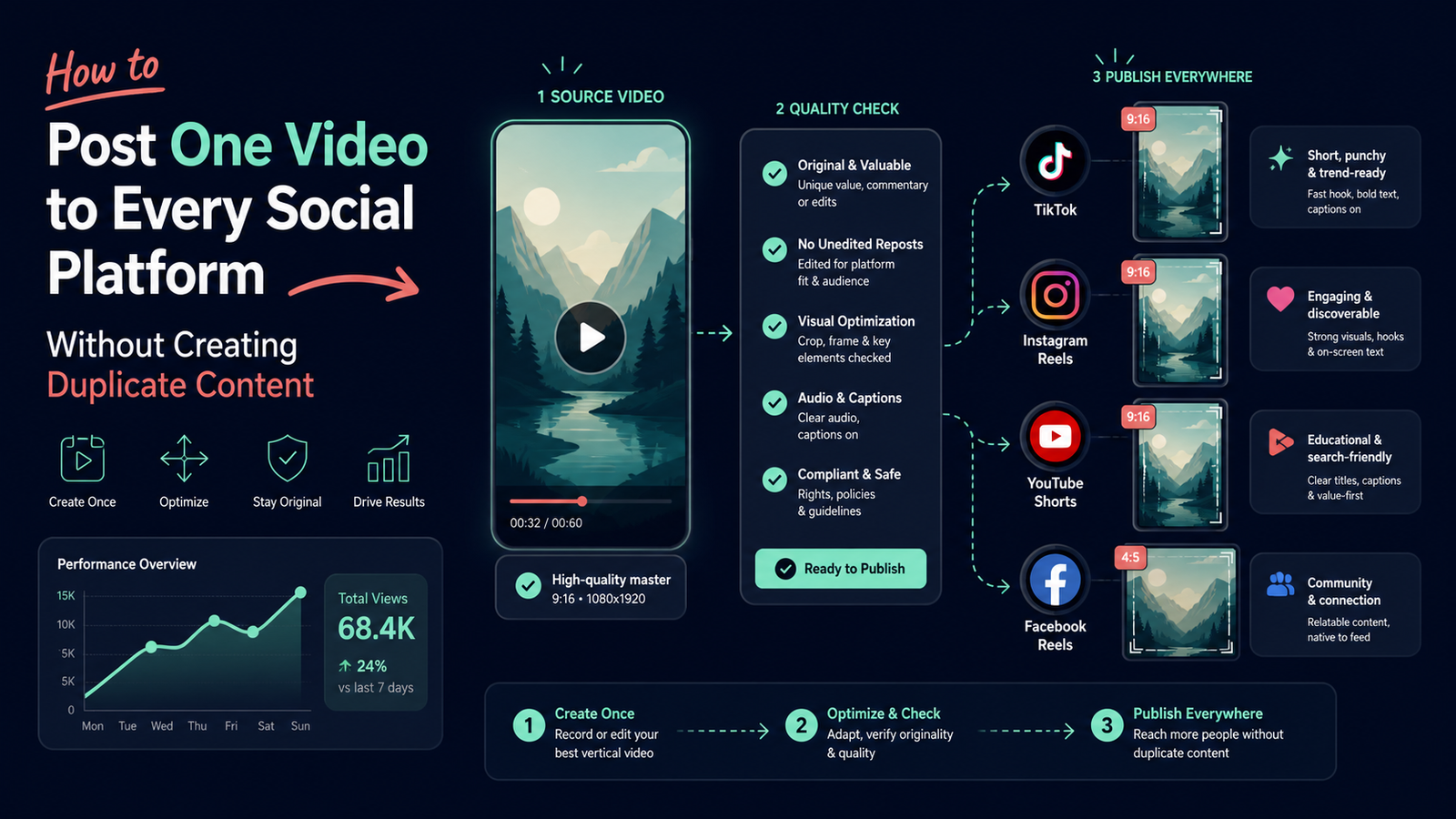
If you want to post one video to all social platforms, the reliable method is not to paste the same upload everywhere and hope for the best. Start with one clean master file, adapt the packaging for each destination, check rights and account permissions, then use a controlled publishing queue and measure the same idea across platforms.
The practical rule is simple: keep the source video, then rewrite the hook, caption, title, cover, hashtags, call to action, and publishing context for each destination. That removes repetitive upload work without making every feed look like an unattended mirror.
Quick answer
The best workflow for posting one video everywhere is:
- Keep a high-quality, watermark-free master file that you own or are licensed to use.
- Check the video for vertical framing, readable text, clean audio, and safe margins.
- Create a small platform brief for TikTok, Instagram Reels, YouTube Shorts, and Facebook Reels.
- Review each caption, title, cover, CTA, destination account, and permission before publishing.
- Publish in a controlled batch or in waves, not through an unreviewed flood of identical posts.
- Compare retention, saves, shares, profile activity, and qualified clicks—not views alone.
Repostit fits the repetitive distribution step: once the creative decision and destination accounts are ready, it can help move approved short-form videos across supported social workflows. It does not replace creative judgment, platform rules, or a final quality check.
Crossposting is not the same as duplicating content
Crossposting means distributing one piece of content to more than one platform. Repurposing means adapting the idea, format, or message for a new context. In practice, a strong system uses both:
| Layer | What stays consistent | What should change |
|---|---|---|
| Source asset | Core idea, claim, demonstration, and rights | Nothing unless a correction is needed |
| Visual packaging | Main subject and useful proof | Crop, safe area, cover frame, on-screen text |
| Copy | The factual promise | Hook, title, caption length, keywords, CTA |
| Distribution | Content ID and campaign label | Destination account, timing, audience context |
| Measurement | Baseline and test question | Platform metric and conversion path |
An identical file is not automatically a problem. The quality problem appears when a creator reuses a platform watermark, leaves the wrong CTA in place, cuts off important text, or publishes a caption that refers to controls the viewer cannot find on the destination platform.
The one-video-to-four-platform workflow
### 1. Choose the right source video
Begin with a video that has one clear promise. A short tutorial, before-and-after demonstration, customer lesson, or strong opinion usually travels better than a clip that depends on a private conversation or a platform-only trend.
Before you queue it, give the video a quick preflight score from 0 to 10:
- Demand (0–3): Did the original earn meaningful retention, saves, replies, or qualified profile activity?
- Portability (0–3): Does the idea make sense without the original platform’s comments, sound, or interface?
- Clarity (0–2): Can a viewer understand the promise in the opening seconds?
- Business relevance (0–2): Is there a natural next step for the audience you want?
An 8–10 is a strong candidate for a multi-platform batch. A 5–7 may need a new opening or a tighter edit. A score below 5 is usually better treated as a learning asset than amplified everywhere.
### 2. Protect the master file
Export one clean source file before uploading anywhere else. Keep the original project file and a distribution copy in a known folder. Avoid downloading a compressed version from one social platform and using that as the master for the next three platforms.
For most short-form workflows, a vertical 9:16 composition is the practical starting point. Before scheduling, check:
- spoken audio is understandable on a phone speaker;
- subtitles are accurate and do not cover faces, products, or demonstrations;
- important text stays away from the edges and interface overlays;
- the first frame communicates the subject without relying on a thumbnail preview;
- the file contains no accidental username, watermark, or end card from another platform;
- music, footage, logos, and voice recordings are cleared for the destinations you will use.
Do not promise a universal technical setting when a platform or account type can change its requirements. If you use an API or publishing tool, check the current platform documentation and the scopes approved for the connected account.
### 3. Write a destination brief before you copy the upload
Prepare four small records rather than one giant caption:
| Destination | Packaging to review | Useful question |
|---|---|---|
| TikTok | Fast hook, conversational caption, native context | Does the opening earn the next second? |
| Instagram Reels | Cover, concise caption, saves/shares CTA | Would someone save this for later? |
| YouTube Shorts | Searchable title, clear topic, description | Can a new viewer understand the subject from the title? |
| Facebook Reels | Broad context, first-frame clarity, Page identity | Does the post make sense to someone outside the original niche? |
The source video can remain the same while the framing becomes more native. For example, a tutorial about social distribution might use a practical “save this checklist” CTA on Instagram, a direct question on TikTok, a descriptive title on YouTube Shorts, and a broader problem statement on Facebook.
### 4. Confirm source and destination permissions
Most broken automated workflows are not creative failures. They are account-routing failures. Before a batch goes live, confirm:
- the source account is the one that owns or is authorized to reuse the video;
- each destination is the intended profile, Page, channel, or business account;
- the connected user has the publishing permission the workflow requires;
- the account is not waiting for an expired authorization, app review, or reconnect;
- the queue shows the correct destination before you approve the post;
- a failed destination can be retried without duplicating successful posts elsewhere.
TikTok publishes requirements for its Content Posting API, Meta documents Instagram content publishing, and Google documents YouTube uploads through videos.insert. These are implementation references, not a promise that every account can use every endpoint. A tool should surface permission or API errors clearly instead of hiding them behind a green “scheduled” label.
### 5. Decide whether to publish simultaneously or in waves
Publishing on every platform at the same second is convenient, but it is not always the best experiment. Waves make debugging easier and reduce the chance that one bad caption, broken link, or wrong account is copied across your entire distribution plan.
A practical wave schedule is:
- Publish the primary destination where the audience is most active.
- Verify the public post, caption, cover, audio, and account identity.
- Send the same approved source to the next destinations with their platform-specific packaging.
- Record the content ID, publish time, destination, and any failure reason.
- Review early signals before you reuse the idea again.
If your campaign depends on a coordinated launch, simultaneous publishing can be reasonable. The quality gate still matters; coordination is not a reason to skip verification.
How Repostit fits into the workflow
Repostit is most useful after the video is already created and approved. The creator or team remains responsible for the idea, rights, creative review, and destination choice. Repostit can reduce the repetitive work of moving finished short-form videos through a repeatable crossposting workflow.
That makes the boundary clear:
- use a creative or editing tool when the video needs a new cut, hook, subtitle pass, or visual treatment;
- use a scheduler when the main problem is a calendar, approvals, and planned publishing slots;
- use a distribution workflow when the finished asset needs to reach several supported destinations reliably;
- keep a manual route for platform features, account types, or formats your automated route does not support.
For a deeper explanation of account routing and permissions, see How to Link Social Media Accounts Safely for Content Repurposing. For the broader automation question, see How to Repost Top-Performing Content Automatically.
If you are designing the full editorial system rather than only the distribution step, use Repostit’s short-form video repurposing workflow guide to connect the source idea, platform adaptations, publishing queue, and review cadence.
What to measure after posting
Views are useful for reach, but they are a weak standalone decision rule. Track results at the content-ID level so you can compare the same idea without pretending that the platforms have identical audiences.
| Metric | What it tells you | Action |
|---|---|---|
| Three-second or early retention | Whether the opening earns attention | Rewrite the hook or first frame |
| Completion rate or average view duration | Whether the promise and pacing hold | Tighten the edit or preserve the structure |
| Saves and shares | Whether the idea is useful enough to keep or pass on | Turn the lesson into a series |
| Profile visits and follows/subscribers | Whether reach creates audience movement | Improve the profile path and next post |
| Qualified clicks or signups | Whether the audience matches the business goal | Align the CTA and landing page |
| Failed, delayed, or duplicate posts | Whether distribution is reliable | Fix permissions, routing, or retry logic |
Use a consistent naming convention such as pillar_topic_version. Add platform and campaign UTMs to destination links when links are appropriate. Do not infer a sale from a view, a click from an impression, or a successful queue event from a publicly visible post.
Common failure modes
### “Post everywhere” becomes “copy the same caption everywhere”
Fix: preserve the factual message but rewrite the opening, metadata, and call to action for the destination.
### The file is technically clean but visually wrong
Fix: preview the first frame, subtitle area, safe margins, and cover on a phone-sized canvas before adding it to the queue.
### The right video reaches the wrong account
Fix: label every destination with the account or Page name, run a one-post test, and verify the public result before increasing volume.
### One failure is retried as four duplicate posts
Fix: give each destination its own delivery state. A failed TikTok attempt should not reset successful Instagram, YouTube, or Facebook results.
### Automation is blamed for a reach change without a test
Fix: compare similar source videos, similar timing, platform-native copy, and the same destination account. The guide on testing whether automatic crossposting affects reach gives a controlled framework.
### Rights are treated as a checkbox
Fix: record the source, owner, license, music clearance, and destination scope. A tool cannot grant permission to reuse somebody else’s footage or audio.
A reusable publishing checklist
Before approving a one-video batch, ask:
- Is this the clean master file?
- Do we own or have permission to reuse every element?
- Is the hook understandable without the original post?
- Are captions and on-screen text accurate?
- Does each destination have the correct account and permissions?
- Is the caption or title native to that platform?
- Does each CTA point to a real next step?
- Can we distinguish a published post from a queued or failed job?
- Do we know which metric decides whether to repeat the idea?
- Can we pause one destination without duplicating the others?
If any answer is no, keep the item in review. More automation does not compensate for an unclear source file or an unverified destination.
Final recommendation
Posting one video to every social platform works best as a single-source, multi-package workflow. Create once, keep the master clean, adapt the presentation, verify account routing, publish in controlled waves, and measure the idea by the action you actually want.
The efficient version is to make one good asset, remove the four repetitive upload sessions, and keep four small quality checks. That is how content repurposing compounds instead of spreading the same mistake everywhere.
### Official implementation references