
 Gianni Cassoni
Your Content, Multiple Platform
How to Automatically Repurpose Tiktok Videos to Instagram Reels? In this blog, I will first explain the differences between the platforms in terms of algorithm, view rates, and professional appearance. Then, I’ll show how to seamlessly repurpose content with just one click.
The first assumption is that the content is already available. Additionally, the video format should be compatible with both platforms, as TikTok and Instagram have slightly different video requirements, see Repost TikTok on Instagram Reels Automatically 2026 Guide. Finally, the video itself must comply with the guidelines of both platforms, TikTok and Instagram.
How Repurpose TikTok Videos to Instagram Reels
The first way is by using the share button present on TikTok, there is a guide for this in our blog, Sharing TikTok Videos: A Step-by-Step Guide. The alternative is to use a repurposing platform; there are many available. The one presented here is Repostit.io, a full-featured creator automation platform.
How To Repurpose Your TikTok Videos to Instagram
in 3 Simple Steps with Repostit.io
Step 1 : Create a workflow to send your TikTok videos to Instagram (~15 seconds)
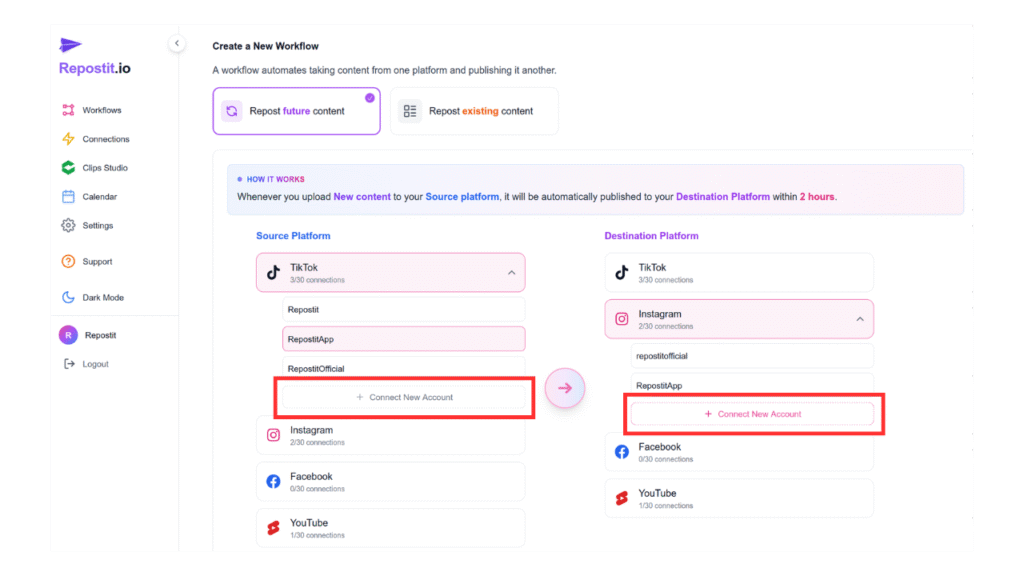
Step 2 : Just publish a new TikTok like you normally do, it’ll automatically get sent to Instagram (no extra steps needed).
Step 3 : Set a workflow to auto-schedule your existing TikTok content, so it gets published over time, hands-free (~20 seconds).
Conclusion
So automatically repurpose Tiktok videos to Instagram Reels content has never been easier. With the right workflow and automation tools like Repostit.io, you can save time, maintain consistent branding, and reach audiences across multiple platforms without extra effort. Your content works harder, your presence grows, and you get the professional look and reach your videos deserve, all with just a few clicks.