 Gianni Cassoni
How to Automatically create your workflow with Repostit
To repost a TikTok to YouTube Shorts, there are several methods. First, you can use TikTok’s built-in Share button. This method works but usually adds a watermark to the video. The second method is to download the video and then manually re-upload it to YouTube. The third method is to use repurposing software, which can automatically take your TikTok videos and upload them to other platforms.
Manual reposting takes hours. Automation handles watermark removal, scheduling, and cross-posting instantly.
How to Repost a TikTok to YouTube Shorts
While the first two methods don’t require external software, this guide will show you how to use the automation platform Repostit.io. Reposting a single TikTok to YouTube Shorts is not difficult, but when you have multiple videos or want to repost older content, automation becomes the only efficient solution. Repostit.io allows you to do this for free, after the 14-day free trial ends, the service continues to work, but a watermark is added.
In this guide, I will walk you through the steps needed to create the workflow: first by connecting your accounts and linking them, and then by scheduling your videos so the entire process can run automatically with just one action. This can also be done for other platforms, for which dedicated guides are available. One important observation is that you have to follow the youtube guidelines.

Create a Workflow with Repostit
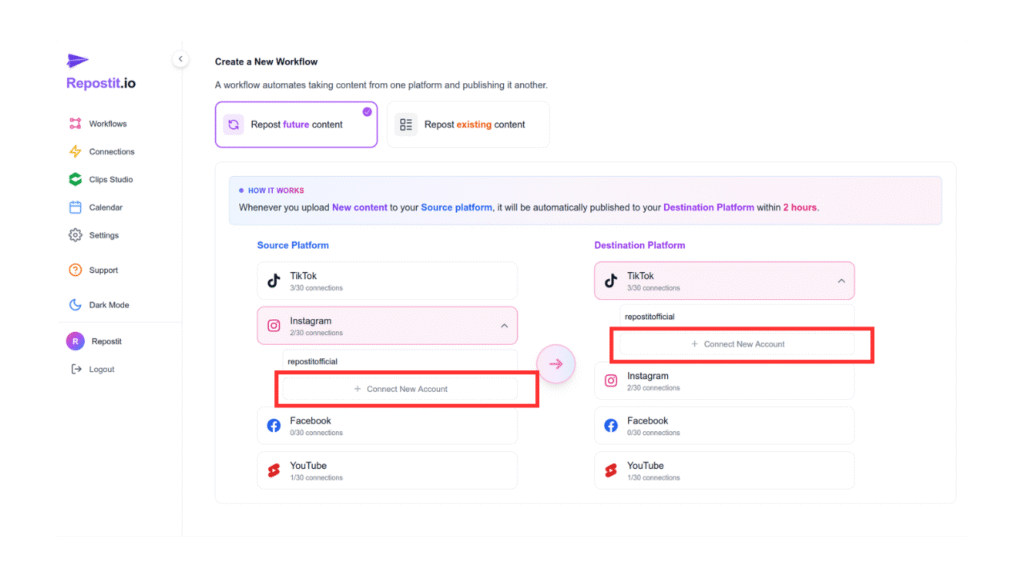
The first step is to create a workflow in Repostit.io. To do this, go to the main dashboard on the left and click “Workflows.” You will see two options: Repost future content and Repost existing content.
The first option creates an automated link between the two distribution channels so that any future post on one platform will be automatically published on the other.
The second option imports all your previous content and, once the connection between the channels is created, allows you to schedule those posts on the output platform.
Create a Connection
After the workflow is created, the next step is to schedule all your previous videos. To do this, go to View Content, and then schedule your videos. You can choose all the metadata, decide what to edit, and select when to post them. This allows you to fully automate the process of publishing all your past TikTok content on YouTube Shorts.
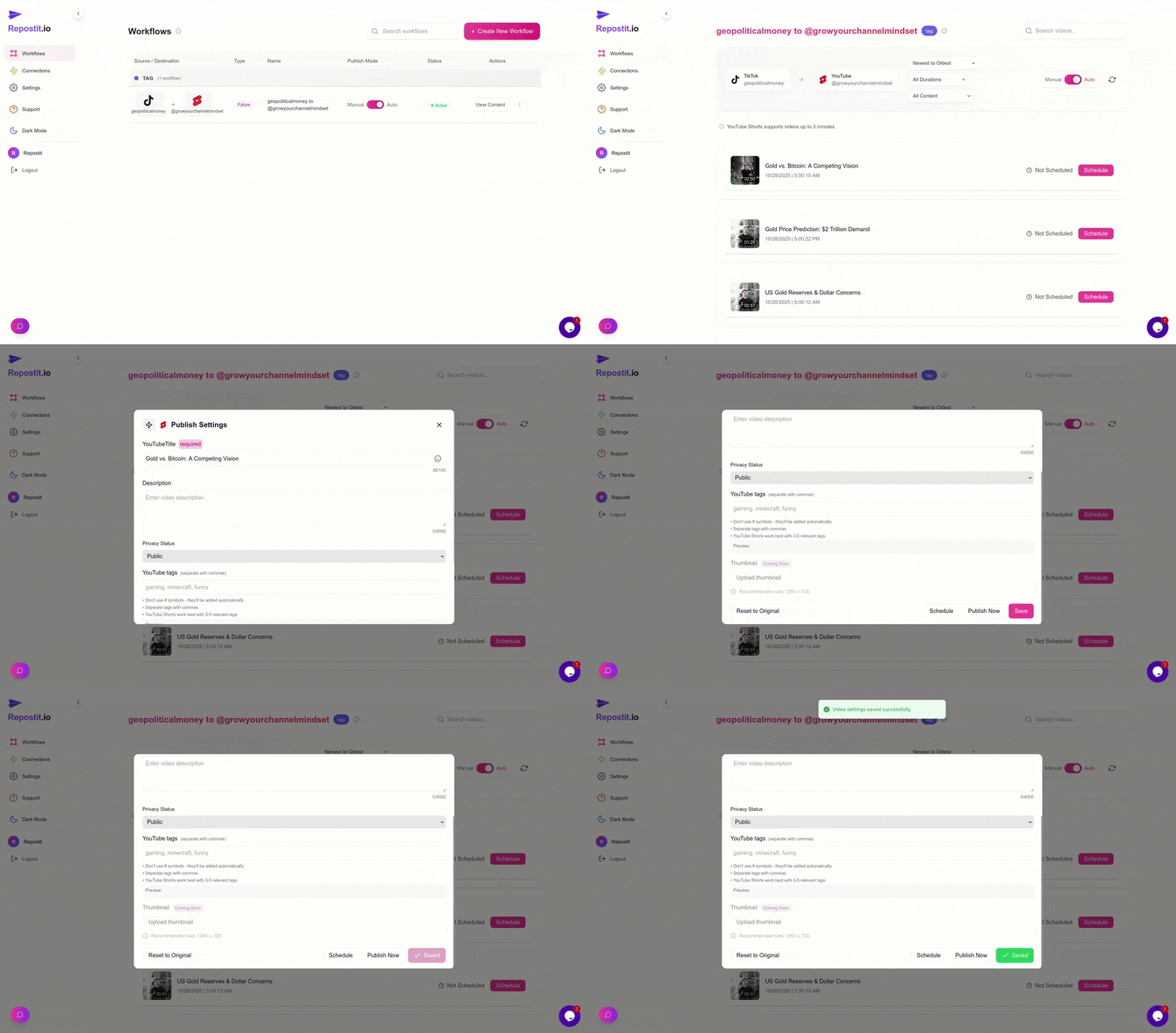
Repost a TikTok to YouTube Shorts has never been easier with Repostit.io. With just two simple steps, you can post all your videos for free and even manage short-form content across multiple platforms. Another important feature is the calendar, which lets you view all your scheduled content. This gives you the ability to manage even large channels efficiently, all with just a click. With these simple steps a repost a TikTok to YouTube Shorts workflow is created.
Unschedule, Redo, and Publish
With the calendar feature, Repostit.io makes it possible to repost a TikTok to YouTube Shorts with just one click and also to view when the content will be published. The calendar allows you to see all scheduled videos, edit important information and tags, or unschedule them, all in one place. This means you can schedule a video, make changes with a single click, or unschedule it whenever you want. This functionality is also fully integrated into the automated workflow.
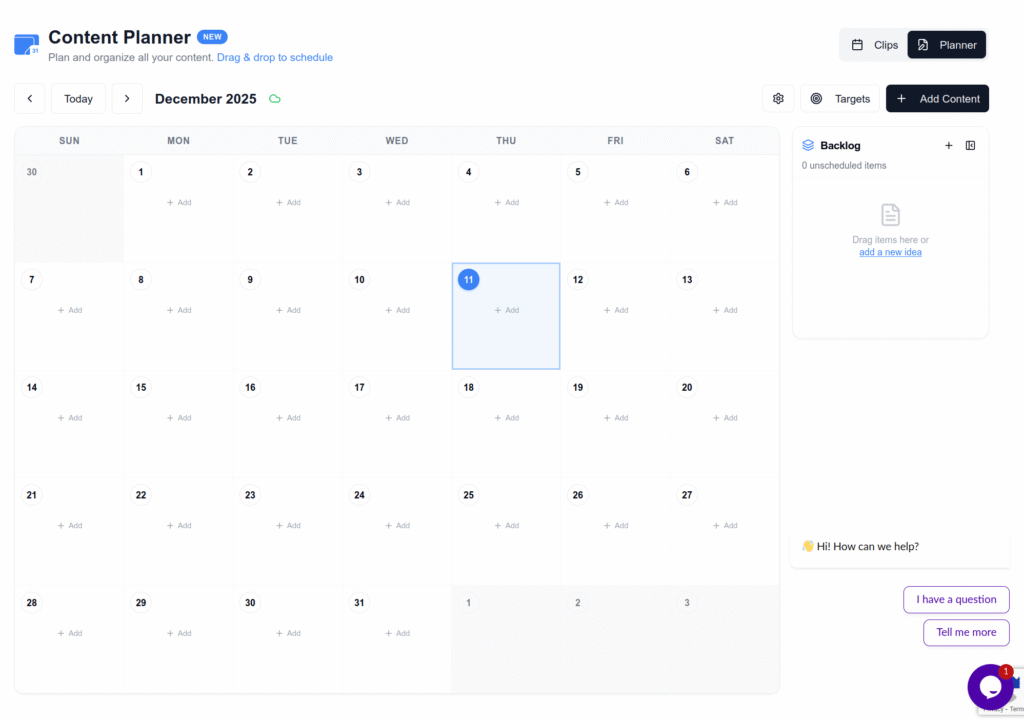
A powerful additional feature is the ability to add target annotations and other important planning details. And the best part: all of this is available for free.
Other Platform Reposting With Repostit
There are many other possible workflows. These can be found in the guides available on our blog. For example, two important ones are repost a TikTok to YouTube Shorts and reposting an Instagram Reel to TikTok another one is reposting TikTok to Instagram Reel. Repostit allows you to automate content distribution across multiple platforms with just a few simple steps.
Related Guides
Clean your videos automatically.
Master cross-platform posting.
Maximize your reach.
FAQ
Can I repost from Instagram to TikTok?
Yes. Repostit supports automated workflows that let you repost Instagram Reels directly to TikTok.
Can I repost from TikTok to Instagram Reels?
Absolutely. You can link both accounts and set up a workflow to automatically publish your TikTok videos on Instagram.
Does reposting work with older content?
Yes. You can import your previous posts and schedule them on your target platform.
Is Repostit free?
Repostit offers a free tier. After the 14-day free trial, the service continues to work with a watermark added.
Can I schedule content across multiple platforms?
Yes. The calendar feature lets you manage and schedule posts across multiple channels from one place.