 Gianni Cassoni
How to Post a TikTok on Facebook Reels in 2026
Learning how to Post a TikTok on Facebook is essential for content creators looking to maximize their reach in 2026. With the digital landscape becoming increasingly interconnected, cross-posting your short-form videos allows you to engage with different audiences without creating entirely new content from scratch.
While TikTok dominates the Gen Z market, Facebook Reels continues to capture a massive, diverse demographic. Knowing the right methods to Post a TikTok on Facebook ensures your content looks professional, performs well in the algorithm, and avoids common pitfalls like watermarks or low-quality uploads.
This comprehensive guide covers everything you need to know to Post a TikTok on Facebook effectively, from understanding platform guidelines to using automated solutions that save you hours of work every week.
TikTok → Facebook Reels
Reach 2 billion+ additional users by cross-posting your best TikToks to Facebook Reels
Why You Should Post a TikTok on Facebook
Before diving into the “how,” it’s important to understand the “why.” When you Post a TikTok on Facebook, you unlock several strategic advantages for your personal brand or business.
Expand Your Reach
Access 2 billion+ Facebook users and tap into demographics that don’t use TikTok.
Monetization
Unlock Facebook Reels bonuses and ad revenue sharing with content you already created.
Expand Your Audience Reach
TikTok and Facebook have distinct user bases. TikTok skews younger, while Facebook retains a strong hold on millennials and older generations. By choosing to Post a TikTok on Facebook, you instantly double your potential viewership and expose your content to demographics that might never open the TikTok app.
Monetization Opportunities
Facebook Reels offers its own monetization programs, including the Reels Play bonus and ad revenue sharing. Repurposing your high-performing TikToks allows you to tap into these revenue streams with content you’ve already created. To maximize earnings, you must Post a TikTok on Facebook without watermarks, as platforms often penalize recycled content with visible logos.
Adhering to Platform Guidelines
When you cross-post content, it is crucial to respect the rules of both the source and destination platforms. Violating these can lead to reduced reach, shadowbanning, or account suspension.
Before you Post a TikTok on Facebook, ensure your content complies with the TikTok Community Guidelines regarding intellectual property and safety. Simultaneously, your content must adhere to Facebook’s standards. You can review the specific rules for content distribution and monetization at the Facebook Help Center.
- Originality: Facebook prioritizes original content. Reposting watermarked videos is often flagged as “unoriginal.”
- Music Rights: Audio licensed for TikTok may not be licensed for Facebook. Be careful with copyrighted music.
- Safety: Ensure your video does not contain prohibited content like hate speech or dangerous acts.
Method 1: The Manual Download and Upload
The most basic way to Post a TikTok on Facebook is by manually saving your video and uploading it to Facebook. While straightforward, this method has a significant drawback: the TikTok watermark.
📱 Manual Download Steps:
This method saves the video with the bouncing TikTok watermark. Facebook’s algorithm explicitly deprioritizes content with watermarks from other platforms, meaning fewer people will see your video when you Post a TikTok on Facebook this way.
Method 2: Using TikTok’s Native Integration
TikTok offers a built-in feature to share directly to other platforms. This is a quick way to Post a TikTok on Facebook, but it shares the content as a link or a watermarked video, depending on the specific update and region.
- On your TikTok video, tap the “Share” button.
- Scroll through the app icons and select “Facebook.”
- Choose whether to share to your News Feed or Your Story.
While convenient, this method rarely results in a high-quality Reel. It often posts as a link preview, which gets significantly less engagement than a native video upload. To properly Post a TikTok on Facebook Reels, you need the raw video file.
Method 3: Automating the Process with Repostit
If your goal is automation and efficiency, Repostit is built to simplify the entire process. Rather than manually downloading, editing, and uploading each video, Repostit can automatically Post a TikTok on Facebook using its powerful cross-posting features. This tool connects your accounts, removes watermarks instantly, and publishes your content directly to Facebook Reels without degrading quality.
Why Choose Repostit?
The smartest way to Post a TikTok on Facebook
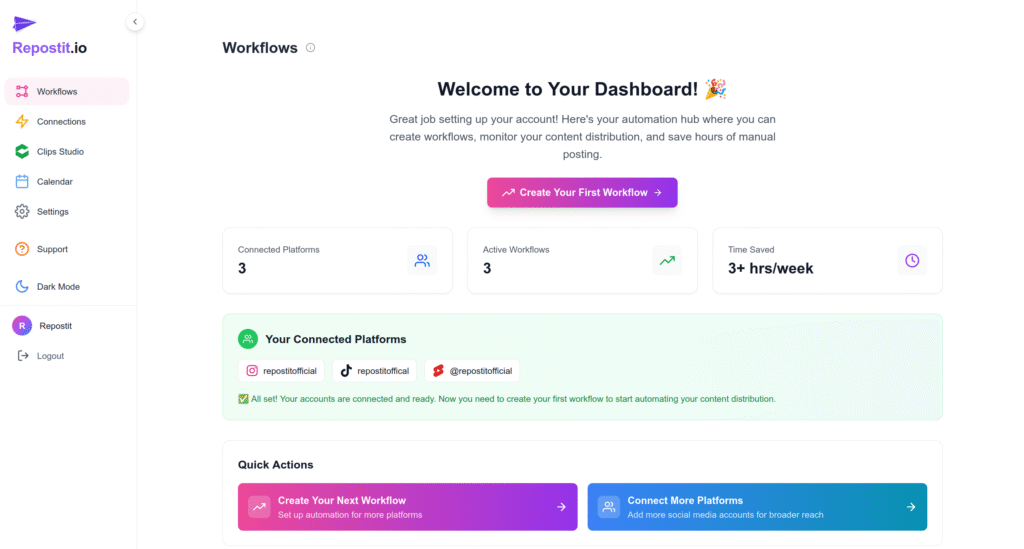
Step 1: Open the Repostit Dashboard
Sign in to your Repostit dashboard. This is the hub for your automations. From the main view, choose “Create New Workflow” to start building a flow that runs whenever you publish a new TikTok. Name the workflow clearly (for example: Repost TikTok to Facebook Reels) so it’s obvious in your dashboard if you run multiple automations.
Step 2: Create a “Future Content” Workflow
Create a Future Content Workflow. This workflow monitors your source platform, in this case, TikTok, and automatically posts new content to your destination, Facebook Reels, so that you can Post a TikTok on Facebook seamlessly.
🔄 How the Workflow Works
All of this runs automatically and typically completes within a couple of hours after the original post, though timing depends on platform rate limits and any scheduling delay you set for Facebook.
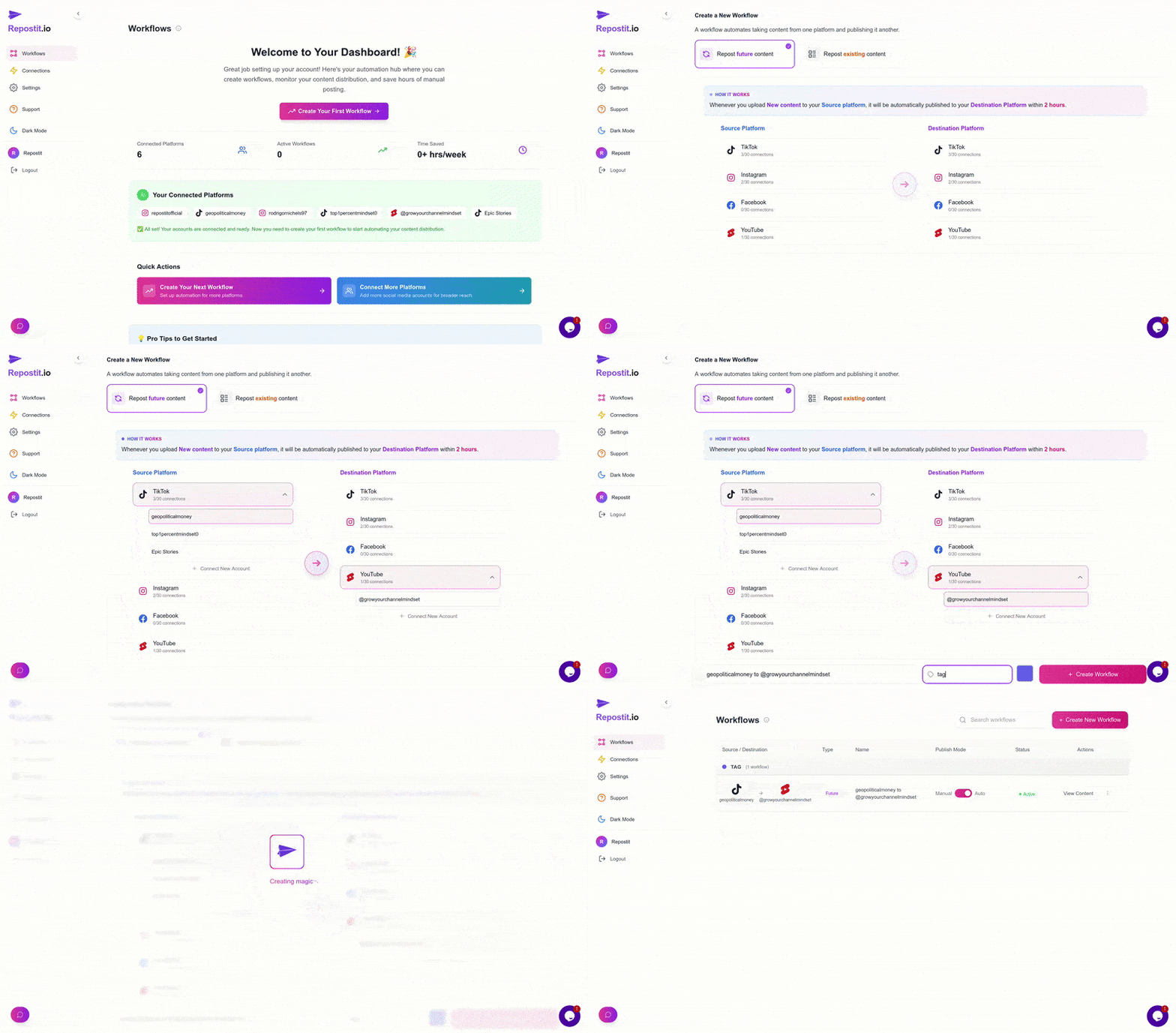
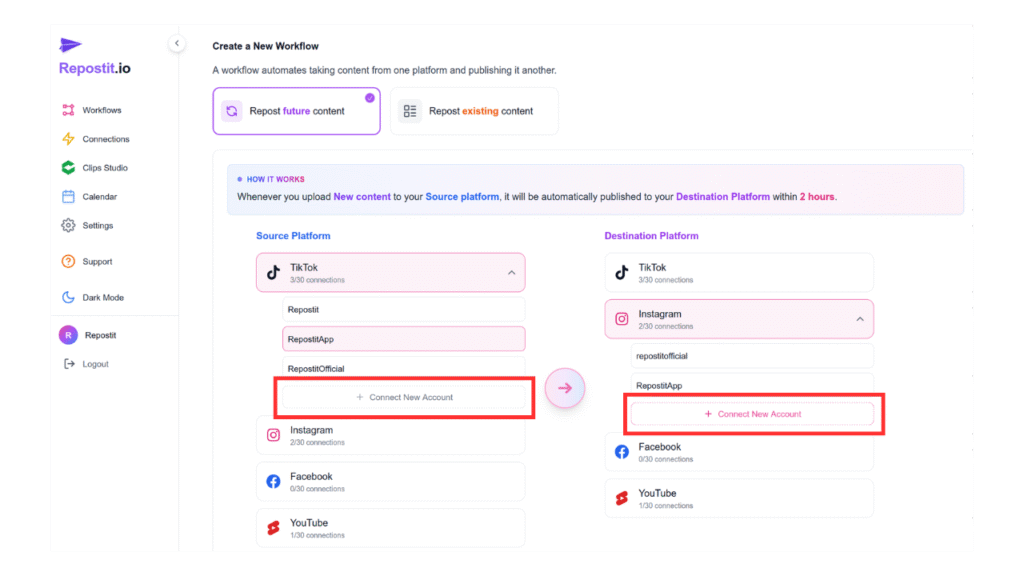
Step 3: Connect Your Accounts
Next, link your TikTok and Facebook accounts so Repostit can access and Post a TikTok on Facebook automatically. Use the platform connection flows and sign in to each account securely. Grant only the permissions required—read access for TikTok and posting access for Facebook, and confirm the correct Facebook Page is selected if you manage multiple pages.
- Click “Connect Account.”
- Complete the prompts on the authentication screen.
- Grant the permissions so Repostit can post to your Facebook account securely.
💡 Tip: Test with a private or unlisted video first to verify settings without public visibility.
Step 4: Activate the Workflow
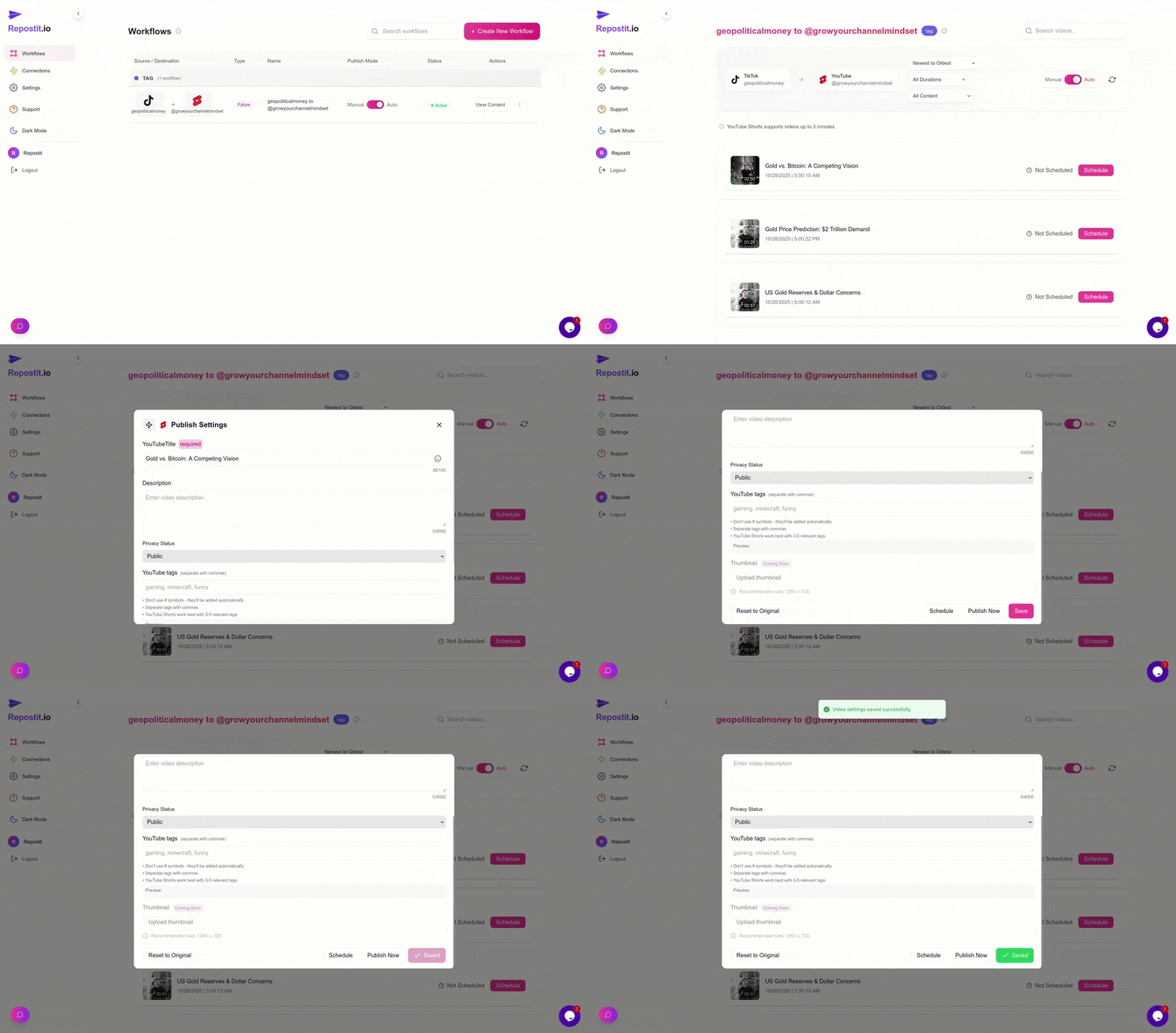
After specifying the source and destination, click “Create Workflow” to activate the automation. Verify these key settings before activation: caption template, hashtag handling, scheduling window, and whether to keep or replace the original TikTok caption. These choices determine how natural your reposted content will feel to native Facebook viewers when you Post a TikTok on Facebook.
- Repostit downloads new TikToks automatically,
- Removes the watermark instantly,
- Publishes to Facebook Reels without you lifting a finger.
Start Automating Today!
Join thousands of creators who automatically Post a TikTok on Facebook without lifting a finger.
Try Repostit Free →Best Practices for Facebook Reels in 2026
Simply knowing the technical steps isn’t enough. To succeed when you Post a TikTok on Facebook, follow these best practices:
Optimize Your Captions
TikTok captions are often short. Facebook audiences appreciate more context. Expand your caption to tell a story or ask a question to drive engagement.
Use Trending Audio
Popular TikTok sounds often perform well on Facebook too. Repostit helps ensure your audio transfers correctly.
Track Performance
Monitor which TikToks perform best on Facebook and adjust your cross-posting strategy accordingly.
Method Comparison: Which is Best?
Cross-posting is a non-negotiable strategy for growth in 2026. Learning how to Post a TikTok on Facebook effectively allows you to squeeze more value out of every video you create. Below is a quick comparison of the methods discussed:
Frequently Asked Questions
❓ Frequently Asked Questions
Does Facebook penalize TikTok watermarks? +
Yes. Facebook has officially stated that their algorithm deprioritizes content that is visibly recycled from other apps. To get maximum reach, you must remove the watermark before you Post a TikTok on Facebook.
Can I monetize Reels if I repost them from TikTok? +
Yes, provided you own the content. However, Facebook’s monetization policies require original content. Videos with watermarks are often ineligible for bonuses. This is why it is crucial to use a clean version when you Post a TikTok on Facebook.
Is it better to post to a Facebook Page or Profile? +
For creators and businesses, a Facebook Page or a Profile in “Professional Mode” is best. Both allow you to access insights and monetization features. When you Post a TikTok on Facebook Reels via a Page, you also get better tools for community management.
How long does it take for Repostit to post my TikTok to Facebook? +
Repostit typically detects and processes new TikTok uploads within a couple of hours. The exact timing depends on platform rate limits and any scheduling delay you configure in your workflow settings.
Will cross-posting hurt my TikTok engagement? +
No, cross-posting to Facebook does not affect your TikTok engagement or algorithm performance. The platforms operate independently, and sharing your content on multiple platforms only increases your overall reach when you Post a TikTok on Facebook.
Can I customize the caption when posting to Facebook? +
Yes, Repostit allows you to customize captions for each destination platform. You can keep the original TikTok caption, modify it, or create entirely new captions optimized for Facebook audiences.
What video quality is maintained when cross-posting? +
Repostit downloads your TikTok videos at the highest available quality and uploads them to Facebook without additional compression. This ensures your Reels look professional and maintain their original clarity when you Post a TikTok on Facebook.
Is Repostit free to use? +
Repostit offers a free tier that allows you to test the cross-posting features. After the 14-day trial, the service continues with full functionality, but a small watermark is added. Premium plans remove the watermark for professional distribution.
Summary
By following this guide, you can build a strong presence on both platforms without doubling your workload. Start today and watch your audience grow as you Post a TikTok on Facebook with consistency and quality.
Related Resources
Enhance your social media strategy with these additional guides:
YouTube to Instagram
A complete guide to cross-platform sharing from YouTube to Instagram.
Cross-Post All Platforms
Master the art of content distribution across all major platforms.
Remove Watermarks
Ensure your content is always platform-ready without visible logos.
Ready to Post a TikTok on Facebook?
Join thousands of creators who automatically cross-post their content and grow their audience on multiple platforms.
✓ No credit card required ✓ 14-day free trial ✓ Cancel anytime