 Gianni Cassoni
How to Link TikTok to Instagram: The Complete 2026 Guide
Wondering how to link TikTok to Instagram so your content reaches both audiences without the headache of manual reposting? You’re not alone. With over 1.5 billion monthly active users on TikTok and 2 billion on Instagram, creators who master cross-platform distribution unlock exponential growth. This guide walks you through every method — from the native profile link to fully automated cross-posting — so you can learn exactly how to link TikTok to Instagram and dominate both platforms in 2026.
Whether you want a simple profile link or a fully automated workflow that reposts every new TikTok directly to Instagram Reels, this guide covers it all. We’ll also show you how Repostit makes the entire process effortless — no downloads, no watermarks, no wasted time.
Why You Need to Link TikTok to Instagram
Why Learning How to Link TikTok to Instagram Matters
Understanding how to link TikTok to Instagram is more than just a convenience — it’s a strategic growth decision. Each platform has a unique audience demographic: TikTok skews younger with powerful discovery algorithms, while Instagram delivers stronger engagement from millennials and established brand partnerships. Creators who post on both platforms consistently report higher follower growth, more brand deals, and diversified income streams.
But there’s a catch. Manually downloading TikTok videos, removing watermarks, and re-uploading to Instagram eats up hours every week. That’s why knowing how to link TikTok to Instagram efficiently — whether through native settings or automation tools — is essential for any serious creator in 2026.
Instagram’s algorithm actively deprioritizes Reels that contain TikTok watermarks. If you’re learning how to link TikTok to Instagram, you need a method that delivers clean, watermark-free content — otherwise your reach could drop by up to 50%.
How to Link TikTok to Instagram: 3 Methods Compared
There are multiple ways to learn how to link TikTok to Instagram, each with different levels of effort and results. Here’s a quick comparison before we dive into each method:
Method 1: How to Link TikTok to Instagram via Profile Settings
The simplest way to learn how to link TikTok to Instagram is through TikTok’s built-in profile link feature. This doesn’t cross-post your content, but it does let followers on one platform easily find you on the other.
Step-by-Step: Adding Instagram to Your TikTok Profile
Open TikTok & Go to Your Profile
Tap the Profile icon in the bottom-right corner of the TikTok app.
Tap “Edit Profile”
Select the Edit Profile button directly below your profile photo and bio.
Find “Add Instagram”
Scroll to the Social section and tap Add Instagram to your profile. You’ll be redirected to Instagram’s login page.
Authorize & Save
Log in to your Instagram account and authorize the connection. Your Instagram handle will now appear as a tappable link on your TikTok profile.
This method of learning how to link TikTok to Instagram is perfect for beginners. However, it only adds a clickable link — it does not automatically share your TikTok videos to Instagram. For that, you need one of the methods below.
The profile link method only works one way: it shows your Instagram on TikTok. To add your TikTok link to Instagram, you’ll need to paste your TikTok URL into your Instagram bio manually under Edit Profile > Links > Add external link.
Method 2: How to Link TikTok to Instagram by Manual Reposting
The second approach to how to link TikTok to Instagram involves manually downloading your TikTok videos and re-uploading them as Instagram Reels. Here’s the process:
- Save your TikTok video: Open your TikTok, tap the share arrow, and select Save video. Note: this downloads the video with a TikTok watermark.
- Remove the watermark: Use a watermark removal tool to strip the TikTok logo. Instagram suppresses videos with visible competitor watermarks.
- Open Instagram: Tap the + button and select Reel.
- Upload from gallery: Select the watermark-free video from your camera roll.
- Add captions and hashtags: Rewrite your caption for Instagram’s audience and add relevant hashtags.
- Publish: Tap Share to post your Reel.
While this method of how to link TikTok to Instagram gives you full control, it’s extremely time-consuming. If you post daily, that’s 7+ hours per week spent on repetitive downloading, editing, and re-uploading. For creators who value their time, there’s a much better solution.
Method 3: How to Link TikTok to Instagram with Repostit (Automated)
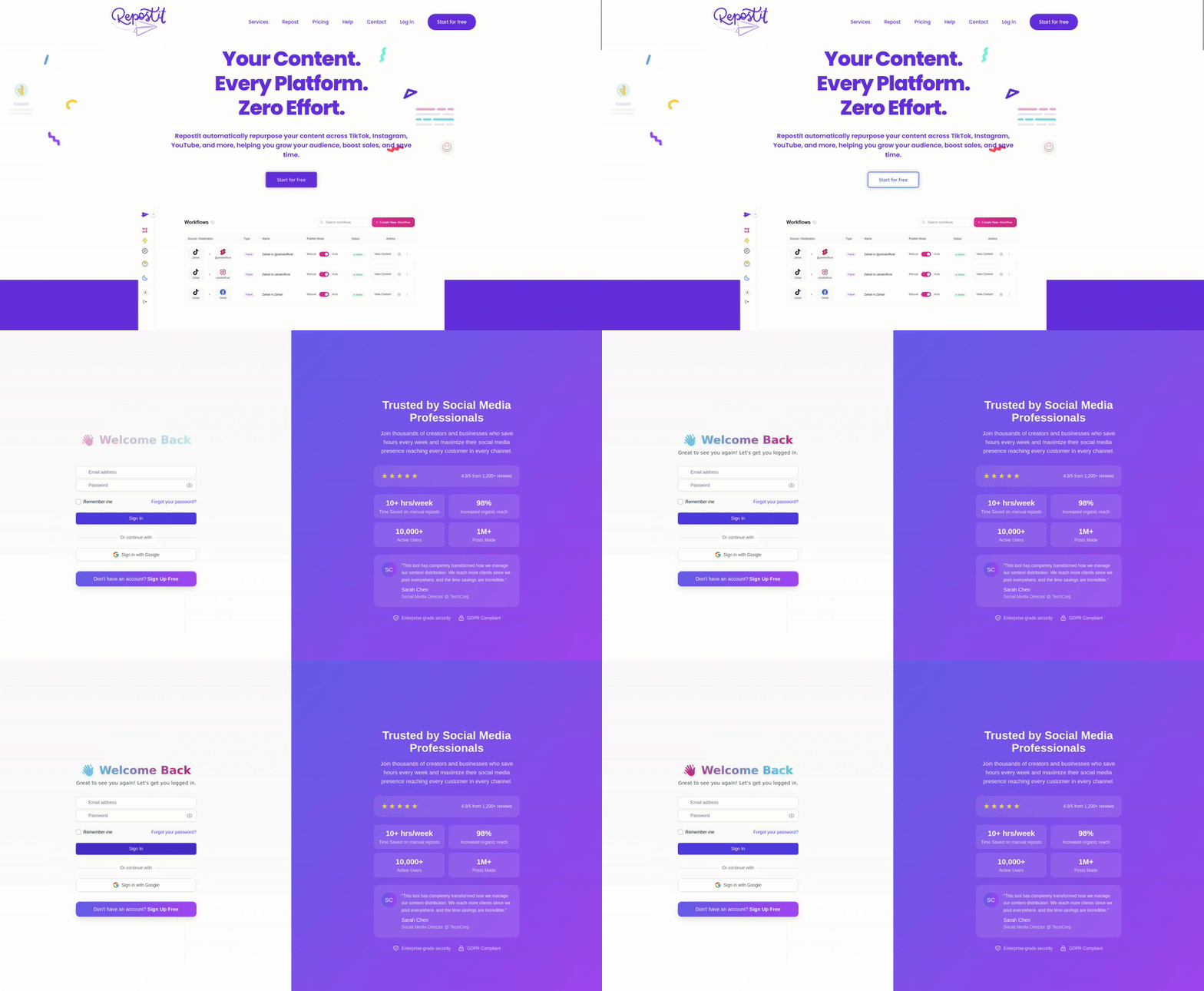
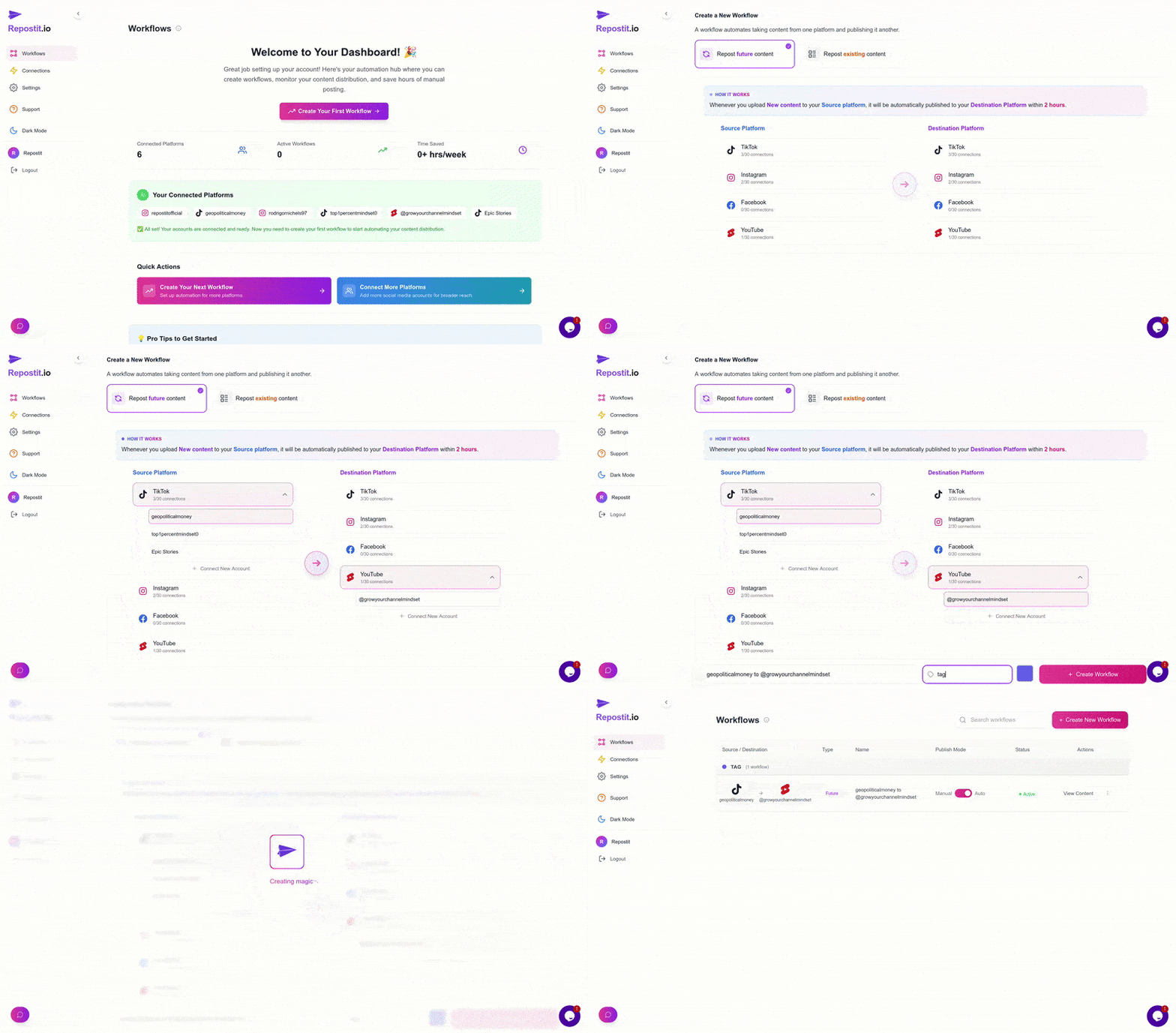
The most powerful way to learn how to link TikTok to Instagram is through automated cross-posting with Repostit. Set up a workflow once, and every new TikTok you publish automatically gets reposted to Instagram Reels — watermark-free, caption included, zero manual work required.
🏆 Why Repostit Is the Best Way to Link TikTok to Instagram
Create a workflow and every future TikTok auto-posts to Instagram
TikTok watermarks removed automatically for maximum reach
Full features available with no credit card required
Step-by-Step: How to Link TikTok to Instagram with Repostit
Create Your Repostit Account
Head to app.repostit.io and sign up for free. No credit card required — you get 14 days of full access.
Connect Your TikTok Account
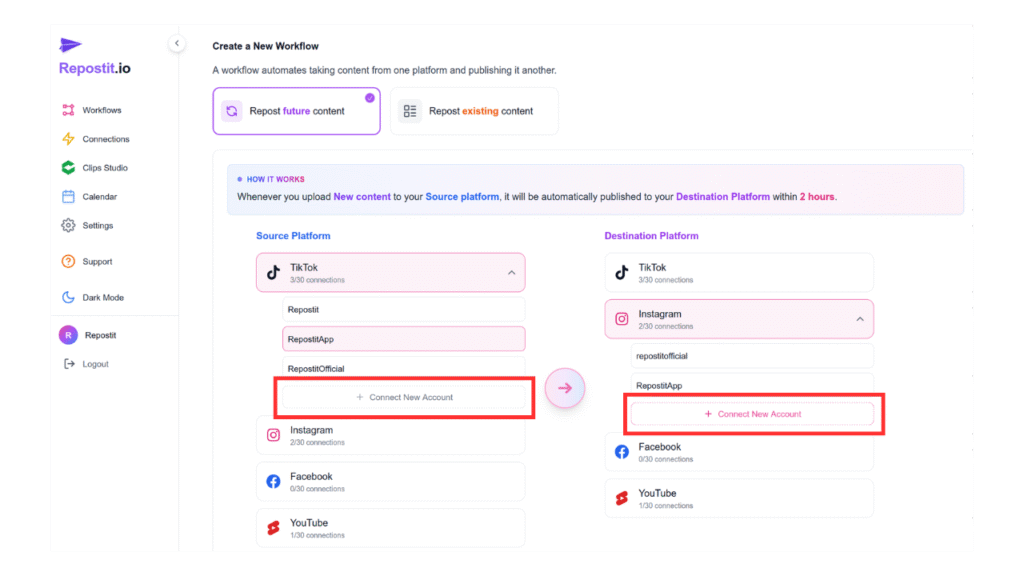
In the dashboard, click Connect Account and link your TikTok. This is your source platform — where Repostit monitors for new uploads.
Connect Your Instagram Account
Link your Instagram as your destination platform. Repostit uses official APIs and secure OAuth for safe authentication.
Create a TikTok → Instagram Workflow
Click Create Workflow, select TikTok as the source and Instagram Reels as the destination. Configure caption handling, scheduling preferences, and watermark removal.
Activate & Forget About It
Toggle your workflow on. From now on, every new TikTok you post will automatically appear on Instagram Reels — watermark-free, on schedule, with zero effort.
How to Link TikTok to Instagram: Why Watermark Removal Matters
A critical detail when learning how to link TikTok to Instagram is understanding the watermark problem. When you download a TikTok video natively, it includes the TikTok logo and your username overlaid on the video. Instagram’s algorithm recognizes these watermarks and significantly reduces the reach of those Reels.
With TikTok Watermark
Instagram suppresses reach by up to 50%. Your Reel looks unprofessional and screams “lazy repost” to viewers.
Without Watermark (Repostit)
Full algorithmic reach. Clean, native-looking content. Repostit removes watermarks automatically before posting.
This is why the automated Repostit method is the superior choice when figuring out how to link TikTok to Instagram. The watermark removal happens in the background — you don’t need to use separate tools or add extra steps to your workflow.
How to Link TikTok to Instagram: Optimizing for Both Platforms
Simply knowing how to link TikTok to Instagram is just the first step. To maximize engagement on both platforms, you need to understand the key differences:
Caption Strategy When Linking TikTok to Instagram
One common mistake creators make when learning how to link TikTok to Instagram is using identical captions on both platforms. TikTok captions tend to be short, punchy, and trend-focused. Instagram captions perform better when they’re slightly longer, include a call-to-action, and use niche-specific hashtags rather than generic trending ones.
With Repostit, you can customize caption templates for each destination platform. This means the same video gets platform-optimized captions automatically — giving you the benefits of cross-posting without the “lazy copy-paste” problem.
Timing Your Cross-Posts
Another advantage of using automation to learn how to link TikTok to Instagram is scheduling flexibility. Your TikTok audience may be most active at 8 PM, while your Instagram followers engage more at noon. Repostit lets you set delay timers and scheduling preferences so your cross-posted content hits each platform at its optimal time rather than simultaneously.
How to Link TikTok to Instagram: Advanced Strategies
Once you’ve mastered the basics of how to link TikTok to Instagram, here are advanced techniques to maximize your cross-platform growth:
🚀 Advanced Cross-Posting Strategies
How to Link TikTok to Instagram: Common Mistakes to Avoid
Even after mastering how to link TikTok to Instagram, creators often stumble on these pitfalls that can hurt their growth:
Leaving TikTok Watermarks
The #1 mistake. Instagram’s algorithm actively suppresses Reels with visible TikTok watermarks. Always remove them before posting.
Posting at the Same Time
TikTok and Instagram audiences are active at different hours. Use scheduling to hit each platform’s peak engagement window.
Copy-Pasting Captions
What resonates on TikTok may fall flat on Instagram. Customize captions for each audience and use platform-specific hashtags.
Ignoring Instagram-Only Features
After cross-posting, engage with your Instagram community: reply to comments, use Stories to promote your Reel, and add it to a themed Highlight.
How to Link TikTok to Instagram: Beyond Reels
When most people search for how to link TikTok to Instagram, they focus on Reels — and that’s the highest-impact connection. But there are additional ways to bridge these two platforms:
- Instagram Stories: Share your TikTok link in Stories with a “Watch the full version” CTA to drive traffic back to TikTok.
- Instagram Feed Posts: Create carousel posts summarizing your top TikTok tips or behind-the-scenes content.
- Bio Links: Use a link-in-bio tool to feature both your TikTok and Instagram content in one landing page.
- Cross-Promote in Captions: Mention your other platform in each post. “Follow me on TikTok for daily tips” or “More content on my Instagram.”
The Easiest Way to Link TikTok to Instagram
Stop wasting hours on manual downloads and re-uploads. Let Repostit automate your entire TikTok to Instagram workflow.
Start Free Trial →How to Link TikTok to Instagram: The Future of Cross-Platform Content
As we move deeper into 2026, learning how to link TikTok to Instagram is just the beginning of a broader cross-platform strategy. The creator economy is evolving rapidly, and the tools available are becoming more intelligent:
- AI Caption Optimization: Future tools will automatically rewrite captions for each platform’s tone and audience.
- Predictive Scheduling: AI will learn your audience’s behavior and auto-schedule posts at the exact optimal moment.
- Multi-Format Adaptation: A single vertical video will be automatically reformatted for Stories, Feed posts, and even horizontal YouTube uploads.
- Performance-Based Routing: Tools will analyze which content performs best on which platform and route accordingly.
The creators who learn how to link TikTok to Instagram now — and build automated workflows early — will have a massive competitive advantage. As platforms multiply and attention fragments, automation isn’t optional anymore. It’s how top creators scale.
Frequently Asked Questions
❓ Frequently Asked Questions About How to Link TikTok to Instagram
How do I link my TikTok account to Instagram? +
Open TikTok, go to your Profile, tap Edit Profile, scroll to the Social section, and tap “Add Instagram to your profile.” Log in to your Instagram account to authorize the connection. Your Instagram handle will appear as a clickable link on your TikTok profile.
Does linking TikTok to Instagram automatically share videos? +
No. The native TikTok profile link only adds a clickable Instagram link to your TikTok bio. It does not automatically cross-post videos. To auto-share TikTok videos to Instagram Reels, you need an automation tool like Repostit.
Will Instagram suppress my Reels if they have a TikTok watermark? +
Yes. Instagram’s algorithm deprioritizes Reels that contain visible TikTok watermarks, reducing your reach by up to 50%. Always remove TikTok watermarks before posting to Instagram. Tools like Repostit handle this automatically.
Can I automatically post TikTok videos to Instagram Reels? +
Yes. Using a cross-posting tool like Repostit, you can create a workflow that monitors your TikTok account and automatically reposts every new video to Instagram Reels — watermark-free, with customized captions and scheduling.
Is it safe to use automation tools to link TikTok to Instagram? +
Yes, reputable automation tools like Repostit use official APIs and secure OAuth authentication. They comply with both TikTok’s and Instagram’s terms of service, so your accounts remain safe and in good standing.
How to link TikTok to Instagram for free? +
You can add your Instagram link to your TikTok profile for free through TikTok’s built-in settings. For automated cross-posting, Repostit offers a free 14-day trial with all features included — no credit card required.
Should I post on TikTok and Instagram at the same time? +
Not necessarily. TikTok and Instagram audiences are often active at different times. TikTok engagement peaks around 7–9 PM while Instagram Reels perform best between 11 AM and 1 PM. Use scheduling tools to post at each platform’s optimal time.
Can I link TikTok to Instagram and YouTube Shorts at the same time? +
Yes. With Repostit, you can create multi-destination workflows that automatically cross-post your TikTok videos to Instagram Reels, YouTube Shorts, and Facebook Reels simultaneously — all watermark-free.
How do I add my TikTok link to my Instagram bio? +
Open Instagram, go to your Profile, tap Edit Profile, then tap Links > Add external link. Paste your TikTok profile URL (e.g., tiktok.com/@yourusername) and save. Your TikTok link will now be visible on your Instagram profile.
Why can’t I link my TikTok to Instagram? +
If the Instagram option doesn’t appear in your TikTok profile settings, try updating both apps to the latest version, logging out and back in, or clearing your app cache. Some business accounts may have different settings. If the issue persists, contact TikTok support.
Related Resources
Continue exploring how to grow your cross-platform presence:
TikTok to Instagram Reels Guide
Deep dive into automated Reels cross-posting with step-by-step walkthroughs.
TikTok Watermark Removal
Learn why removing watermarks is critical and how to do it automatically.
Content Repurposing Guide
Master the art of maximizing every piece of content across all platforms.
Official Platform Guidelines
- TikTok Community Guidelines — TikTok’s official content and community standards.
- Instagram Reels Guidelines — Meta’s official guidelines for Reels content.
- Instagram Account Settings — Instagram’s official help for profile and account management.
Start Linking TikTok to Instagram Today
Now you know exactly how to link TikTok to Instagram — from the simple profile link to full automated cross-posting. The profile link method takes 30 seconds but only directs followers. Manual downloading works but wastes hours every week. Automated workflows with Repostit give you the best of both worlds: zero effort, watermark-free content, and optimized scheduling across platforms.
The most successful creators in 2026 don’t choose between TikTok and Instagram — they dominate both. And they do it by working smarter, not harder, with the right automation tools.
Ready to Link TikTok to Instagram Automatically?
Join thousands of creators who’ve mastered how to link TikTok to Instagram with Repostit’s set-and-forget automation.
✓ No credit card required ✓ 14-day free trial ✓ Automatic watermark removal
Don’t let manual reposting slow down your growth. Master how to link TikTok to Instagram with automation, and watch your cross-platform audience explode.