 Gianni Cassoni
Twitch to TikTok Detailed API Posting Limits and How to Avoid Shadowbans (2026 Guide)
You just finished a 4-hour Twitch stream. Your AI clipping tool extracted 12 viral-worthy shorts. You are excited to flood TikTok, Instagram Reels, YouTube Shorts, and Facebook Reels with content. You upload all 12 clips in 15 minutes – and within 24 hours, your account reach drops to zero. No warning. No notification. Just silence.
This is the API posting limit problem that no one talks about when discussing Twitch to TikTok Detailed API Posting workflows. Every major social media platform enforces strict daily and per-minute upload quotas through their APIs. Exceed them, and your content gets throttled, shadowbanned, or outright rejected. Understanding the exact API posting limits for TikTok, YouTube, Instagram, and Facebook – and knowing how to avoid shadowbans – is not optional. It is the difference between sustainable growth and account destruction.
If you are using automation tools to distribute your Twitch clips, the tool you choose matters enormously. Poorly built bots ignore these limits and get your account flagged. Repostit.io is built specifically around these constraints – it uses official APIs with intelligent rate-limiting to keep your accounts safe while maximizing output. This guide breaks down every API posting limit you need to know and exactly how to avoid shadowbans on every platform.
Why API Posting Limits Exist
Before diving into the numbers, you need to understand why platforms enforce these limits. It is not arbitrary – there are three distinct types of restrictions that affect your Twitch to TikTok Detailed API Posting workflow:
- Hard API Rate Limits: These are technical ceilings enforced at the server level. If your tool sends more requests than allowed, the API returns an error (usually HTTP 429 “Too Many Requests”) and refuses to process the upload. These are documented and absolute.
- Velocity Limits (Spam Detection): These are undocumented behavioral thresholds. Even if you stay under the hard API limit, posting too many videos in rapid succession triggers spam-detection algorithms. The platform does not reject the upload – it silently reduces the reach of your content. This is what people call a “shadowban.”
- Account-Age Limits: New accounts (under 30 days old) face significantly stricter limits than established accounts. Platforms assume new accounts posting at high volume are bots. If you just created a TikTok account to post your Twitch clips, you need to ramp up slowly.
The danger for Twitch streamers is clear: you generate a large batch of clips from a single stream, and the natural instinct is to post them all immediately. But every platform interprets rapid-fire uploads as bot behavior. Understanding the specific limits below will prevent you from accidentally destroying the reach of your own content.
TikTok API Posting Limits for Twitch to TikTok Detailed API Posting
TikTok is the primary destination for most Twitch to TikTok Detailed API Posting workflows, and it has some of the most restrictive API limits of any platform. TikTok’s Content Posting API enforces limits at multiple levels:
| Limit Type | Threshold | What Happens When Exceeded |
|---|---|---|
| Daily Video Uploads (per user) | Undisclosed – estimated 3–5 videos/day via API for unverified apps | API returns error; uploads silently fail or get queued indefinitely. |
| API Requests per Day (per app) | Varies by app tier – Sandbox: ~100 requests/day; Production: higher but capped | HTTP 429 error. All API calls from that app are blocked until the limit resets. |
| Spam Velocity Trigger | More than 2–3 uploads within 30 minutes | No error – content is accepted but reach is suppressed (shadowban). Videos get near-zero views. |
| New Account Restriction | Accounts under 7 days old | Even stricter velocity detection. Posting more than 1 video/day can trigger review. |
| Duplicate Content Detection | Frame-level similarity analysis | If two clips from the same Twitch VOD are too similar, the second one gets suppressed. |
TikTok Safe Posting Schedule for Twitch to TikTok Detailed API Posting
Based on extensive testing and TikTok’s documented API behavior, here is the safe posting cadence for Twitch to TikTok Detailed API Posting strategies:
- Maximum safe uploads: 3 videos per day via API.
- Minimum spacing: At least 2–4 hours between each upload.
- Optimal schedule: Morning (8–9 AM), Afternoon (1–2 PM), Evening (7–8 PM) in your target audience’s timezone.
- New accounts: Start with 1 video per day for the first 2 weeks, then ramp to 2, then 3.
Critical detail: TikTok’s Content Posting API requires that your automation tool is a registered and approved TikTok developer application. Tools that bypass this by using unofficial methods (browser automation, cookie injection) put your account at immediate risk of permanent ban. Repostit uses TikTok’s official Content Posting API with proper OAuth authentication, ensuring every upload is legitimate. For a deeper breakdown of TikTok’s specific rate limits, see our dedicated guide: TikTok API Daily Limit.
YouTube Shorts API Posting Limits (2026)
YouTube uses a fundamentally different rate-limiting system than TikTok. Instead of simple “uploads per day,” YouTube’s Data API v3 uses a quota points system. Every API action costs a certain number of points, and you get a fixed daily budget.
| Limit Type | Threshold | What Happens When Exceeded |
|---|---|---|
| Daily Quota Budget | 10,000 units per day (default for most apps) | All API calls fail with HTTP 403 “quotaExceeded” until midnight Pacific Time reset. |
| Cost per Video Upload | 1,600 quota units per upload | At 10,000 units/day, you can upload a maximum of 6 videos per day (with 400 units left for metadata calls). |
| Cost per Metadata Update | 50 quota units per update (title, description, tags) | Updating metadata after upload consumes additional quota. |
| Spam Velocity Trigger | More than 3–4 uploads within 1 hour | YouTube may flag the channel for review or temporarily restrict uploads. |
| Shorts-Specific Limit | Videos must be ≤60 seconds and vertical (9:16) to qualify as Shorts | Videos over 60 seconds are processed as regular uploads and do not appear on the Shorts shelf. |
| Daily Reset | Midnight Pacific Time (UTC-8) | Quota resets to 10,000 units. No rollover of unused quota. |
YouTube Safe Posting Schedule for Twitch to TikTok Detailed API Posting
YouTube is actually the most generous platform for high-volume Twitch to TikTok Detailed API Posting (and YouTube) repurposing, but the quota math catches people off guard:
- Maximum safe uploads: 5–6 Shorts per day (staying under the 10,000 unit quota ceiling).
- Minimum spacing: At least 1–2 hours between uploads.
- Optimal schedule: Spread across the day. YouTube’s algorithm favors consistent daily uploads over sporadic bursts.
- Watch the quota: If your tool also reads analytics, fetches comments, or updates playlists, those operations consume quota too. A single “list videos” call costs 1 unit, but they add up fast if polled frequently.
Pro tip: If you need more than 6 uploads per day, you can apply to Google for an increased quota allocation through the YouTube API Services quota extension form. Approval takes 2–4 weeks and requires justification. For a complete breakdown of how YouTube’s quota system works, see our guide: YouTube API Daily Limit.
Instagram Reels API Posting Limits (2026)
Instagram is the strictest platform for automated posting and the one most likely to punish your Twitch to TikTok Detailed API Posting workflow if you are not careful. Meta’s Instagram Graph API enforces aggressive rate limits specifically designed to prevent automation abuse.
| Limit Type | Threshold | What Happens When Exceeded |
|---|---|---|
| Content Publishing Limit | 25 API-published posts per 24-hour rolling window | API returns error code 9007 – “The app has reached the content publishing rate limit.” |
| API Rate Limit (per user) | 200 calls per hour per user token | HTTP 429 error. All API calls blocked for that user until the hourly window passes. |
| Spam Velocity Trigger | More than 2 Reels within 30 minutes | Reach suppression – Reels are posted but shown to near-zero people. Can last 24–72 hours. |
| Action Block | Rapid follows, likes, and posts in combination | “Action Blocked” popup – all posting suspended for 24–48 hours. Repeat offenses extend to 2 weeks. |
| New Account Restriction | Accounts under 30 days old | Even 1–2 Reels per day via API can trigger review for new accounts. |
| Duplicate Content Detection | Visual + audio fingerprinting | If the same Twitch clip is posted to Instagram that was already posted to Facebook Reels, reach is reduced on the duplicate. |
Instagram Safe Posting Schedule for Twitch to TikTok Detailed API Posting
Instagram requires the most conservative approach of all platforms:
- Maximum safe uploads: 2–3 Reels per day via API.
- Minimum spacing: At least 3–4 hours between each Reel.
- Optimal schedule: Morning (9–10 AM), Evening (6–7 PM), Late Night (10–11 PM).
- New accounts: Start with 1 Reel per day for the first 30 days. Instagram is the most aggressive about flagging new accounts that post via API.
- Avoid combining actions: Do not automate follows, likes, comments, and Reel uploads from the same tool simultaneously. Instagram’s system evaluates total account activity across all action types.
Important: The 25-post daily limit sounds generous, but the velocity trigger at 2 Reels per 30 minutes means you can never safely batch-upload. The only safe approach is scheduled, spaced distribution – exactly what Repostit is designed to do. For a complete breakdown of Instagram’s API rate limits, see our guide: Instagram Graph API Day Limit.
Facebook Reels API Posting Limits (2026)
Facebook Reels shares Meta’s infrastructure with Instagram, but has slightly different limits through the Facebook Video API:
| Limit Type | Threshold | What Happens When Exceeded |
|---|---|---|
| Content Publishing Limit | 25 API-published posts per 24-hour rolling window (shared across post types) | API returns rate limit error. Uploads blocked until the window passes. |
| API Rate Limit (per app) | 200 calls per hour per user token | HTTP 429 error. |
| Spam Velocity Trigger | More than 3–4 Reels within 1 hour | Content accepted but distribution suppressed. |
| Cross-Platform Duplication | Posting identical content to both Facebook and Instagram via API | Meta detects cross-posting and may reduce reach on one or both platforms. |
Facebook Safe Posting Schedule for Twitch to TikTok Detailed API Posting
- Maximum safe uploads: 3–4 Reels per day.
- Minimum spacing: At least 2–3 hours between each Reel.
- Cross-posting strategy: If you post the same clip to both Instagram and Facebook, stagger them by at least 6–12 hours and use different captions/hashtags to reduce duplication signals.
Twitch API Rate Limits (The Source Side)
Most guides about Twitch to TikTok Detailed API Posting workflows only cover the destination platform limits. But there are also limits on how fast you can fetch content from Twitch. If your automation tool pulls clips and VODs too aggressively, it gets rate-limited on the source side before anything is even uploaded.
The Twitch Helix API enforces the following:
| Limit Type | Threshold | What Happens When Exceeded |
|---|---|---|
| Standard Rate Limit | 800 requests per minute (using OAuth User Access Token) | HTTP 429 error. Requests blocked until the rate limit window resets (typically 60 seconds). |
| App Access Token Rate Limit | 800 requests per minute (shared across all users of the app) | Same HTTP 429 error – but this limit is shared, meaning high-traffic apps hit it faster. |
| Clip Fetching | Each “Get Clips” call returns max 100 clips per request | Pagination required for channels with many clips. Each page costs 1 request toward the 800/min limit. |
| VOD Download | No official API endpoint for direct download – requires resolving m3u8 playlist URLs | Twitch can throttle or block IPs that download VODs too aggressively. |
| OAuth Token Expiry | User Access Tokens expire – must be refreshed via refresh token flow | Expired tokens return 401 Unauthorized. Automation tools must handle token refresh gracefully. |
Practical impact: If you use a tool that fetches your Twitch clips, analyzes them, and then distributes them, the tool is making API calls on both ends – Twitch (source) and TikTok/YouTube/Instagram (destination). A poorly optimized tool can exhaust Twitch’s 800 requests/minute limit just by polling for new clips too frequently. Repostit caches clip data and uses efficient pagination to stay well within Twitch’s rate limits. For a complete overview of the Twitch API architecture, see our guide: Twitch API Guide.
The Complete Cross-Platform Limit Cheat Sheet
Here is every limit that matters for a Twitch to TikTok Detailed API Posting (and beyond) repurposing workflow in one table:
| Platform | Hard API Limit | Safe Daily Uploads | Minimum Spacing | New Account Warning |
|---|---|---|---|---|
| Twitch (Source) | 800 req/min | N/A (fetch only) | N/A | N/A |
| TikTok | App-tier dependent | 3 videos/day | 2–4 hours | 1 video/day for first 2 weeks |
| YouTube Shorts | 10,000 quota units/day (1,600 per upload) | 5–6 Shorts/day | 1–2 hours | Standard limits apply |
| Instagram Reels | 25 posts/24h + 200 calls/hour | 2–3 Reels/day | 3–4 hours | 1 Reel/day for first 30 days |
| Facebook Reels | 25 posts/24h + 200 calls/hour | 3–4 Reels/day | 2–3 hours | Moderate restrictions for new Pages |
This means that from a single 4-hour Twitch stream producing 12 clips, the maximum safe daily output across all platforms is approximately:
- 3 TikToks + 3 Instagram Reels + 5 YouTube Shorts + 3 Facebook Reels = 14 posts per day
- But only if each post is staggered by 2–4 hours and no two identical clips go to the same platform.
With 12 unique clips from one stream, you have enough content for 3–4 days of consistent posting across all platforms – without hitting any API ceiling. This is why smart streamers do not rush to post everything on day one. For a comprehensive overview of all platform limits in one place, see our master guide: API Posting Limits: YouTube, Instagram, Facebook & TikTok.
What Is a Shadowban in Twitch to TikTok Detailed API Posting?
A “shadowban” is when a social media platform silently suppresses your content’s reach without notifying you. No email. No warning banner. No API error code. Your videos still appear on your profile, and you can still post – but the algorithm stops showing your content to anyone new. It is the digital equivalent of shouting into a soundproofed room, ruining your Twitch to TikTok Detailed API Posting efforts.
TikTok has never officially acknowledged that shadowbans exist. But thousands of creators – including major accounts like Alix Earle – have reported the same pattern: consistent video views in the thousands suddenly dropping to under 100, overnight, with no explanation. Whether you call it a “shadowban” or “reduced distribution,” the effect is identical: your Twitch to TikTok Detailed API Posting pipeline stops producing results.
The reality is that most creators who think they are shadowbanned are actually experiencing one of two things: either they genuinely triggered TikTok’s spam detection systems (often by violating the API posting limits documented above), or their content simply stopped performing well due to quality or timing issues. The interactive checker below will help you diagnose which category you fall into.
TikTok Shadowban Checker for Twitch to TikTok Detailed API Posting
Use this diagnostic tool to determine whether your TikTok account is likely shadowbanned or if something else is causing your view drop. Answer each question honestly – the tool will calculate your shadowban probability based on the same criteria that social media experts and experienced creators use to diagnose reach suppression.
TikTok Shadowban Diagnostic
Answer these 10 questions about your account. Each answer is weighted based on how strongly it correlates with confirmed shadowban cases.
1. How did your views change?
2. What does your “For You” traffic source show?
Check in TikTok Studio → Analytics → Content → select a recent video → Traffic sources
3. Have you used automation tools to post content?
4. How many videos did you post in the 24 hours before the view drop?
5. Does your TikTok Studio show any community guideline violations?
Check in TikTok Studio → Settings → Account → Account status
6. Are your recent videos stuck on “Processing” or “Under Review” for longer than 30 minutes?
7. How old is your TikTok account?
8. Is your content reposted or heavily duplicated from another platform?
9. Did you recently come back from a long break (2+ weeks of no posting)?
10. Have you bought followers, used engagement pods, or used a VPN while posting?
How Shadowbans Actually Work in Twitch to TikTok Detailed API Posting
No platform returns a “shadowbanned” status code in their API. What actually happens is more nuanced and more dangerous for creators running Twitch to TikTok Detailed API Posting workflows. Here is what occurs under the hood on each platform:
| What People Call It | What Actually Happens | How It Is Triggered | Duration |
|---|---|---|---|
| TikTok Shadowban | Videos receive 0–200 views despite having thousands of followers. Content is not shown on “For You Page.” For You traffic source drops below 1%. | Rapid-fire uploads via API, duplicate/reposted content, using unregistered automation tools, buying followers, VPN usage while posting, or posting aggressively after a long break. | 7–30 days. No official notification. Resolves by stopping all automated activity for 7+ days and posting 1 original video manually. |
| Instagram Reach Drop | Reels shown only to existing followers. Explore page distribution drops to zero. | Exceeding velocity limits (2+ Reels in 30 min), combining automated posts with automated likes/follows. | 24–72 hours for minor violations. 2+ weeks for repeat offenders. |
| YouTube “Limited Distribution” | Shorts do not appear on the Shorts Shelf. Video is accessible but not recommended. | Uploading content flagged as “repetitive” or “reused” by YouTube’s automated systems. | Indefinite per video. Channel-level restrictions are rare but possible. |
| Facebook Reduced Distribution | Reels shown to fewer people. Engagement rate drops significantly. | Cross-posting identical content from Instagram without modification. | 24–48 hours typically. |
How Long Does a TikTok Shadowban Last in Your Twitch to TikTok Detailed API Posting?
Since TikTok does not officially acknowledge shadowbans, there is no published duration. Based on creator reports and community feedback, the timeline depends entirely on the severity of the trigger and how you respond:
| Trigger Severity | Example | Typical Duration | Recovery Approach |
|---|---|---|---|
| Mild | Posted 4–5 videos in one day via API; slight content duplication | 3–7 days | Reduce to 1 video/day. Delete duplicate posts. Engage with other content for 3 days. |
| Moderate | Used unofficial automation tool; posted aggressively after a 3-week break; minor guideline violation | 1–2 weeks | Stop all posting for 5 days. Disconnect third-party tools. Clear cache. Post 1 original video. Monitor For You traffic. |
| Severe | Bought followers; multiple guideline violations; used bot to mass-comment; VPN detected | 2–4 weeks (potentially months) | Full 7-day posting break. Delete all flagged content. Remove purchased followers. Go Live during break. Ease back with 1 video every 2 days. |
| Permanent/Near-Permanent | Repeated severe violations after previous bans; hate speech; impersonation | Indefinite – may require a new account | Appeal through TikTok support. If no resolution after 30 days, consider starting a fresh account with clean behavior from day one. |
The key insight is that your response determines the duration of the disruption to your Twitch to TikTok Detailed API Posting. Creators who panic and post even more aggressively to “compensate” for lost views extend their shadowban significantly. Creators who immediately stop, diagnose the issue (use the checker above), and follow a measured recovery plan typically see views return within 1–2 weeks.
The “Reused Content” Problem for Twitch to TikTok Detailed API Posting
YouTube specifically has a “Reused Content” policy that directly affects Twitch to TikTok Detailed API Posting and YouTube workflows. If YouTube’s system detects that your Shorts are simply raw, unedited clips from another platform (like Twitch), it may flag them as “reused content” and limit their distribution.
To avoid this:
- Add unique elements: Captions, text overlays, zooms, and vertical reframing all signal to YouTube that the content has been “transformed.”
- Never upload raw 16:9 clips: An unedited horizontal Twitch clip with black bars is the #1 trigger for “reused content” flags.
- Write unique titles and descriptions: Do not copy-paste the same text across YouTube, TikTok, and Instagram.
- Use tools that add value: Repostit’s AI reframing, auto-captions, and intelligent cropping transform the source content enough to pass YouTube’s originality checks.
How Repostit Handles API Limits Safely for Twitch to TikTok Detailed API Posting
The entire architecture of Repostit is built around respecting these API constraints while maximizing your content output. Here is how it works under the hood:
Intelligent Queue System for Twitch to TikTok Detailed API Posting
When you upload a Twitch VOD and generate 12 clips, Repostit does not attempt to post all 12 immediately. Instead, it creates a publishing queue that:
- Checks remaining quota for each connected platform (YouTube quota units, TikTok daily cap, Instagram hourly rate).
- Calculates optimal spacing based on the platform-specific velocity triggers documented above.
- Distributes clips across days – if you have 12 clips, Repostit might schedule 3 per day over 4 days rather than dumping all 12 on day one.
- Staggers cross-platform posts – the same clip goes to TikTok at 9 AM, YouTube at 1 PM, and Instagram at 6 PM, preventing simultaneous duplicate-content flags.
Official API Connections Only for Twitch to TikTok Detailed API Posting
Repostit connects to every platform exclusively through their official, documented APIs:
- Twitch: Helix API with OAuth 2.0 User Access Tokens for secure clip/VOD retrieval.
- TikTok: Content Posting API with registered developer application credentials.
- YouTube: Data API v3 with proper quota management and OAuth consent.
- Instagram: Instagram Graph API through Meta Business Suite integration.
- Facebook: Facebook Video API for Reels publishing.
No browser automation. No cookie scraping. No unofficial endpoints. This is why accounts connected through Repostit do not get flagged – the platforms see legitimate, authorized API traffic, not bot behavior.
Content Differentiation Per Platform in Twitch to TikTok Detailed API Posting
Repostit allows you to customize each clip before it is published to each platform:
- Different captions per platform – TikTok trending hashtags vs. YouTube SEO keywords vs. Instagram niche tags.
- Different thumbnails where supported (YouTube Shorts).
- Platform-specific aspect ratio tweaks – ensuring safe zones are respected on each platform’s unique UI layout.
This per-platform customization is what prevents “duplicate content” flags across Meta’s ecosystem (Instagram + Facebook) and YouTube’s “reused content” detection.
The Optimal 7-Day Twitch to TikTok Detailed API Posting Schedule
Here is a real-world example of how to safely distribute clips from two 4-hour Twitch streams per week (generating roughly 20–24 clips total) across all platforms in your Twitch to TikTok Detailed API Posting plan without hitting any API limits:
| Day | TikTok (3/day max) | YouTube Shorts (5/day max) | Instagram Reels (2/day max) | Facebook Reels (3/day max) |
|---|---|---|---|---|
| Monday (Stream Day) | – | – | – | – |
| Tuesday | Clip 1 (9AM), Clip 2 (2PM), Clip 3 (8PM) | Clip 1 (10AM), Clip 2 (1PM), Clip 3 (5PM) | Clip 1 (11AM), Clip 2 (7PM) | Clip 1 (9AM), Clip 2 (3PM), Clip 3 (9PM) |
| Wednesday | Clip 4 (9AM), Clip 5 (2PM), Clip 6 (8PM) | Clip 4 (10AM), Clip 5 (1PM), Clip 6 (5PM) | Clip 3 (11AM), Clip 4 (7PM) | Clip 4 (9AM), Clip 5 (3PM) |
| Thursday (Stream Day) | Clip 7 (9AM), Clip 8 (8PM) | Clip 7 (10AM), Clip 8 (5PM) | Clip 5 (11AM) | Clip 6 (9AM), Clip 7 (9PM) |
| Friday | Clip 9 (9AM), Clip 10 (2PM), Clip 11 (8PM) | Clip 9 (10AM), Clip 10 (1PM), Clip 11 (5PM) | Clip 6 (11AM), Clip 7 (7PM) | Clip 8 (9AM), Clip 9 (3PM), Clip 10 (9PM) |
| Saturday | Clip 12 (9AM), Clip 13 (2PM) | Clip 12 (10AM), Clip 13 (1PM), Clip 14 (5PM) | Clip 8 (11AM), Clip 9 (7PM) | Clip 11 (9AM), Clip 12 (3PM) |
| Sunday | Clip 14 (9AM) | Clip 15 (10AM) | Clip 10 (11AM) | – |
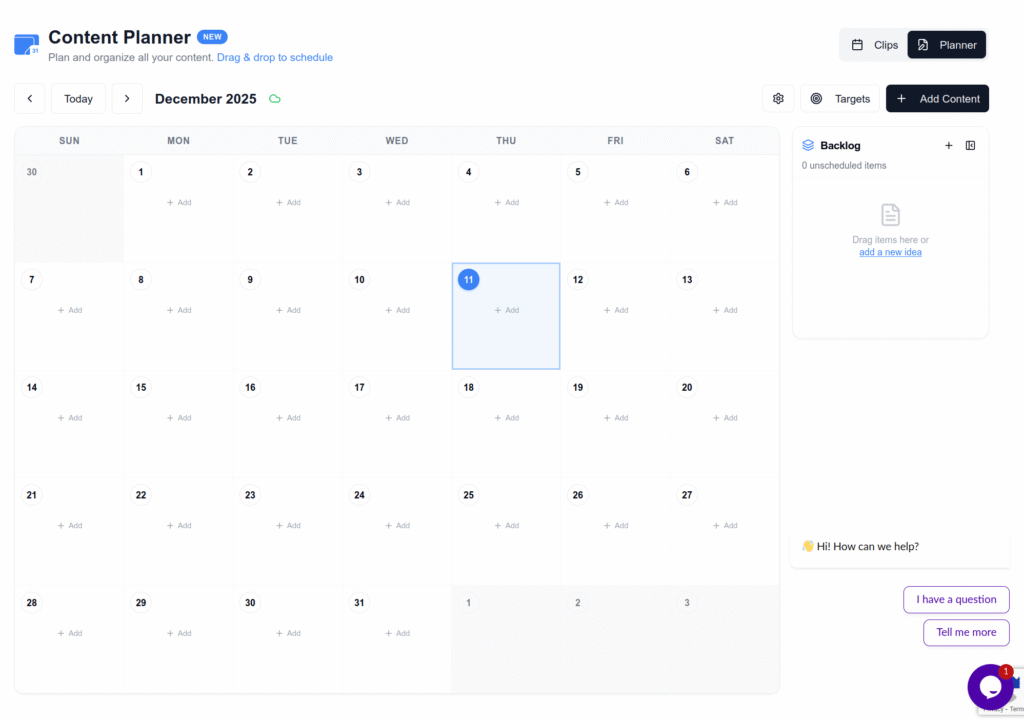
Notice how no platform receives more than its safe daily maximum, and clips are always spaced by 2+ hours. This schedule can be fully automated using Repostit’s content calendar – you upload the VODs, review the AI-generated clips, and the system handles the rest.
Signs You Have Been Shadowbanned (And How to Recover)
If you have already exceeded the limits above, here is how to diagnose and recover from each platform:
| Platform | Shadowban Symptoms | Recovery Steps | Recovery Time |
|---|---|---|---|
| TikTok | Views drop to 0–200 per video. Videos do not appear in hashtag searches. “For You” distribution stops entirely. | Stop all automated posting for 7 days. Post 1 organic video manually. Wait for views to normalize before resuming API uploads. | 7–30 days |
| Reels only shown to existing followers. Explore reach drops to zero. “Action Blocked” popups appear. | Stop all API activity for 48 hours. Remove any third-party apps with suspicious permissions. Post 1 manual Reel. Gradually resume. | 2–14 days | |
| YouTube | Shorts get views but are not on the Shorts Shelf. “Limited or no ads” label appears. Content flagged as “repetitive.” | Ensure each Short has unique captions, titles, and visual modifications. File an appeal if “reused content” flag appears. Space uploads further apart. | Per-video (indefinite). Channel recovery: 2–4 weeks of compliant behavior. |
| Reel engagement drops. Page quality score decreases in Meta Business Suite. | Reduce posting frequency to 1 Reel per day. Ensure content differs from Instagram posts. Monitor Page quality score. | 24–72 hours |
Common Mistakes That Trigger API Limits in Twitch to TikTok Detailed API Posting
| Mistake | Why It Is Dangerous | Solution |
|---|---|---|
| Posting all clips immediately after stream | Triggers velocity limits on every platform simultaneously | Use a scheduling tool to space clips over 3–4 days across all platforms. |
| Using unofficial automation tools | Browser automation and cookie injection are detected by anti-bot systems and result in permanent bans | Only use tools that connect via official OAuth APIs (like Repostit) for secure Twitch to TikTok Detailed API Posting. |
| Identical content on Instagram + Facebook | Meta’s shared infrastructure detects duplicates across both platforms and suppresses reach on one or both | Use different captions, hashtags, and if possible, slightly different clip lengths on each platform. |
| Uploading raw horizontal clips | YouTube flags unedited 16:9 content as “reused content” – Instagram and TikTok algorithms deprioritize it | Always reframe to 9:16 vertical with captions and visual modifications. |
| Not monitoring quota usage | YouTube’s 10,000 quota units get exhausted by analytics calls + uploads, causing uploads to silently fail | Reserve at least 8,000 units exclusively for uploads. Minimize other API calls. |
| Automating likes/follows alongside posts | Instagram evaluates total account activity – combining automated posts with automated engagement triggers Action Blocks | Only automate content publishing. Never automate engagement actions (likes, follows, comments). |
| Ignoring new account restrictions | New TikTok and Instagram accounts have stricter undocumented limits – posting at “established account” rates gets them flagged immediately | Start with 1 post/day for the first 2–4 weeks. Ramp up gradually. |
| Not refreshing OAuth tokens | Expired tokens cause silent upload failures – clips appear “posted” in the tool but never actually publish | Use tools that handle automatic token refresh. Re-authenticate manually if you notice failed uploads. |
Step-by-Step Summary: Safe Twitch to TikTok Detailed API Posting Workflow
- Stream on Twitch with VOD-safe audio tracks enabled in OBS (Track 1 for live, Track 6 for VOD without copyrighted music).
- Download or process your VOD within 24 hours – standard VODs expire after 14 days.
- Generate clips using Repostit’s AI Video-to-Short or manual editing. Aim for 10–15 clips per stream.
- Do NOT upload all clips immediately. This is the most common mistake that triggers shadowbans.
- Schedule across 3–4 days using Repostit’s content calendar:
- TikTok: 3 clips/day, spaced 2–4 hours apart.
- YouTube Shorts: 5 clips/day, spaced 1–2 hours apart.
- Instagram Reels: 2 clips/day, spaced 3–4 hours apart.
- Facebook Reels: 3 clips/day, spaced 2–3 hours apart.
- Customize captions per platform – different hashtags, different titles, different descriptions. Never copy-paste identical text.
- Stagger cross-platform posts – if the same clip goes to TikTok and Instagram, post them 6–12 hours apart.
- Monitor analytics independently on each platform. Watch for sudden view drops (shadowban indicator).
- If you detect a shadowban: Stop all automated activity immediately. Wait 7 days (TikTok) or 48 hours (Instagram). Post 1 manual video. Resume automation gradually.
- For new accounts: Start with 1 post/day per platform for the first 2–4 weeks. Ramp up to safe maximums only after establishing account trust.
Frequently Asked Questions About Twitch to TikTok Detailed API Posting
Related Resources and Guides
Continue exploring API limits and safe automation strategies for every platform:
Platform-Specific API Limit Guides
- API Posting Limits: YouTube, Instagram, Facebook & TikTok – The master reference for all platform API limits in one place.
- TikTok API Daily Limit – Deep dive into TikTok’s Content Posting API restrictions and safe posting strategies.
- YouTube API Daily Limit – Complete breakdown of YouTube’s quota point system and how to maximize uploads per day.
- Instagram Graph API Day Limit – Understanding Instagram’s strict rate limits and anti-spam systems.
- Twitch API Guide – Technical reference for the Twitch Helix API, OAuth flows, and clip retrieval.
Content Strategy Guides
- Convert Long Videos into Short Clips – How Repostit’s AI Video-to-Short feature works for Twitch VODs, YouTube videos, and podcasts.
- How to Create an Effective Content Calendar – Plan your posting schedule to stay within all API limits while maintaining consistency.
- How to Repurpose Content Automatically – The complete guide to turning one piece of content into dozens of safe, scheduled posts.
- How to Auto Post TikTok to Instagram – Automate cross-platform distribution while respecting Meta’s duplicate content detection.
Official Platform Documentation
- TikTok Content Posting API Reference – TikTok’s official API documentation for video uploads.
- YouTube Data API v3 – Quota Usage – Google’s official documentation on quota costs and limits.
- Instagram Graph API – Content Publishing – Meta’s official rate limit documentation for Instagram.
- Twitch Helix API – Rate Limits – Twitch’s official rate limit documentation for clip and VOD retrieval.
- Facebook Video API – Reels Publishing – Meta’s official documentation for Facebook Reels via API.
Start Your Twitch to TikTok Detailed API Posting Today
The difference between a Twitch streamer who grows and one who gets shadowbanned is not the quality of their clips – it is how they distribute them. Every platform has hard API ceilings and hidden velocity triggers that punish Twitch to TikTok Detailed API Posting creators who post too much, too fast. Now you know exactly what those limits are for TikTok, YouTube, Instagram, Facebook, and even the Twitch source API.
The safest path is simple: generate your clips, schedule them across 3–4 days, space them 2–4 hours apart, customize captions per platform, and use official API connections only. You can do this manually with spreadsheets and alarms – or you can let Repostit handle the entire Twitch to TikTok Detailed API Posting pipeline automatically, from Twitch VOD extraction to safe, staggered multi-platform distribution.
Your content deserves to be seen by as many people as possible. Do not let a preventable API violation silence it. Start with Repostit’s free trial and turn every Twitch stream into a week of safe, sustained growth across every short-form platform.