 Gianni Cassoni
Instagram Graph API Day Limit: Complete Guide to Meta Posting Restrictions in 2025
Understanding the Instagram Graph API Day Limit is essential for developers, marketers, and content creators who rely on automated posting to manage their social media presence. Whether you’re building a scheduling app, managing multiple client accounts, or automating your content distribution, knowing exactly how many posts you can publish before hitting restrictions will save you from unexpected failures and frustrated users.
In this comprehensive guide, we’ll break down everything you need to know about the Instagram Graph API Day Limit, including the technical specifications from Meta’s official documentation, rate limiting calculations, best practices for staying within bounds, and strategies for maximizing your posting efficiency. We’ll also cover Facebook Pages limits since both platforms operate under Meta’s unified Graph API infrastructure.
Instagram Graph API Day Limit Quick Reference
What Is the Instagram Graph API Day Limit?
The Instagram Graph API Day Limit refers to the maximum number of content pieces you can publish programmatically to an Instagram Business or Creator account within a 24-hour period. This limit applies specifically to API-published content and is enforced by Meta to prevent spam, maintain platform quality, and ensure fair resource allocation across all developers using the API.
These limits apply to Instagram Graph API version v24.0. All official information about the API can be found in the Meta Developers Documentation. Understanding these constraints is crucial for anyone building applications that interact with Instagram’s publishing endpoints.
The Instagram Graph API Day Limit operates on a rolling 24-hour window, not a calendar day reset. This means the limit continuously updates based on when posts were published in the previous 24 hours.
Understanding Meta’s Rate Limiting System
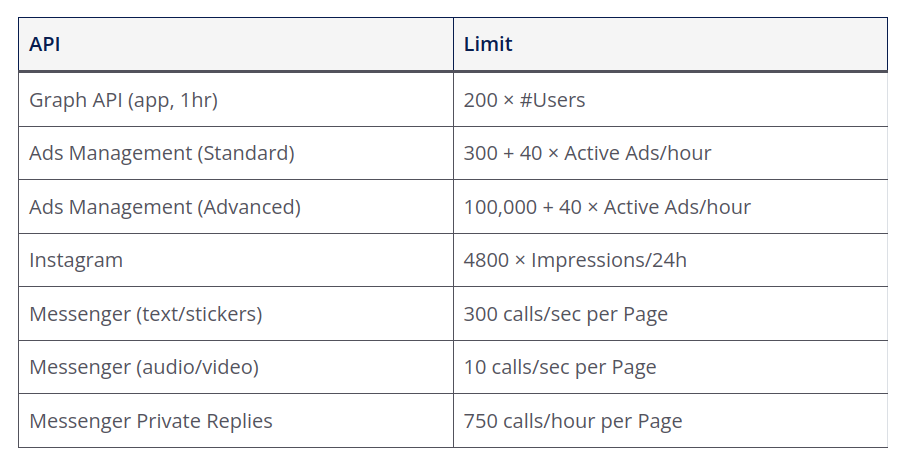
Before diving into the specific Instagram Graph API Day Limit, it’s important to understand how Meta’s broader rate limiting system works. Graph API requests made with an application access token are counted against that app’s rate limit.
An app’s call count is the number of calls it can make during a rolling one-hour window and is calculated using this formula:
Calls within one hour = 200 × Number of Users
The “Number of Users” is based on the number of unique daily active users your app has. In cases where there are slow periods of daily usage—such as if your app has high activity on weekends but low activity over weekdays—the weekly and monthly active users are used to calculate the number of users for your app.
This means apps with high daily engagement will have higher rate limits than apps with low daily engagement, regardless of the actual number of app installs. This dynamic scaling helps ensure that popular, actively-used applications have the resources they need while preventing abuse from dormant or suspicious applications.
Instagram Reels and Content Publishing Limits
The official Instagram Graph API Day Limit for content publishing is clearly defined in Meta’s documentation:
Instagram Content Publishing Limit
100 API-published posts per 24 hours per Instagram Business or Creator account. This includes Reels, Feed Posts, and Stories combined. Carousels count as a single post.
If you exceed this Instagram Graph API Day Limit, Instagram will reject the upload until the 24-hour rolling window resets. This limit is notably more generous than YouTube’s daily upload restrictions, giving developers and marketers more flexibility for high-volume content strategies.
Official Documentation Statement
According to Meta’s official rate limiting documentation regarding the Instagram Graph API Day Limit:
“Instagram accounts are limited to 100 API-published posts within a 24-hour moving period. Carousels count as a single post. This limit is enforced on the POST /<IG_ID>/media_publish endpoint when attempting to publish a media container. We recommend that your app also enforce the publishing rate limit, especially if your app allows app users to schedule posts to be published in the future.”
To check an Instagram professional account’s current rate limit usage, query the GET /<IG_ID>/content_publishing_limit endpoint.
Real-World Observations vs. Official Limits
While the official Instagram Graph API Day Limit states 100 posts per 24 hours, some developers and users report encountering restrictions at lower numbers—around 50 or even 25 posts in certain cases. This discrepancy may be due to:
- Account age and trust level: Newer accounts may face stricter limits as Instagram’s anti-spam systems evaluate their legitimacy.
- Account history: Accounts with previous violations or suspicious activity may have reduced limits.
- Content type: Certain content categories may trigger additional scrutiny.
- Engagement patterns: Accounts with unusually low engagement relative to posting frequency may be flagged.
It is recommended to limit posting to 1-3 high-quality posts per user per day to increase the algorithmic authority of each post. This is especially important for newer accounts that need to first warm up their profile, as strong filters are in place to prevent content spam by bots.
API Content Limitations
Beyond the Instagram Graph API Day Limit on post quantity, there are also content type restrictions when publishing via the API. The following features are not supported through API publishing:
Facebook Pages Publishing Limits
Since Facebook and Instagram both operate under Meta’s Graph API, understanding Facebook’s limits is equally important when working with the Instagram Graph API Day Limit. Here are the key restrictions for Facebook Pages:
Facebook Pages Publishing Limit
- 25 posts per Page per 24 hours — the official API limit
- Includes videos, photos, links, and text posts
- Hitting this limit is rare for most creators but possible for agencies managing multiple clients
The Facebook API enforces rate limiting using the same calculation method described earlier. Over a 24-hour period, the estimated number of API calls is approximately 4,800 × Number of Users. This provides substantial headroom for most applications, though high-volume posting operations should implement proper rate limit monitoring.
The API documentation does not appear to publish a universal “number of video uploads per day” quota that is clearly defined (at least publicly). This makes monitoring your actual usage via the rate limit endpoints essential.
Authentication and Access Tokens
To use the Instagram Content Publishing API, you need to authenticate via Facebook Login, as Instagram Professional accounts are connected to Facebook Pages. Here is the process:
- Create a Meta Developer App: Go to the Meta for Developers portal, create an app, and select “Business” as the app type.
- Add Products: Add “Instagram Graph API” and “Facebook Login for Business” to your app.
- Permissions: You will need to request the following permissions during the login flow:
instagram_business_basicorinstagram_basicinstagram_business_content_publishorinstagram_content_publishpages_read_engagementads_management(if app user has a role on the Page via Business Manager)
- Get Access Token: Use the Facebook Login flow to obtain a User Access Token. Alternatively, for server-side operations, you exchange this for a long-lived page access token.
Managing User Access Tokens
The tokens returned by the standard OAuth flow are “short-lived” (valid for approx. 1 hour). For automated publishing, you should exchange this short-lived token for a long-lived access token (valid for 60 days). This allows your backend to publish content without requiring the user to re-login constantly. The long-lived token can be refreshed simply by making an API call before it expires.
Instagram Content Publishing API Structure
Unlike some other platforms where you upload and publish in one go, Instagram uses a two-step process (or container-based architecture):
- Create a Media Container: You send your media (image URL or video URL) and caption to the API. The API downloads the media and prepares it, returning a Container ID. Note that detailed HTML URL encoding may be needed for some parameters.
- Publish the Container: Once the container status is
FINISHED, you make a second call to publish that Container ID, which makes the post live on Instagram.
Request Fields (Create Container)
Publish Endpoint Fields
Below is a Python example showing how to publish a single photo:
import requests
import json
import time

# === CONFIG ===
ACCESS_TOKEN = "YOUR_ACCESS_TOKEN"
IG_USER_ID = "YOUR_INSTAGRAM_USER_ID"
IMAGE_URL = "https://your-public-server.com/image.jpg"
CAPTION = "Check out this photo! #instagramapi"

# === STEP 1: Create Media Container ===
print("Creating container...")
create_url = f"https://graph.facebook.com/v19.0/{IG_USER_ID}/media"
create_params = {
    "image_url": IMAGE_URL,
    "caption": CAPTION,
    "access_token": ACCESS_TOKEN
}

response = requests.post(create_url, json=create_params)
data = response.json()

if "id" in data:
    container_id = data["id"]
    print(f"Container Created: {container_id}")

    # Wait briefly for container to be ready (mostly for videos, but good practice)
    time.sleep(5)

    # === STEP 2: Publish Container ===
    print("Publishing container...")
    publish_url = f"https://graph.facebook.com/v19.0/{IG_USER_ID}/media_publish"
    publish_params = {
        "creation_id": container_id,
        "access_token": ACCESS_TOKEN
    }

    publish_response = requests.post(publish_url, json=publish_params)
    print("Publish Response:", json.dumps(publish_response.json(), indent=2))
else:
print("Error creating container:", data)How to Monitor Your Instagram Graph API Day Limit Usage
Proactively monitoring your Instagram Graph API Day Limit usage is crucial for maintaining uninterrupted service. Meta provides a dedicated endpoint for checking your current publishing capacity:
GET /<IG_ID>/content_publishing_limit
This endpoint returns information about how many posts you’ve published within the current 24-hour window and how much capacity remains. Implementing regular checks of this endpoint in your application allows you to:
- Prevent failed publish attempts before they occur
- Queue posts intelligently when approaching limits
- Notify users when their accounts are near capacity
- Optimize posting schedules across multiple accounts
Best Practices for Working Within the Instagram Graph API Day Limit
To maximize your efficiency while respecting the Instagram Graph API Day Limit, follow these recommended practices:
Spread Posts Throughout the Day
Rather than batch-publishing all content at once, distribute posts across different times to maximize reach and avoid triggering spam filters.
Prioritize Quality Over Quantity
Stick to 1-3 high-quality Reels daily. Posting too often may actually reduce engagement as algorithms deprioritize accounts that appear spammy.
Implement Rate Limit Checks
Query the content_publishing_limit endpoint before each publish operation to ensure you have available capacity.
Warm Up New Accounts
Start with lower posting frequencies for new accounts and gradually increase over weeks to build algorithmic trust.
Comparison: Instagram Graph API Day Limit vs. Other Platforms
Understanding how the Instagram Graph API Day Limit compares to other platforms helps you plan cross-platform content strategies effectively:
Frequently Asked Questions
❓ Common Questions About Instagram Graph API Day Limit
What is the Instagram Graph API Day Limit? +
The Instagram Graph API Day Limit is 100 API-published posts per 24-hour rolling period per Instagram Business or Creator account. This includes Reels, Feed Posts, and Stories combined. Carousels count as a single post.
How do I check my current rate limit usage? +
You can check your current Instagram Graph API Day Limit usage by querying the GET /<IG_ID>/content_publishing_limit endpoint. This returns information about how many posts you’ve published within the current 24-hour window.
What happens if I exceed the limit? +
If you exceed the Instagram Graph API Day Limit of 100 posts, Instagram will reject any additional upload attempts until the 24-hour rolling window resets. Your application should handle this gracefully by queuing posts for later publication.
Does a carousel count as multiple posts? +
No, carousel posts count as a single post toward your Instagram Graph API Day Limit, regardless of how many images or videos are included in the carousel. This makes carousels an efficient way to share more content within the limit.
Why am I hitting limits before reaching 100 posts? +
Newer accounts or those with previous violations may face stricter limits below the standard Instagram Graph API Day Limit. Instagram’s anti-spam systems apply additional scrutiny to accounts that haven’t established trust. Start with lower posting frequencies and gradually increase over time.
Automate Within Limits Using Repostit
Working within the Instagram Graph API Day Limit doesn’t mean sacrificing efficiency. Tools like Repostit are designed to help creators and marketers automate their content distribution while respecting platform limits and maximizing engagement.
Repostit intelligently schedules your posts throughout the day, monitors rate limits automatically, and ensures your content is distributed at optimal times without risking API rejections. Whether you’re cross-posting between TikTok, Instagram, YouTube, and Facebook, or repurposing long-form content into shorts, Repostit handles the complexity so you can focus on creating.
Automate Your Instagram Posting Safely
Let Repostit manage your content distribution within the Instagram Graph API Day Limit while maximizing your reach across all platforms.
✓ API limit monitoring ✓ Smart scheduling ✓ Cross-platform automation
Conclusion
The Instagram Graph API Day Limit of 100 posts per 24 hours provides ample room for most content creators and applications, but understanding how it works—and implementing proper monitoring—is essential for building reliable automated posting systems. By following best practices, checking your rate limit usage regularly, and using intelligent scheduling tools, you can maximize your Instagram presence while staying safely within Meta’s guidelines.
Remember: quality consistently outperforms quantity on Instagram. Even if the Instagram Graph API Day Limit allows 100 posts, focusing on 1-3 high-quality pieces of content daily will typically yield better engagement, algorithmic favor, and audience growth than flooding your feed with automated posts.