 sara bellin
How to Remove the TikTok Watermark Automatically in 2025
If you’re a content creator looking to expand your reach across multiple platforms, learning how to Remove the TikTok Watermark is one of the most important skills you can develop. That bouncing logo might seem like a minor annoyance, but it can significantly impact how your content performs when shared on other platforms like Instagram Reels, YouTube Shorts, and Facebook Reels.
This comprehensive guide covers everything you need to know about how to Remove the TikTok Watermark effectively in 2025. Whether you’re looking for quick manual solutions or want to set up fully automated workflows, you’ll find the right approach for your content strategy here.
By the end of this guide, you’ll understand exactly why watermark removal matters for your growth, the different methods available to Remove the TikTok Watermark, and how to choose the best approach based on your posting frequency and goals.
Why You Should Remove the TikTok Watermark
If you’ve ever tried reposting your TikTok videos to Instagram Reels, YouTube Shorts, or Facebook Reels, you’ve probably noticed the TikTok watermark bouncing around the video. While it might seem harmless, this small logo creates several significant problems for creators who want to maximize their content’s performance across platforms.
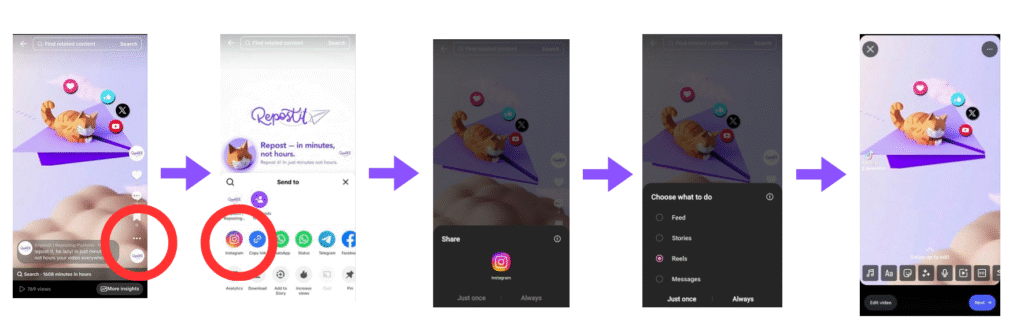
Understanding why you should Remove the TikTok Watermark helps you appreciate the importance of implementing a proper solution. Here are the main reasons watermarks hurt your content:
Lower Engagement and Reduced Reach
Other platforms may actively reduce reach for videos that display competitor logos. While platforms don’t officially confirm algorithmic penalties for watermarked content, numerous creator studies and experiments suggest that content without watermarks consistently outperforms watermarked versions. When you Remove the TikTok Watermark, you give your content the best possible chance of reaching new audiences.
The algorithmic impact makes logical sense from the platform’s perspective. Instagram, YouTube, and Facebook want users to stay on their platforms and perceive them as sources of original content. Videos that obviously came from a competitor platform work against that goal, so the algorithm may naturally deprioritize them.
Unprofessional Appearance
Brands and audiences often perceive watermarked content as recycled or low-effort material. When viewers see a TikTok watermark on Instagram or YouTube, they immediately know you’re repurposing content rather than creating platform-native material. This perception can reduce trust and engagement, especially for creators building professional brands.
First impressions matter enormously in the fast-scrolling world of short-form video. When you Remove the TikTok Watermark, your content appears more polished and intentional, signaling to viewers that you care about quality and presentation.
Visual Distraction
The watermark can cover text overlays, important visual elements, or key parts of your video. TikTok’s watermark moves around the screen throughout the video, which means it can obscure different elements at different times. This visual interference can make your content harder to follow and less engaging for viewers.
For content that includes on-screen text, tutorials, or detailed visuals, the watermark creates genuine usability problems. Viewers may miss important information because the bouncing logo covered it at a critical moment. When you Remove the TikTok Watermark, you ensure your audience can fully experience your content as intended.
In short, removing the watermark helps your content perform better everywhere. The effort invested in learning to Remove the TikTok Watermark pays dividends across every piece of content you distribute.
Why Automatic Removal Is Better Than Manual Methods
You could use manual methods to Remove the TikTok Watermark, and for occasional users, these approaches might seem adequate. However, understanding the limitations of manual methods helps you appreciate why automation provides superior results for serious creators.
Common manual approaches include:
- Cropping the video to cut out the watermark area, which loses important content and changes the aspect ratio
- Blurring the watermark area, which looks messy and draws even more attention to the fact that you’re hiding something
- Downloading from TikTok and manually re-editing in video software, which is extremely time-consuming
- Using online tools one video at a time, which adds friction and breaks your workflow
- Screen recording without the watermark visible, which significantly degrades video quality
Manual editing takes considerable time, often reduces quality through additional compression or cropping, and becomes frustrating when you post frequently. If you’re publishing content daily or multiple times per day, spending 10 to 15 minutes per video on watermark removal adds up to hours of wasted time every week.
That’s why automatic watermark removal is the best option for creators who are serious about growth. When you can Remove the TikTok Watermark automatically, you eliminate repetitive manual work while ensuring consistent, high-quality results across all your content.
Automation also removes human error from the equation. You’ll never forget to remove the watermark before posting, never accidentally crop too much, and never upload a lower-quality version because you were rushing through the manual process.
How to Remove the TikTok Watermark Automatically
The easiest and most effective way to Remove the TikTok Watermark automatically is with Repostit. This platform handles the entire process seamlessly, from downloading your content without the watermark to distributing it across all your connected platforms.
Here’s how to set up automatic watermark removal:
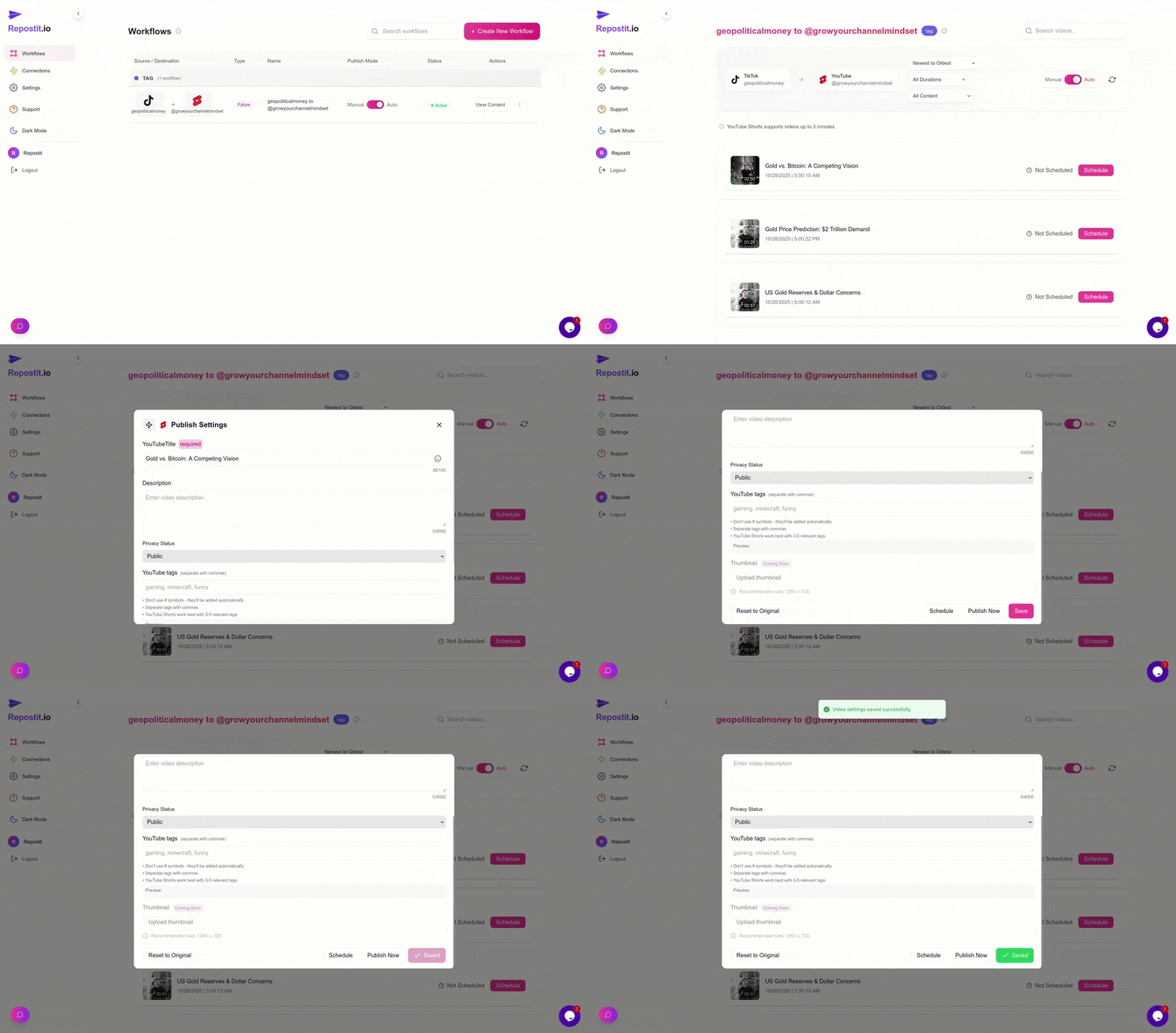
Step 1: Connect TikTok as Your Source
Create your Repostit account and connect your TikTok profile as a Source. This connection allows Repostit to access your published content and download it in the highest available quality without the TikTok watermark. The connection process is secure and uses authorized methods to access your content.
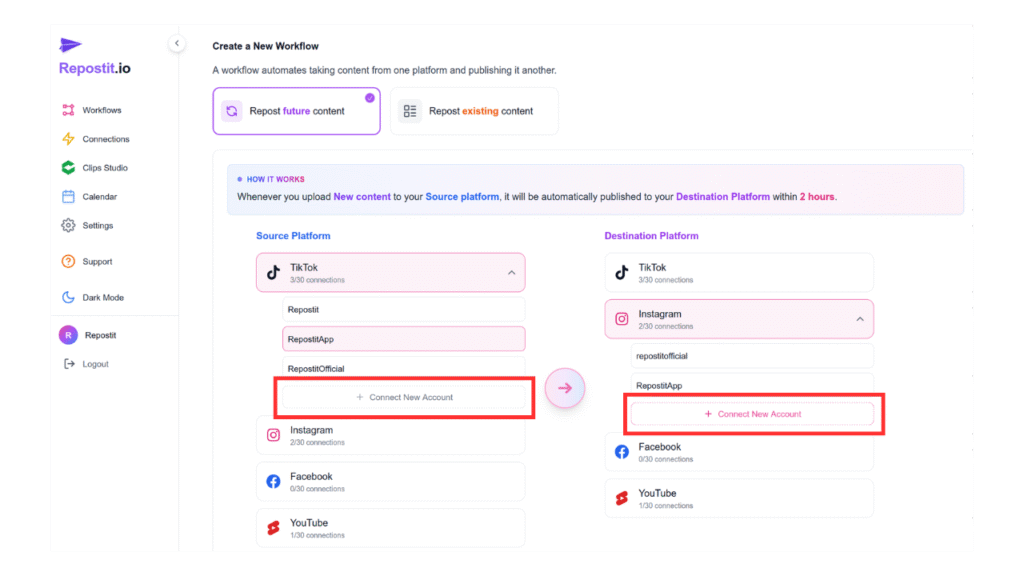
Step 2: Connect Your Destination Platforms
Connect your destination platforms where you want your watermark-free content to appear. Options include Instagram Reels, YouTube Shorts, Facebook Reels, and other supported platforms. Each destination receives your content formatted appropriately for its specific requirements.
Step 3: Choose Your Workflow Type
Select the workflow that matches your needs to Remove the TikTok Watermark automatically:
Existing Content Workflow: Perfect for reposting older videos that have already been published to TikTok. This option lets you select specific videos from your library and distribute them to new platforms without watermarks.
Future Content Workflow: Ideal for ongoing automation. Every time you post new content to TikTok, Repostit automatically detects it, downloads it without the watermark, and reposts it to all your connected destinations.
Step 4: Let Automation Handle Everything
Once your workflow is configured, the system handles everything automatically whenever you post to TikTok:
- Downloads the video in highest quality directly from TikTok’s servers
- Completely removes the TikTok watermark without any cropping or quality loss
- Formats the content appropriately for each destination platform
- Reposts to all your connected destinations within 2 hours, ready to go
- Applies any caption templates or hashtag strategies you’ve configured
The benefits of this automated approach to Remove the TikTok Watermark are significant:
- No cropping required, preserving your full video frame
- No quality loss from additional processing or compression
- No extra work beyond your normal TikTok posting routine
- Consistent results across every video you publish
- Time savings that compound over every piece of content
Manual Alternatives for Occasional Users
If you only repost TikTok videos occasionally and don’t mind the extra steps involved, you can try free online watermark removal tools to Remove the TikTok Watermark on a per-video basis. These tools work well for infrequent use cases where automation might feel like overkill.
Popular manual options include:
- SnapTik: Paste your TikTok link and download the video without a watermark. Simple interface with no account required.
- SSSTikTok: Another simple, no-login watermark remover that processes videos quickly.
These tools are fine for occasional use, but they come with important limitations to consider:
- You’ll have to manually process every single video, which becomes tedious with frequent posting
- Some tools compress your video quality during the download process
- The process is significantly slower and not practical for daily content creation
- You still need to manually upload to each destination platform after downloading
- There’s no scheduling capability, so you must be available to post at optimal times
- Free tools may have daily limits or show ads that slow down your workflow
If you post frequently and are serious about growing across platforms, automatic removal with Repostit is far faster, keeps full HD quality, and publishes to multiple platforms without you lifting a finger. The time investment in setting up automation pays for itself within the first week of use for most active creators.
Why Watermark Removal Matters for Growth
Understanding the growth implications of clean content helps you appreciate why taking time to Remove the TikTok Watermark is worth the effort. Algorithms on Instagram, YouTube, and Facebook prefer native-looking content that appears to be created specifically for their platform.
When you Remove the TikTok Watermark from your content, several positive effects occur:
Avoid Hidden Algorithmic Penalties
While platforms don’t publicly confirm that they downrank watermarked content, extensive testing by creators consistently shows that watermark-free videos receive more impressions and higher engagement rates. By removing the watermark, you eliminate any potential algorithmic disadvantage and give your content a fair chance to compete.
Appear as a Native Creator
When you Remove the TikTok Watermark, you look like you created content specifically for that platform. This perception matters for building authority and trust with new audiences. Viewers are more likely to follow creators who appear invested in the platform they’re using, rather than creators who obviously cross-post everything.
Improve Watch Time and Retention
Viewers are more likely to watch videos to the end without visual distractions. The bouncing watermark can subconsciously signal to viewers that they’re watching repurposed content, which may reduce their engagement. Clean videos feel more polished and intentional, encouraging longer watch times that further boost algorithmic performance.
Build a Cohesive Brand Presence
Consistent, professional-looking content across all platforms strengthens your brand identity. When you Remove the TikTok Watermark from all your cross-posted content, your entire multi-platform presence feels intentional and well-managed. This cohesion helps with brand recognition and audience loyalty.
Pro Tip: Combine Watermark Removal with Optimal Posting Times
For maximum reach and engagement, removing the watermark is just one piece of the puzzle. Combining clean content with strategic timing creates a powerful growth formula that maximizes every video’s potential.
Here’s the optimal approach to Remove the TikTok Watermark while maximizing performance:
- Remove the watermark for a clean, native look that avoids algorithmic penalties
- Schedule posts for peak engagement times when your audience is most active (see our Best Times to Post Guide for platform-specific recommendations)
- Automate everything so your videos are always fresh, platform-friendly, and perfectly timed without manual intervention
- Use platform-specific captions and hashtags to maximize discoverability on each destination
- Monitor performance across platforms to identify where your content resonates most strongly
When you automate the process to Remove the TikTok Watermark, you free up time and mental energy to focus on these higher-level strategic considerations. Instead of spending time on repetitive technical tasks, you can analyze performance, engage with your audience, and create better content.
Getting Started with Automatic Watermark Removal
Ready to Remove the TikTok Watermark automatically from all your content? Getting started with Repostit takes just a few minutes and immediately transforms your cross-posting workflow.
The free tier includes:
- Connect 2 platforms to establish your source and destination
- Automate 1 workflow for hands-free watermark removal and distribution
- Post up to once per day to experience the time savings
- Full 14-day trial with all premium features
Start removing watermarks automatically with Repostit
Frequently Asked Questions
Does removing the watermark affect video quality?
When you Remove the TikTok Watermark using Repostit, there’s no quality loss. The system downloads your video at the highest available resolution directly from TikTok’s servers, bypassing the watermark entirely rather than trying to edit it out. This approach preserves full quality unlike manual methods that may involve additional compression.
Is it legal to Remove the TikTok Watermark from my own videos?
Yes. You own the rights to content you create, and removing the platform watermark from your own original content is perfectly acceptable. You’re simply reformatting your own creative work for distribution on other platforms where you also have accounts.
Will platforms penalize me for posting content without watermarks?
No. Platforms prefer native-looking content. Posting without competitor watermarks actually helps your content perform better. When you Remove the TikTok Watermark, you’re giving your videos the best chance at algorithmic success on destination platforms.
How quickly does automatic watermark removal work?
When you set up Future Content Workflows to Remove the TikTok Watermark automatically, your content typically appears on destination platforms within 2 hours of your original TikTok post. This timing ensures content stays fresh while allowing for processing and quality optimization.
Can I remove watermarks from videos I’ve already posted?
Yes. The Existing Content Workflow allows you to Remove the TikTok Watermark from older videos in your library. This is perfect for repurposing your best-performing content or building out your presence on new platforms with your existing video catalog.
What if I only need to remove watermarks occasionally?
For occasional use, free tools like SnapTik or SSSTikTok work adequately to Remove the TikTok Watermark on individual videos. However, if you post more than a few times per week, the time savings from automation quickly make Repostit worthwhile.
Summary
Learning to Remove the TikTok Watermark effectively is essential for creators who want to maximize their content’s reach across multiple platforms. Here’s what you need to remember:
- TikTok watermarks can hurt reach on other platforms due to algorithmic preferences and viewer perception
- Manual removal methods work but are slow, often reduce quality, and become tedious with frequent posting
- Automatic removal via Repostit delivers fast, watermark-free, high-quality reposts without any manual effort
- Use manual tools only for rare, occasional posts where automation feels unnecessary
- Automate your workflow if you’re serious about growing across platforms efficiently
- Combine watermark removal with optimal posting times for maximum impact
When you Remove the TikTok Watermark automatically, you save hours every week while ensuring your content looks professional and performs optimally across every platform in your distribution strategy.
Related Resources
Continue learning about cross-platform content distribution with these helpful guides:
- How to Share TikTok Videos on YouTube Shorts, Instagram Reels and Facebook Reels Automatically Complete guide to automated cross-posting workflows.
- Best Times to Post on TikTok, Instagram and YouTube in 2025 Optimize your posting schedule for maximum engagement.
- Cross-Posting Strategies for Content Creators Advanced techniques for multi-platform growth.
Official Platform Guidelines
- TikTok Creator Portal Official TikTok resources for content creators.
- Instagram for Creators Instagram’s official creator resources and best practices.
- YouTube Creators Official YouTube creator resources and tools.