 Gianni Cassoni
How to Repost TikTok to Instagram Without Watermark Automatically
How to automatically repost TikTok to Instagram without watermark? Tired of manually re-uploading your TikToks to Instagram Reels? Want to save time and grow faster without messy watermarks or clunky apps? You’re not alone. In this comprehensive guide, we’ll show you exactly how to Repost TikTok to Instagram Without Watermark using Repostit, a free automation tool built specifically for creators and marketers who want to maximize their reach across platforms.
Learning how to Repost TikTok to Instagram Without Watermark is one of the most valuable skills for any content creator in 2025. The ability to automatically distribute your content across multiple platforms without the hassle of manual uploads or ugly watermarks can save you hours every week while dramatically increasing your overall reach and engagement.

Why Repost Your TikTok Videos on Instagram Reels
If you’re not cross-posting your content, you’re leaving views on the table. Understanding how to Repost TikTok to Instagram Without Watermark opens up enormous opportunities for growth that many creators overlook. Here’s why this strategy is so powerful:
- TikTok and Instagram reward consistency. Both platforms prioritize creators who post regularly, and cross-posting helps you maintain that consistency without creating twice the content.
- Each platform has unique audiences. Your TikTok followers may not follow you on Instagram, and vice versa. Cross-posting ensures your content reaches both audience segments.
- Reels often go viral with reused TikTok content. Many creators have seen their reposted TikToks perform even better on Instagram than on the original platform.
- You’re already doing the hard work of creating content. Why not multiply your reach by distributing it across multiple platforms?
- Different algorithms mean different opportunities. Content that didn’t perform well on TikTok might find its audience on Instagram Reels.
But reposting manually is a pain. It takes time, it gets repetitive, and if you post the same video with the TikTok watermark, Instagram’s algorithm may suppress your reach. That’s why knowing how to Repost TikTok to Instagram Without Watermark automatically is such a game-changer for serious creators.
The Problem with Manual Reposting
Most creators who want to Repost TikTok to Instagram Without Watermark face significant challenges with the manual approach. Here’s what the typical workflow looks like:
- Download TikToks directly from the app, which includes an intrusive watermark
- Search for third-party watermark removal tools that may compromise video quality
- Manually re-upload to Instagram with adjusted captions and hashtags
- Repeat this process for every single video, multiple times per week
- Hope that Instagram doesn’t suppress reach due to detected watermarks
That’s not scalable. If you’re posting multiple times per week on TikTok, the manual approach to Repost TikTok to Instagram Without Watermark can consume hours of your valuable time. Time that could be spent creating new content, engaging with your audience, or growing other aspects of your business.
The TikTok watermark problem is particularly significant. Instagram’s algorithm has been known to reduce the reach of videos that contain visible TikTok branding. This means all your effort in creating great content gets undermined by a simple watermark. Learning to properly Repost TikTok to Instagram Without Watermark solves this problem completely.
The Solution: Automated Reposting with Repostit
Repostit automates your entire workflow to Repost TikTok to Instagram Without Watermark in three simple steps. Once configured, the system works automatically so you can focus on creating content rather than distributing it.
Step 1: Connect Your TikTok and Instagram Accounts
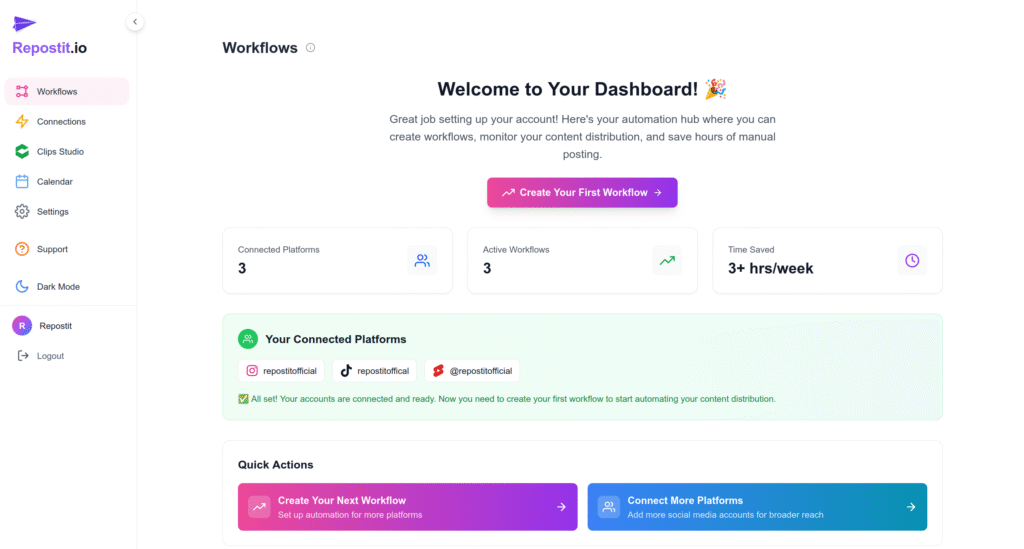
The first step to Repost TikTok to Instagram Without Watermark automatically is setting up connections on Repostit. This process links your accounts so the platform can access your content and post on your behalf.
The connection process is straightforward and secure. Repostit uses official platform APIs wherever possible to ensure your accounts remain safe. You’ll authorize the connection through each platform’s standard authentication process.

Step 2: Create a Future Workflow
The future workflow feature is what makes it possible to Repost TikTok to Instagram Without Watermark completely hands-free. Here’s how it works:
- Every time you upload a new TikTok video, the system detects it automatically
- Repostit downloads your video in the highest quality available without the watermark
- The clean video is automatically posted to your Instagram Reels within 2 hours
- Captions and hashtags can be customized or carried over from your original post
Just set it and forget it. The automation handles everything required to Repost TikTok to Instagram Without Watermark while you focus on creating your next piece of content.
Step 3: Grow While You Sleep
Once your workflow is configured, your content gets posted to both platforms automatically. This means you can Repost TikTok to Instagram Without Watermark 24/7 without lifting a finger. Your reach expands, your audience grows, and you reclaim hours of time previously spent on manual uploads.
The automation continues working even when you’re offline, on vacation, or focused on other projects. Every TikTok you post automatically appears on Instagram Reels, maintaining your presence across both platforms consistently.
Example Use Case
Let’s walk through a real example of how creators use Repostit to Repost TikTok to Instagram Without Watermark:
- You post a TikTok on Monday at 3 PM featuring your latest content
- You’ve previously set up a future workflow from TikTok to Instagram
- Repostit automatically detects your new TikTok and begins processing
- By 5 PM, the video is already published to Instagram as a native Reel
The result: no watermark, no copy-paste, no uploading twice. You’ve successfully managed to Repost TikTok to Instagram Without Watermark without any additional effort beyond your original TikTok upload.
This workflow scales beautifully. Whether you post once a week or multiple times per day, the automation handles every single video. Creators who post frequently save the most time, but even occasional posters benefit from the convenience and consistency.
Why Creators Love Using Repostit
Thousands of creators have discovered how to Repost TikTok to Instagram Without Watermark using Repostit. Here’s what makes the platform stand out:
- Saves hours every week that would otherwise be spent on manual uploads and watermark removal
- 100% automated workflow means truly hands-free operation once configured
- Supports multiple platforms including Instagram, TikTok, YouTube Shorts, Facebook, and more
- Zero watermark with full video quality preservation ensures your content looks professional
- Works with both existing content libraries and future uploads for maximum flexibility
- Integrated content calendar helps you visualize and plan your cross-platform strategy
- AI-powered long to short video conversion for repurposing YouTube content
The ability to Repost TikTok to Instagram Without Watermark is just one of many features that make Repostit valuable for content creators. The platform is designed to handle your entire cross-posting workflow, not just a single platform pair.
Expand Your Reach with Multiple Connections
On Repostit, you can have multiple types of connections beyond just TikTok to Instagram. For example, you can link your TikTok account to your YouTube channel to automatically share or repost your content across platforms, making it easier to manage and grow your audience in one place.
This multi-platform capability means you can Repost TikTok to Instagram Without Watermark while simultaneously distributing to YouTube Shorts, Facebook Reels, and other platforms. Your single TikTok upload can automatically appear across your entire social media presence.
Popular workflow combinations include:
- TikTok to Instagram Reels and YouTube Shorts simultaneously
- Instagram Reels to TikTok for creators who start on Instagram
- YouTube Shorts to TikTok and Instagram for YouTube-first creators
- Long-form YouTube to all short-form platforms using AI conversion
Getting Started for Free
You can start learning how to Repost TikTok to Instagram Without Watermark with Repostit completely free. The free tier includes everything you need to test the automation:
- Connect 2 platforms such as TikTok and Instagram
- Automate 1 Future Workflow for hands-free reposting
- Get up to 1 repost per day to experience the automation
- Full access to all features during the 14-day trial period
Upgrade anytime to unlock more workflows, additional daily reposts, watermark-free exports, and team features. But the free tier gives you everything needed to Repost TikTok to Instagram Without Watermark and experience the time savings firsthand.
Start Now in Less Than 2 Minutes
Ready to Repost TikTok to Instagram Without Watermark automatically? Getting started takes less than 2 minutes:
No credit card required. Just connect your TikTok and Instagram accounts, set up your workflow, and you’re ready to go. From that point forward, every TikTok you post will automatically appear on Instagram Reels without the watermark.
Frequently Asked Questions
How fast does Repostit sync my content?
Future workflows to Repost TikTok to Instagram Without Watermark typically complete within 2 hours of your original TikTok upload. Existing workflows let you schedule old content anytime with full control over posting times.
Will the repost include the TikTok watermark?
No. Repostit downloads the highest quality version of your video without the watermark. This is the core feature that makes it possible to Repost TikTok to Instagram Without Watermark effectively. Your Instagram audience will see clean, professional-looking content.
Can I repost to more than one platform?
Yes. You can connect TikTok, Instagram, YouTube Shorts, Facebook, and more. Set up multiple workflows to Repost TikTok to Instagram Without Watermark while simultaneously distributing to other platforms.
Do I need to install anything?
Nope. Repostit is 100% web-based. Just sign up and connect your accounts. There’s no app to download or software to install. Everything runs in the cloud, which means it works even when your computer is off.
Is this against Instagram’s terms of service?
Repostit uses authorized methods to post content on your behalf. You’re sharing your own original content across platforms you control, which is a standard and accepted practice. Always ensure you only Repost TikTok to Instagram Without Watermark for content you own or have rights to use.
What video quality can I expect?
Repostit captures your content at the highest available quality from TikTok. When you Repost TikTok to Instagram Without Watermark using the platform, your videos maintain their original resolution and clarity.
Summary
If you’re creating on TikTok, you should be reposting to Instagram Reels. But doing it manually is a drag that consumes valuable time and often results in watermarked content that gets suppressed by Instagram’s algorithm.
Repostit automates the entire process to Repost TikTok to Instagram Without Watermark. High quality, zero hassle, and completely hands-free once configured. Set it up once and grow everywhere.
Try Repostit free for 14 days and experience how automation can transform your content distribution workflow.
Related Resources
Learn more about cross-platform content distribution with these helpful guides:
- How to Repost Instagram Reels on TikTok Automatically Discover reverse workflow automation for Instagram-first creators.
- Repost TikTok on Instagram Reels Comprehensive cross-posting guide with advanced strategies.
- Connect TikTok to YouTube Expand your reach to YouTube Shorts automatically.
Official Platform Guidelines
- Instagram Community Guidelines Official Instagram documentation for content policies.
- TikTok Community Guidelines TikTok’s official community guidelines for creators.
Coming Soon
Next up on the blog: How to Repurpose Your YouTube Shorts for TikTok and Instagram in One Click. We’ll publish a complete walkthrough on how to repurpose YouTube Shorts for TikTok and Instagram Reels automatically, including best practices for aspect ratios, captions, and tag strategies to maximize cross-platform virality. Stay tuned for detailed templates and workflow examples.