 Gianni Cassoni
Simple Steps to Repost from TikTok to Instagram
Looking to Repost TikTok to Instagram Reels? If you’re a content creator looking to maximize your reach across social media platforms, repurposing your TikTok videos for Instagram Reels is a smart strategy. Both platforms offer short-form video content, making them perfect companions for cross-posting. In this comprehensive guide, we’ll walk you through multiple methods to seamlessly Repost TikTok to Instagram Reels and grow your audience on both platforms.
Why Repost TikTok to Instagram Reels?
Before diving into the how-to, let’s understand why learning to Repost TikTok to Instagram Reels matters. TikTok and Instagram have different user demographics, meaning you can reach entirely new audiences by sharing your content on both platforms. Additionally, repurposing content saves time and effort while maintaining a consistent posting schedule across your social media presence. Many successful creators use this technique to grow their following exponentially without creating double the content.
Another big advantage of learning how to Repost TikTok to Instagram Reels is that it helps you schedule your content more effectively, which strengthens consistency. One of the best ways to grow organically is to stay consistent. This doesn’t mean you must post every day; instead, it means maintaining a steady presence through posts, videos, and interactions such as comments.
Method 1: Download Without Watermark Using Third-Party Apps
TikTok’s Share to Instagram
What it is: TikTok has a built-in “Sharing TikTok Videos” option that lets you send your video straight to Instagram Reels or Stories right after posting. This is the quickest way to Repost TikTok to Instagram Reels, but it comes with limitations.
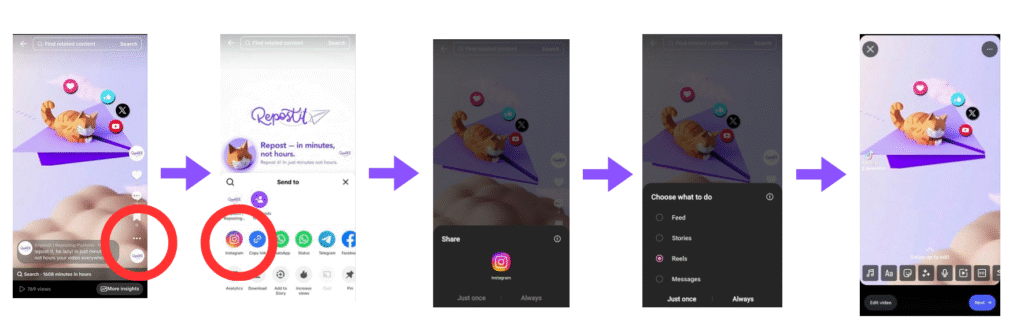
Why it matters: It’s quick and convenient, no extra apps or downloads needed. But there’s a catch: your shared video keeps the TikTok watermark, which can hurt your reach on Instagram and make your content look recycled when you Repost TikTok to Instagram Reels.
More information can be found on TikTok website.
TikTok Watermark Problem
What it is: TikTok videos usually have a watermark with the TikTok logo and username. If you Repost TikTok to Instagram Reels directly using the share feature, it can reduce reach and engagement because Instagram’s algorithm favors content that looks native to the platform.
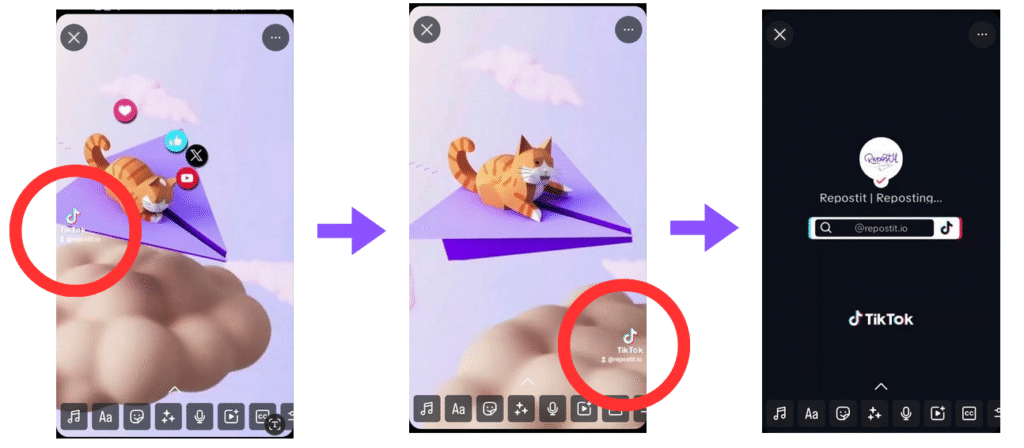
Why it matters: Videos with watermarks can appear less professional and may be penalized by Instagram’s algorithm. To successfully Repost TikTok to Instagram Reels, removing the watermark is essential for optimal performance.
Method 2: Save Your Original Video Before Posting
The simplest approach to Repost TikTok to Instagram Reels without watermarks is to save your video before posting it to TikTok. When you finish editing your video in TikTok’s editor, tap “Next” and then look for the “Save to Device” option before hitting “Post.” This gives you the original, watermark-free version that you can later upload to Instagram Reels without any quality loss or branding issues.
This proactive method ensures you always have a clean copy of your content ready for cross-posting. Many professional content creators who regularly Repost TikTok to Instagram Reels make this a standard part of their workflow, saving each video locally before publishing on any platform.
Method 3: Use Repostit to Automatically Repost TikTok to Instagram Reels
If your goal is automation, Repostit is built to simplify the process. Rather than scheduling each upload manually, Repostit can automatically Repost TikTok to Instagram Reels and other destinations without degrading quality or leaving watermarks. The flow is designed to keep your source master file intact, let you tweak captions and hashtags per platform, and optionally delay posting so your uploads hit the best engagement windows on Instagram.
Why Repostit Stands Out for Reposting TikTok to Instagram Reels
- True automation: Upload once to TikTok, Repostit detects the new video and handles everything after that so you don’t need to touch the clip again to Repost TikTok to Instagram Reels.
- Multi-platform reach: Send the same TikTok to Instagram Reels, YouTube Shorts, Facebook Reels, and other destinations from a single workflow.
- No watermarks: The tool pulls the original master file so when you Repost TikTok to Instagram Reels, your content is clean, professional, and native-looking.
- Creator friendly: Ideal for solo creators, teams, and agencies that want consistent cross-posting without repetitive work.
- Built-in editing: Quick Clip Generator options let you trim, add simple captions, or swap aspect ratios before pushing to Instagram.
Whether you’re a busy creator, social media manager, or business owner, automating to Repost TikTok to Instagram Reels saves time and helps maintain a cohesive cross-platform presence.
Step 1: Open the Repostit Dashboard
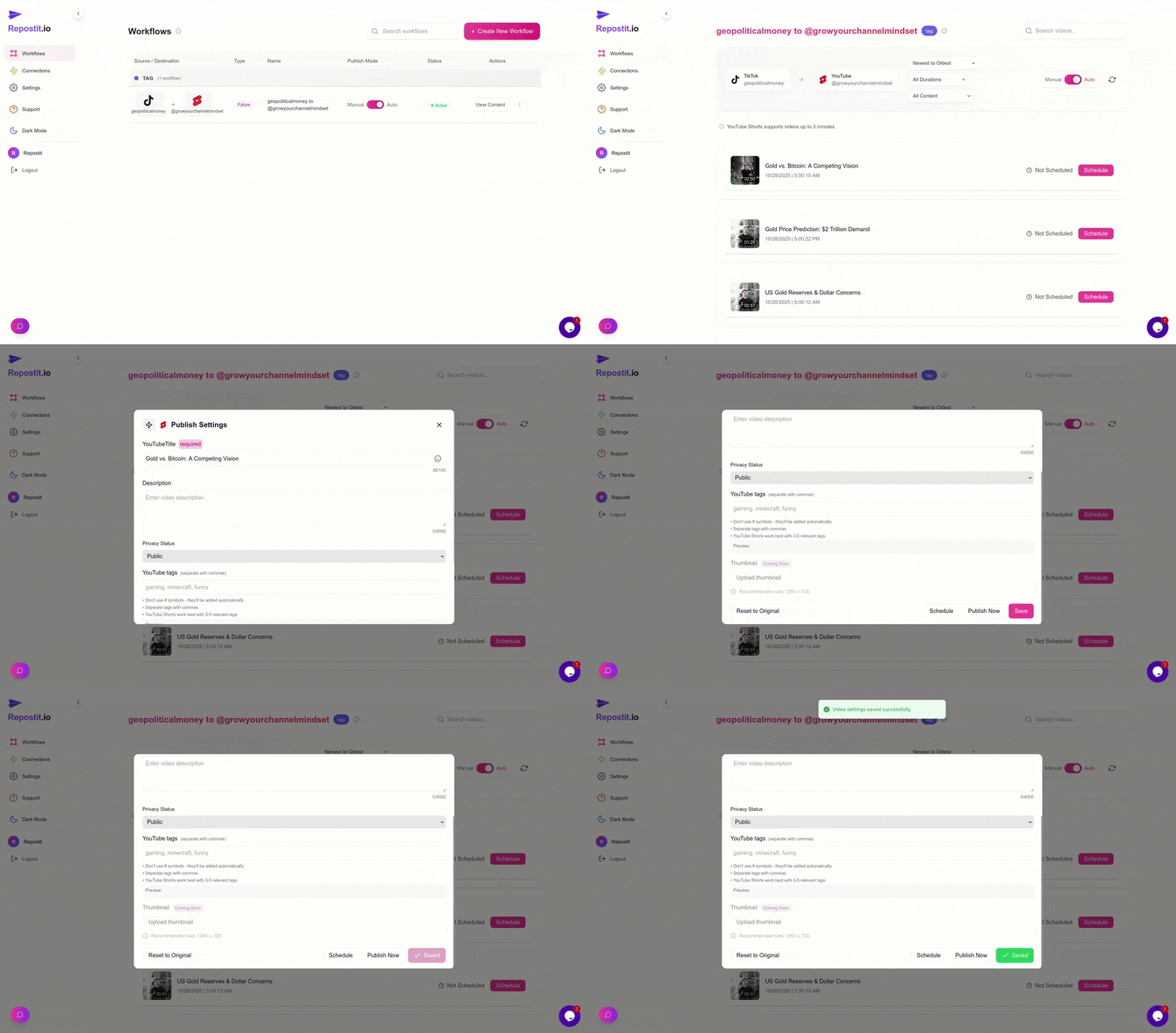
Sign in to your Repostit dashboard. This is the hub for your automations. From the main view, choose “Create New Workflow” to start building a flow that runs whenever you publish a new TikTok. Name the workflow clearly (for example: Repost TikTok to Instagram Reels) so it’s obvious in your dashboard if you run multiple automations.
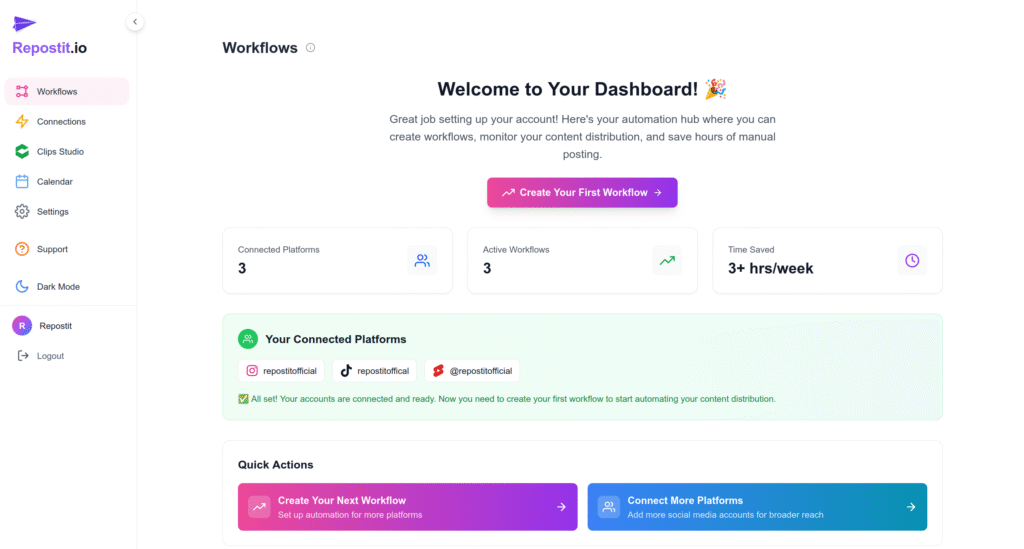
Step 2: Create a “Future Content” Workflow
Create a Future Content Workflow. This workflow monitors your source platform, in this case, TikTok, and automatically posts new content to your destination, Instagram Reels, so that you can Repost TikTok to Instagram Reels seamlessly. The typical flow does four things: detect new uploads, download the original video file, optionally modify metadata, and push the file to Instagram as a native Reel.
- When you upload a new clip to your source platform (TikTok),
- Repostit detects the new upload automatically,
- Downloads the video without a watermark and at optimal quality,
- Then publishes it to your destination platform (Instagram Reels) using your preset caption and scheduling rules.
All of this runs automatically and typically completes within a couple of hours after the original post, though timing depends on platform rate limits and any scheduling delay you set for Instagram.
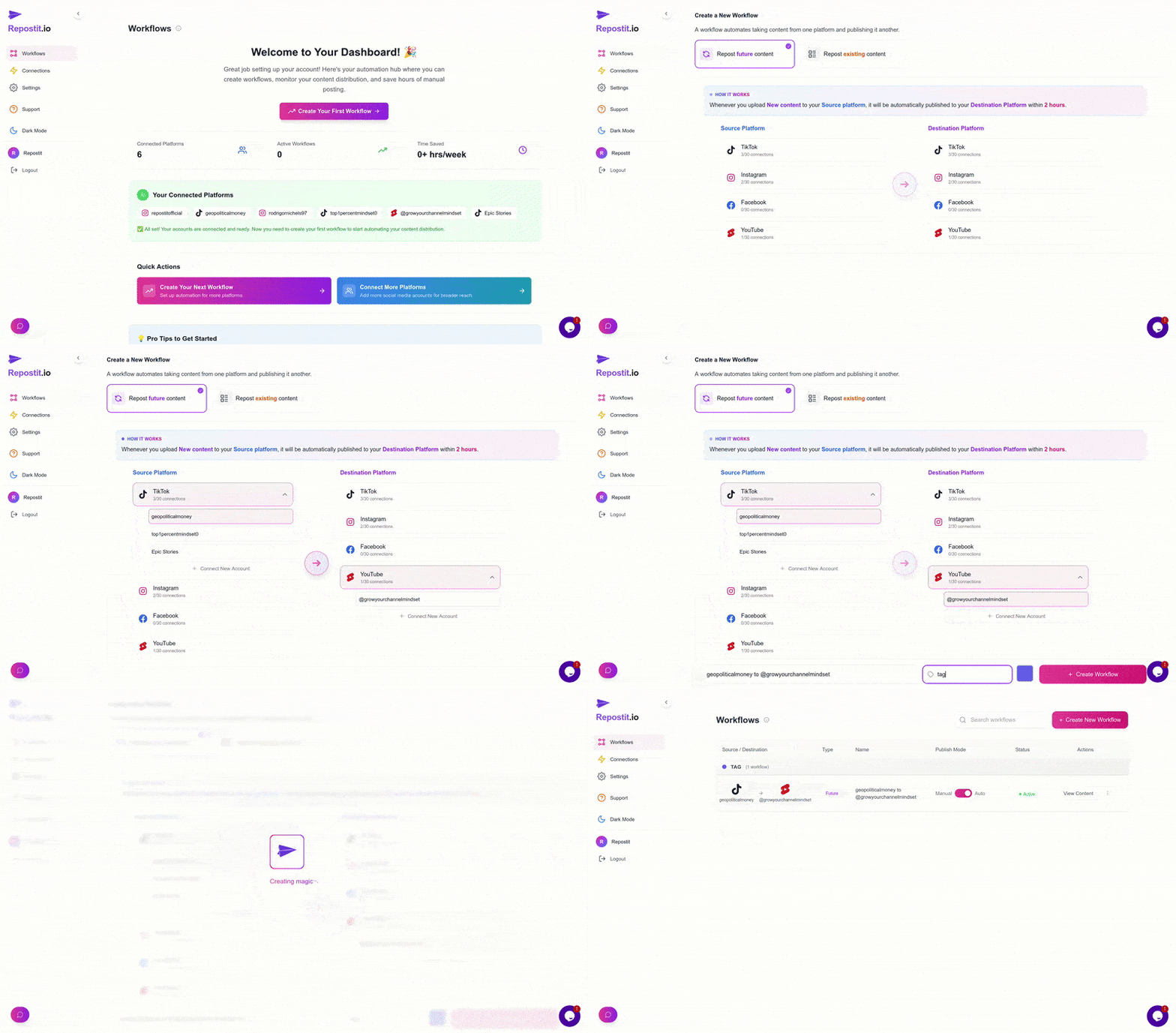
Step 3: Connect Your Accounts
Next, link your TikTok and Instagram accounts so Repostit can access and Repost TikTok to Instagram Reels automatically. Use the platform connection flows and sign in to each account securely. Grant only the permissions required—read access for TikTok and posting access for Instagram, and confirm the correct Instagram profile is selected if you manage multiple accounts.
- Click “Connect Account.”
- Complete the prompts on the authentication screen,
- Grant the permissions so Repostit can post to your Instagram account securely.
Once connected, the tool will pull videos from TikTok and queue them for reposting to Instagram automatically. Make sure you test with a private or unlisted video so you can verify the settings without public visibility.
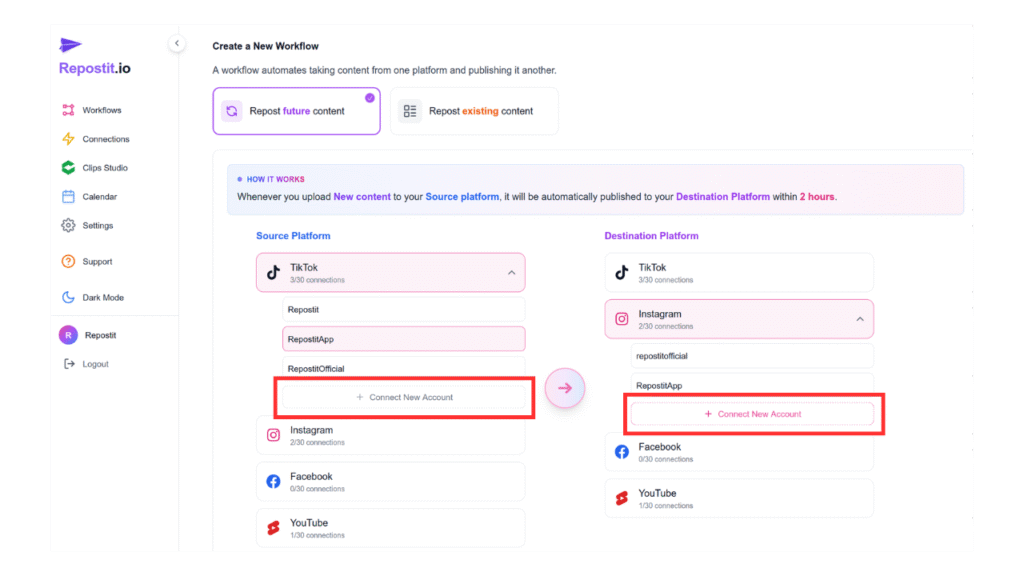
Step 4: Activate the Workflow
After specifying the source and destination, click “Create Workflow” to activate the automation. Verify these key settings before activation: caption template, hashtag handling, scheduling window, and whether to keep or replace the original TikTok caption. These choices determine how natural your reposted content will feel to native Instagram viewers when you Repost TikTok to Instagram Reels.
- Repostit downloads new TikToks automatically,
- Saves them in the highest available quality,
- And posts them to Instagram Reels within a few hours.
No extra apps, no watermark removers, and no repeated uploads, just hands-free distribution that keeps your content consistent across platforms. With this automation, you can easily Repost TikTok to Instagram Reels without any manual effort.
Step 5: Pause or Deactivate as Needed
If you ever want to stop the automation:
- Open the Repostit Dashboard.
- Locate the active workflow,
- Click “Deactivate.”
You can reactivate the workflow any time with a single click, or duplicate it to create separate flows for YouTube Shorts, Facebook Reels, or other destinations, so the same TikTok can be distributed widely without manual effort. With this setup, you can easily Repost TikTok to Instagram Reels and reach a broader audience effortlessly.
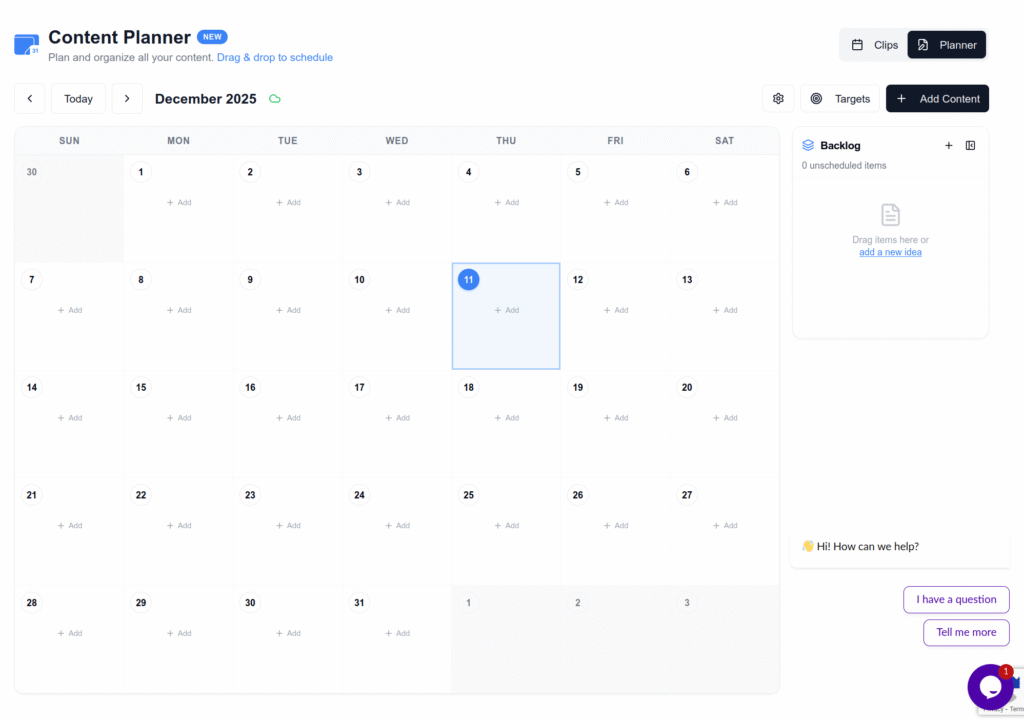
Pro tip: Batch your uploads if you want several clips reposted on a schedule, upload them to TikTok and let the Future Content workflow handle timing and delivery for Instagram and other platforms. Check out our guide on creating an effective content calendar to master this workflow.
Method 4: Screen Recording
Another option to Repost TikTok to Instagram Reels is to screen record your TikTok video while it plays. Both iOS and Android devices have built-in screen recording features. Simply play your video in full screen, start the screen recording, and capture the content. Afterward, you can crop out any unwanted edges or interface elements using your phone’s video editor before uploading to Instagram Reels.
Keep in mind that this method may result in slightly lower video quality compared to downloading the original file. However, it’s a quick solution when other methods to Repost TikTok to Instagram Reels aren’t available.
Key Features to Look for in a Repurposing Tool
When choosing a tool to Repost TikTok to Instagram Reels, there are several features worth prioritizing to get the best results for growth and engagement:
- Scheduling and Auto-Publishing: The ability to schedule your videos automatically ensures consistent posting without manual effort.
- Custom Metadata: Options to create personalized captions, hashtags, titles, and descriptions help optimize your content for search engines.
- Watermark Removal: Essential for ensuring Instagram doesn’t suppress your content due to competitor branding.
- Templates and Branding Tools: Customizable templates, watermarks, fonts, and logos help build a consistent identity.
Best Practices to Repost TikTok to Instagram Reels
When you Repost TikTok to Instagram Reels, consider these important tips for maximum engagement:
- Always remove the TikTok watermark – Instagram may limit the reach of videos with competitor branding when you Repost TikTok to Instagram Reels.
- Adjust your captions and hashtags – What works on TikTok might not perform the same on Instagram.
- Consider posting timing – Some creators wait a day or two before cross-posting to give each platform’s audience exclusive access first.
- Engage with comments separately – Build community in each space by responding to your audience on both platforms.
- Optimize for Instagram’s format – Add relevant hashtags, write engaging captions, and consider adding a compelling cover image.
Which Method to Repost TikTok to Instagram Reels Is Best for You?
Best for creators who post daily: Use Repostit.io for reliable content scheduling, automation, and simple analytics to keep a daily cadence without manual uploads when you Repost TikTok to Instagram Reels.
Best budget option: Save your videos before posting to TikTok, or use Repostit.io’s free tier for quick resharing (note: free exports may include watermarks).
Best for occasional reposters: Third-party download apps offer a quick, free solution when you only need to Repost TikTok to Instagram Reels occasionally.
Best for professional creators and agencies: Invest in Repostit’s Future Content workflow that offers full automation, scheduling, branding options, and multi-platform support to Repost TikTok to Instagram Reels at scale.
Conclusion
Learning how to Repost TikTok to Instagram Reels is an effective strategy for expanding your social media presence without doubling your workload. Whether you choose to download watermark-free versions, save originals before posting, or use dedicated repurposing tools like Repostit, the key is finding a workflow that fits your content creation process.
Configuring a one-click repost workflow saves time and keeps your content consistent across apps. With Repostit handling downloads and uploads for you, you’ll spend less time on admin and more time creating. Follow the steps above to set up your Future Content workflow, test with a private video, and iterate on captions and scheduling until you can Repost TikTok to Instagram Reels with content that looks and performs like native posts.
Ready to try it? Sign in to your Repostit dashboard and create your first Future Content workflow to Repost TikTok to Instagram Reels automatically, then relax and let automation do the heavy lifting.
FAQ: How to Repost TikTok to Instagram Reels
To answer the most common questions about how to Repost TikTok to Instagram Reels:
1. Is it allowed to Repost TikTok to Instagram Reels?
Yes, it’s allowed to Repost TikTok to Instagram Reels as long as the content is original or you have rights to use it. Avoid reposting copyrighted material without permission. Always follow Instagram’s community guidelines when posting content.
2. Will Instagram suppress my video if it has a TikTok watermark?
Yes, Instagram’s algorithm tends to reduce the reach of videos with visible TikTok watermarks. When you Repost TikTok to Instagram Reels, it’s recommended to remove the watermark for optimal performance. Tools like Repostit automatically handle this for you.
3. Will Repostit keep the TikTok watermark on my videos?
No, Repostit downloads TikToks without the watermark when configured to pull the original file. When you Repost TikTok to Instagram Reels using Repostit, your content will appear clean, professional, and native-looking.
4. How long does it take to Repost TikTok to Instagram Reels with Repostit?
Reposts usually appear on the destination within a couple of hours, depending on platform queues and any scheduling delay you set. The process to Repost TikTok to Instagram Reels is fully automated once your workflow is configured.
5. Can I Repost TikTok to Instagram Reels and other platforms at once?
Yes, with Repostit you can create additional workflows or add multiple destinations to the same workflow where supported. Repost TikTok to Instagram Reels, YouTube Shorts, Facebook Reels, and other platforms from a single workflow.
6. What’s the best free method to Repost TikTok to Instagram Reels?
The best free method to Repost TikTok to Instagram Reels is to save your original video before posting it to TikTok. Alternatively, you can use free third-party websites like SnapTik or SaveTik to download your videos without watermarks. Repostit also offers a free tier for basic reposting needs.
7. Can learning to Repost TikTok to Instagram Reels help grow my account?
Absolutely. When you Repost TikTok to Instagram Reels, you increase visibility across multiple platforms, which boosts reach and organic growth. Consistency and optimized metadata (captions, hashtags, keywords) help even more.
8. Do I need to post every day on Instagram to grow?
No. You don’t need to post every day, but you do need to consistency. Scheduling tools like Repostit help maintain a steady posting rhythm, which is more important than frequency alone. Learning to Repost TikTok to Instagram Reels efficiently helps you stay consistent.
9. Why use Repostit to Repost TikTok to Instagram Reels instead of doing it manually?
Repostit saves time by automatically detecting new uploads, removing watermarks, formatting, captioning, and scheduling your content for different platforms. This reduces repetitive work and allows you to focus on creating, not manually posting when you Repost TikTok to Instagram Reels.
10. What video format does Instagram Reels require?
Instagram Reels supports MP4 and MOV formats with a 9:16 aspect ratio (vertical video). Videos can be up to 90 seconds long, though shorter videos (15-30 seconds) often perform better. When you Repost TikTok to Instagram Reels using Repostit, format conversion is handled automatically.
11. Can I use the same hashtags when I Repost TikTok to Instagram Reels?
While some hashtags work on both platforms, it’s best to customize your hashtags for each when you Repost TikTok to Instagram Reels. Research trending hashtags specific to Instagram Reels for better discoverability. Repostit allows you to set custom caption templates with different hashtags per platform.
12. Will my engagement be the same when I Repost TikTok to Instagram Reels?
Not necessarily. Each platform has different algorithms and user behaviors. Content that goes viral on TikTok may perform differently when you Repost TikTok to Instagram Reels. Test and analyze your results to understand what works best on each platform.